Which Favicon Files Does Chrome Download?
Chrome 155 fetched one icon per page: the SVG when declared, the 32-pixel PNG when sizes were given, /favicon.ico when nothing usable was declared, and 480 KB when the only icon was a 512-pixel PNG.
Every site has a small icon in the browser tab, and favicon advice ranges from “add a dozen sizes” to “just put a favicon.ico in the root”. Each icon file is a request. Which icon files does Chrome actually download, and what happens when the markup offers several or none? We loaded seven versions of a page in a fresh browser and logged every request.
The test
A local test server logged all requests for seven pages that differ only in the <head>: no icon link at all; one SVG icon; one 32 × 32 PNG; PNGs at 32 and 192 pixels; a 32-pixel PNG followed by an SVG; only an apple-touch-icon link; and only a 512 × 512 PNG, as some generators produce. A /favicon.ico file (2.8 KB) existed in the server root. Our first run reused the same browser between pages and missed the favicon.ico request, because Chrome remembers icons per site; the results below come from a fresh Chrome 155.0.8059.82 for every load, three loads per page, on a desktop viewport. See our methodology.
Results
| Markup in head | File requested | Bytes |
|---|---|---|
| No icon link | /favicon.ico | 2,898 |
| SVG icon | /fav/icon.svg | 113 |
| PNG 32 × 32 | /fav/icon-32.png | 2,898 |
| PNG 32 and 192 | /fav/icon-32.png | 2,898 |
| PNG 32, then SVG | /fav/icon.svg | 113 |
| apple-touch-icon only | /favicon.ico | 2,898 |
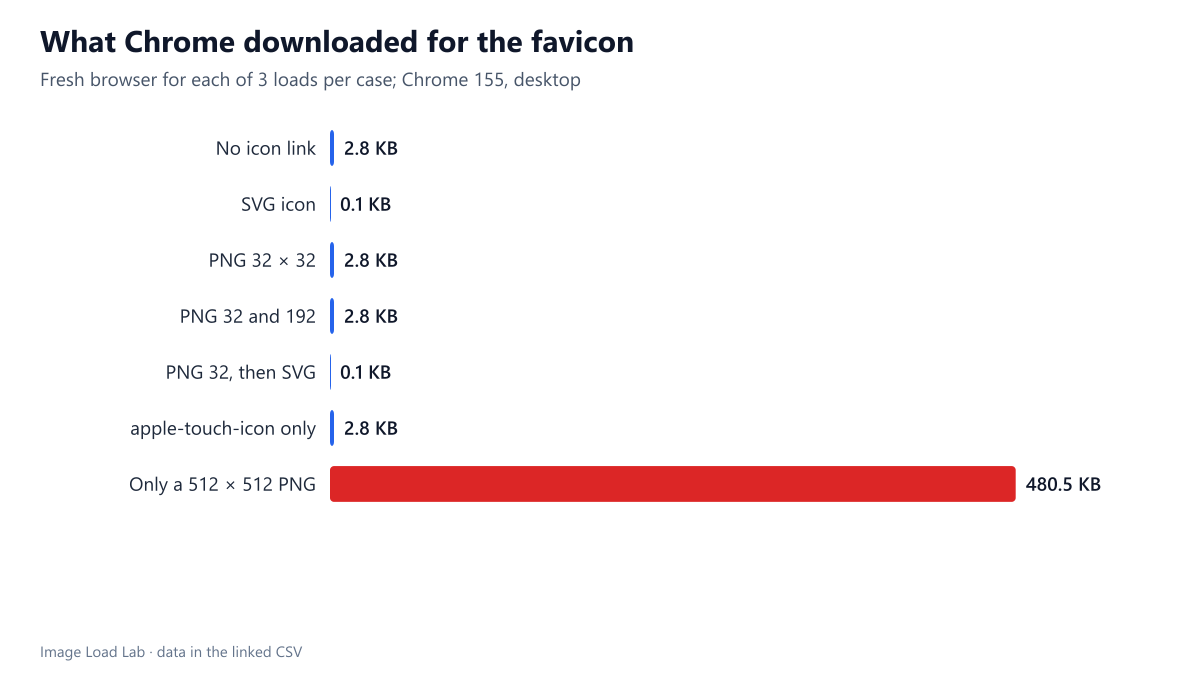
| Only a 512 × 512 PNG | /fav/icon-512.png | 492,011 |
Without an icon link, Chrome requested /favicon.ico. The page with no icon markup still cost one request and 2.8 KB, for the conventional file at the root. If that file does not exist, the request ends in a 404, which still costs a round trip and appears in logs.
With a declared icon, Chrome downloaded exactly one file. An SVG link meant one 113-byte request and no favicon.ico. With 32- and 192-pixel PNGs, only the 32-pixel file was fetched for the tab. When a PNG and an SVG were both declared, Chrome took the SVG.
An apple-touch-icon alone did not count as a favicon. Chrome ignored it for the tab and fell back to /favicon.ico.
A large icon as the only option was expensive. When the only declared icon was a 512 × 512 PNG, Chrome downloaded it for a 16-pixel tab icon: 480.5 KB for this test file. Real 512-pixel icons are usually simpler and smaller, but still many times the size of a 32-pixel one.
A sensible favicon setup
- Declare an SVG icon (
<link rel="icon" href="/icon.svg" type="image/svg+xml">). It was the smallest file and Chrome preferred it. - Keep a small
/favicon.icoor a 32-pixel PNG link as a fallback for browsers and tools that do not use SVG icons. - Do not make a large PNG the only icon. If you need 192- or 512-pixel icons for home screens and web app manifests, declare them in the manifest and keep a small icon in the HTML.
- Check what your CMS outputs. On this WordPress site, the Site Icon setting declares a 150-pixel PNG (8.1 KB) labelled
sizes="32x32"and a 300-pixel PNG (16.8 KB) labelledsizes="192x192". By the pattern in this test, Chrome takes the one labelled 32 × 32, which here is a 150-pixel file: larger than needed, but far from the 512-pixel worst case.
Practical conclusion
Chrome 155 fetched one icon per page: the SVG when one was declared, the 32-pixel PNG when sizes were given, /favicon.ico when nothing usable was declared, and a 480 KB file when the only icon was 512 pixels. Declare a small SVG plus a small fallback.
Limitations
Desktop Chrome only. Mobile browsers, other browsers and operating-system features (home-screen shortcuts, pinned tabs) request other icon sizes. We tested on one desktop pixel density; on higher densities Chrome may prefer a larger PNG.
Data and files
Download favicon.csv (7 rows, 0.3 KB) · Method: testing methodology.