 Client Hints on Image Requests: What Chrome Sends
Chrome 155 sent DPR, width and network hints with image requests only after Accept-CH, and to another origin only with Permissions-Policy delegation. Width was in device pixels.
Browser Behaviour ▸ 4 min read
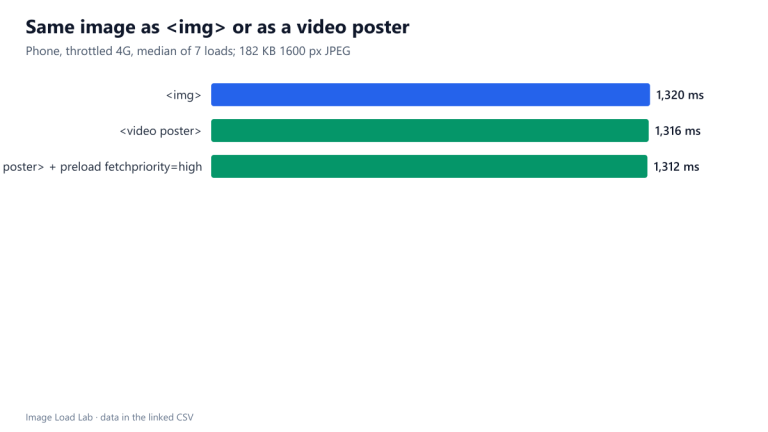 Video Poster Images and LCP: Same as an img?
A video poster was discovered as early as an img, got the same priority and counted as the LCP element with the same timing, 1,316 ms against 1,320 ms. It cannot use srcset.
Browser Behaviour ▸ 3 min read
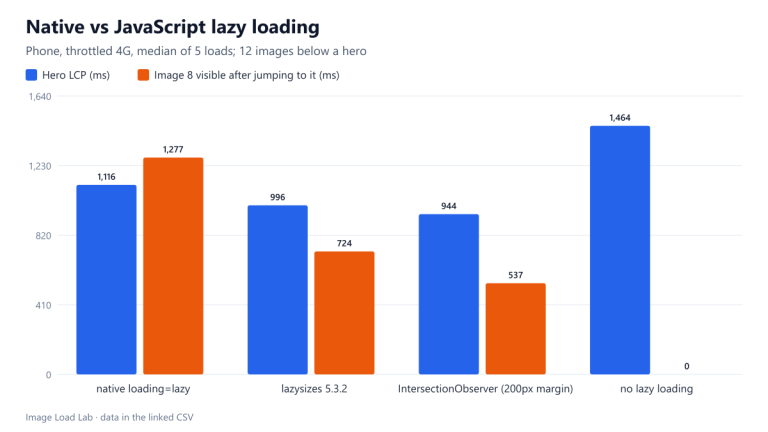 Native Lazy Loading vs lazysizes vs IntersectionObserver
All three cut LCP from 1,464 ms to 944 to 1,116 ms. Native lazy loading fetched one image more up front and was slowest after a long jump; it needs no JavaScript.
Browser Behaviour ▸ 4 min read
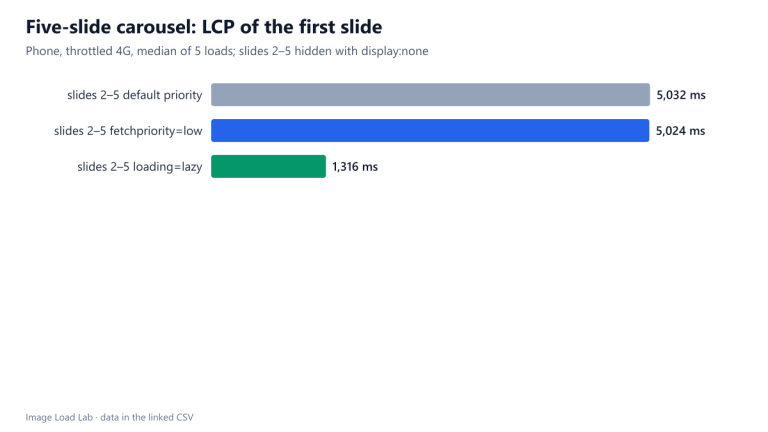 Carousel Slides: fetchpriority=low Did Not Help, loading=lazy Did
Hidden slides with fetchpriority=low still downloaded and LCP stayed at 5.0 s. With loading=lazy they were never requested, and LCP fell to 1.3 s.
Browser Behaviour ▸ 4 min read
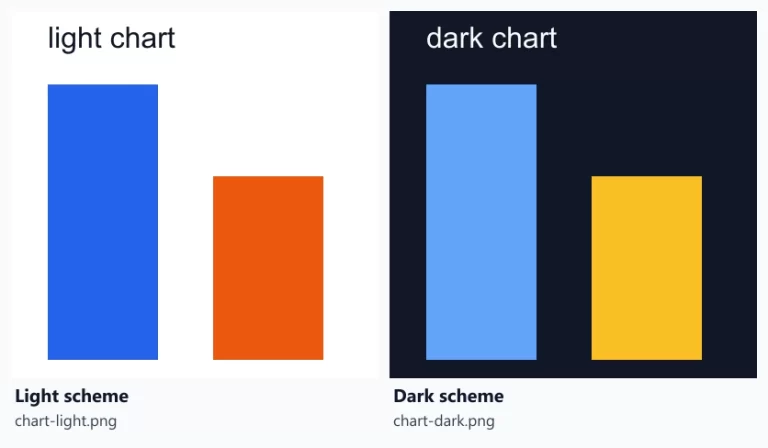 picture for Dark Mode and Reduced Motion: What Chrome Downloads
With prefers-color-scheme and prefers-reduced-motion sources, Chrome downloaded only the matching image, and fetched the other chart only when the colour scheme changed.
Browser Behaviour ▸ 3 min read
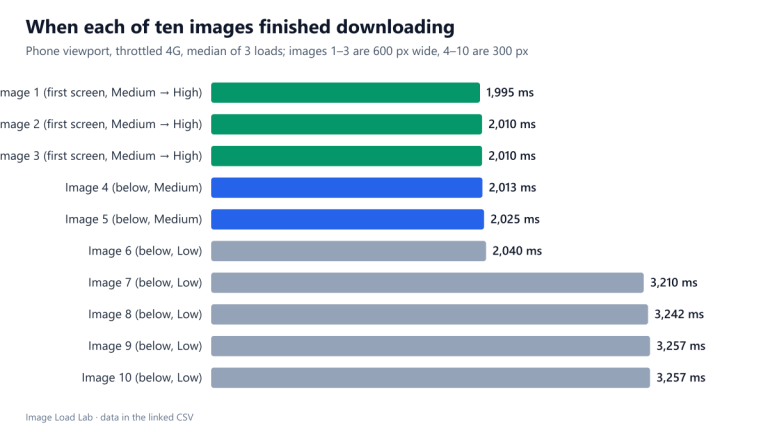 Chrome’s Image Priorities: Medium, Low and the Boost to High
Chrome 155 gave the first five images Medium priority and the rest Low, then raised only the images in the first screen to High once the page was laid out.
Browser Behaviour ▸ 4 min read
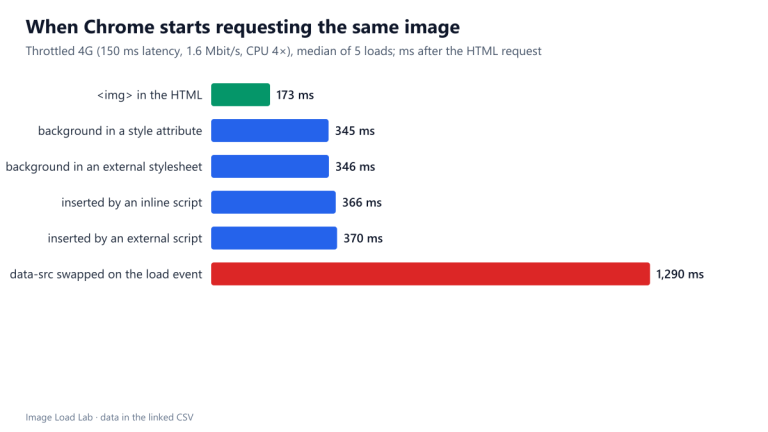 When Does Chrome Request an Image? Six Ways to Reference It, Timed
An img tag in the HTML was requested at 173 ms. The same image as a CSS background or inserted by a script waited for the stylesheet until 345 to 370 ms, and a data-src swap until 1,290 ms.
Browser Behaviour ▸ 4 min read
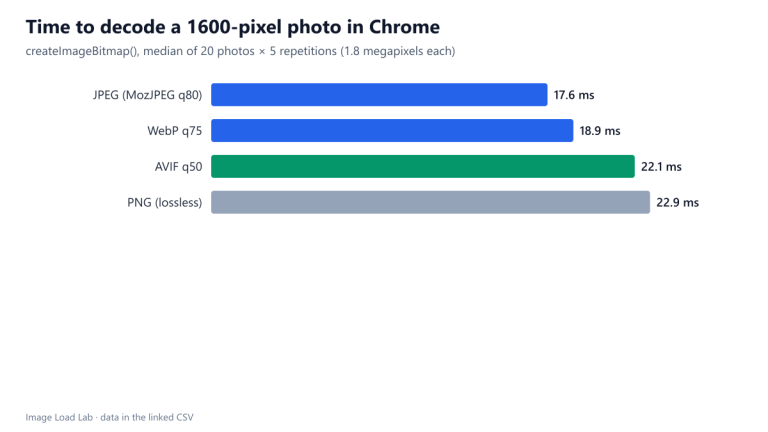 Image Decode Time in Chrome: JPEG vs WebP vs AVIF vs PNG
Decoding a 1.8-megapixel photo took a median 17.6 ms as JPEG, 18.9 ms as WebP, 22.1 ms as AVIF and 22.9 ms as PNG, tiny next to the download time AVIF's smaller files save.
Browser Behaviour ▸ 3 min read
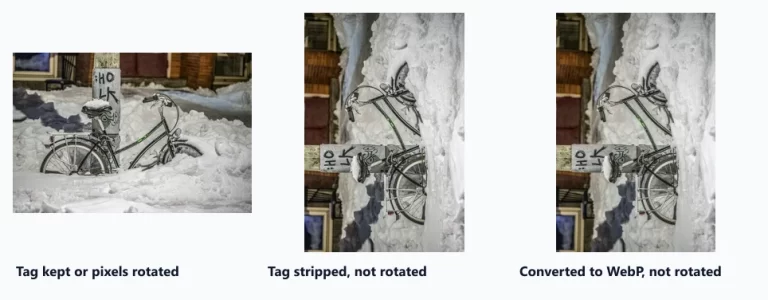 EXIF Orientation: Why Stripped or Converted Photos Turn Sideways
Chrome 155 displayed a tagged camera photo upright as an image, a background and on a canvas. Stripping metadata or converting to WebP without rotating first left it on its side.
Browser Behaviour ▸ 3 min read
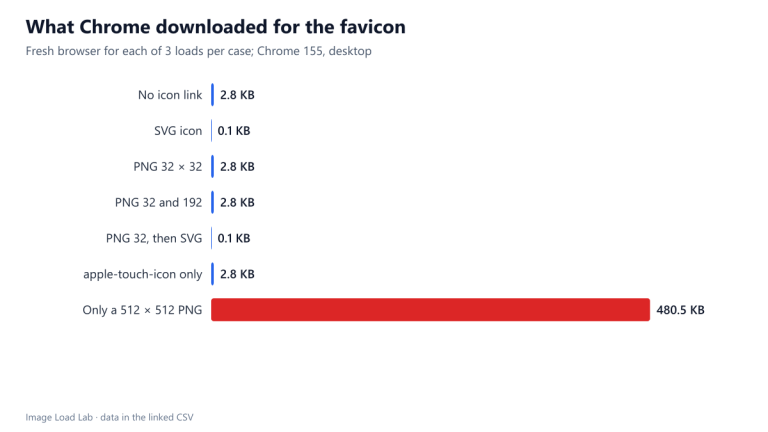 Which Favicon Files Does Chrome Download?
Chrome 155 fetched one icon per page: the SVG when declared, the 32-pixel PNG when sizes were given, /favicon.ico when nothing usable was declared, and 480 KB when the only icon was a 512-pixel PNG.
Browser Behaviour ▸ 3 min read
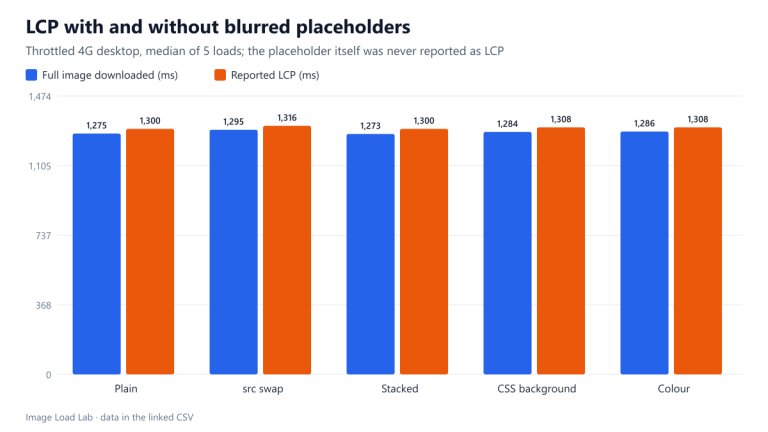 Do Blurred Placeholders Improve LCP? Four Techniques Tested
Chrome 155 never counted a blurred placeholder as the LCP element. In every setup LCP was the full photo at 1,300 to 1,316 ms; a script-swapped src started the real image slightly later.
Browser Behaviour ▸ 3 min read
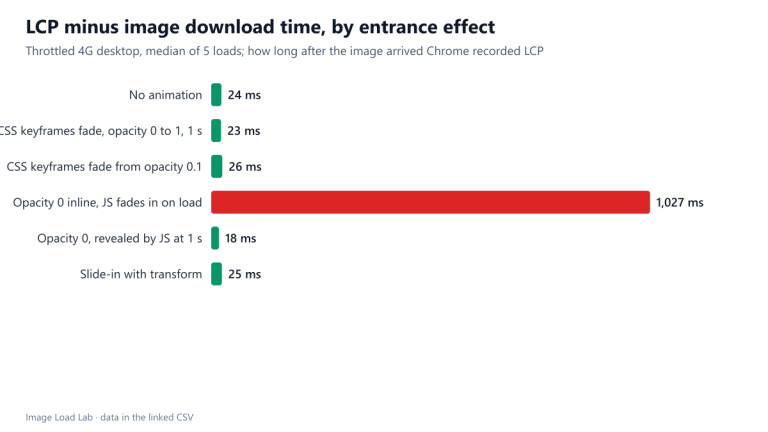 Fade-In Effects and LCP: Which Entrance Animations Delay It
A hero faded in by JavaScript after loading reported LCP 1,027 ms after the image arrived. CSS keyframe fades, a transform slide-in and an early reveal did not delay LCP in Chrome 155.
Browser Behaviour ▸ 3 min read
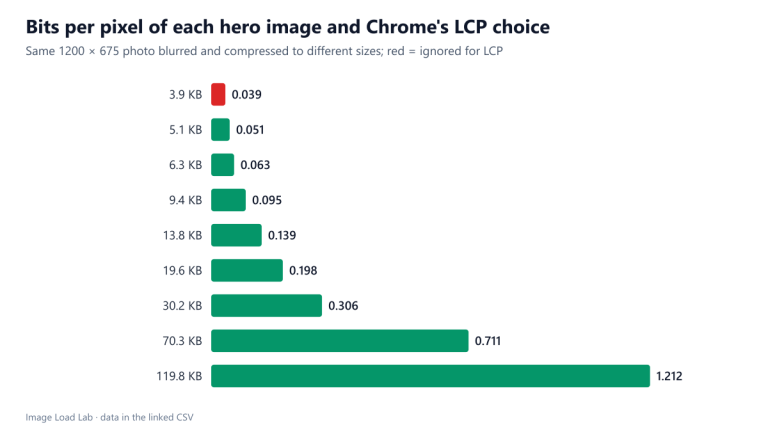 Low-Content Images and LCP: Testing Chrome’s 0.05 Bits-per-Pixel Rule
Chrome 155 ignored a hero image at 0.039 bits per pixel and counted one at 0.051, confirming the low-content threshold that keeps placeholders and flat backgrounds out of LCP.
Browser Behaviour ▸ 3 min read
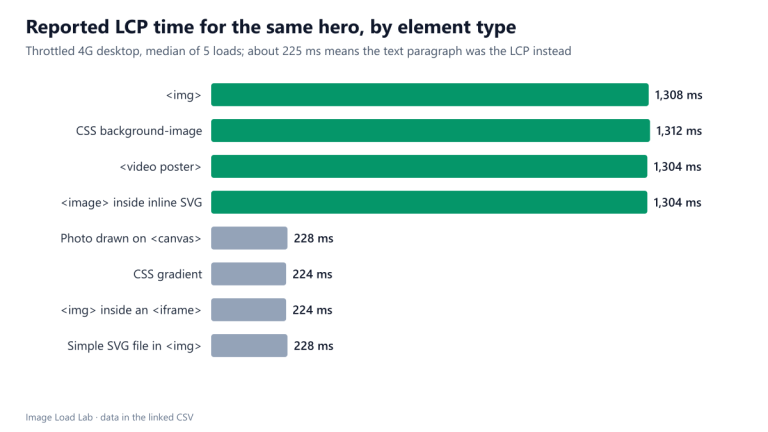 Which Elements Count as LCP? img, Background, Poster, SVG and Canvas Tested
Chrome 155 counted a hero as LCP when it was an img, a CSS background, a video poster or an SVG image element. On a canvas, in an iframe or as a gradient it was ignored, and LCP stayed at the text.
Browser Behaviour ▸ 3 min read
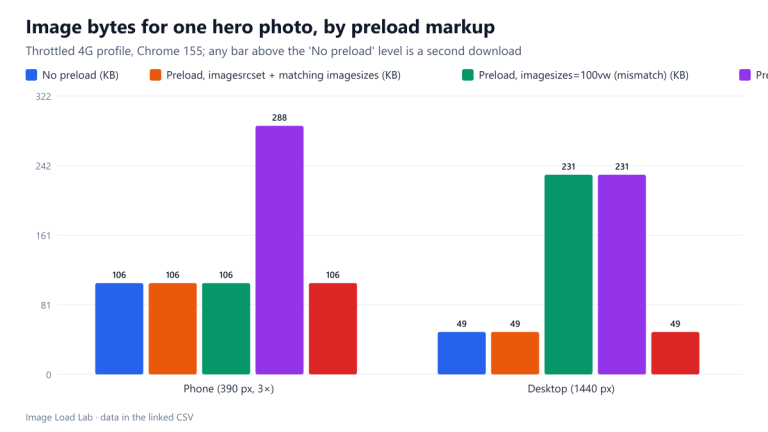 Preloading Responsive Images: How a Mismatch Causes Double Downloads
A preload with only href, or with an imagesizes value that did not match the image, made Chrome 155 download two files and finish the hero image about a second later on a throttled connection.
Browser Behaviour ▸ 3 min read
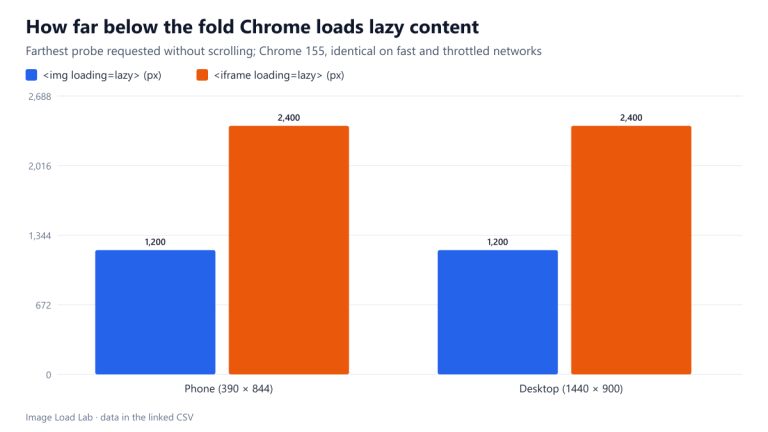 Lazy-Loaded iframes: Chrome Loads Them Twice as Far Ahead as Images
Chrome 155 loaded lazy iframes up to 2,400 pixels below the fold and lazy images up to 1,200 pixels, identically on phone and desktop and on fast and throttled networks.
Browser Behaviour ▸ 3 min read
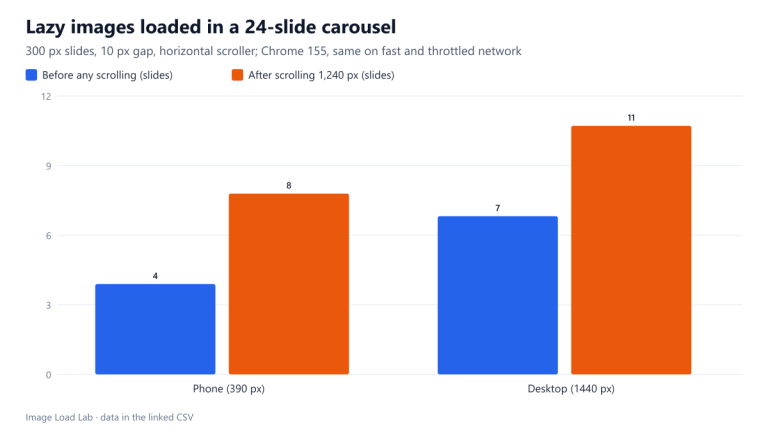 Lazy Loading in a Horizontal Carousel: How Far Ahead Chrome Loads
In a sideways-scrolling carousel, Chrome 155 fetched lazy images only about 600 pixels beyond the visible edge: 4 of 24 slides on a phone and 7 on a desktop before any swipe.
Browser Behaviour ▸ 3 min read
 Does Chrome Reuse a Larger srcset Image From Its Cache?
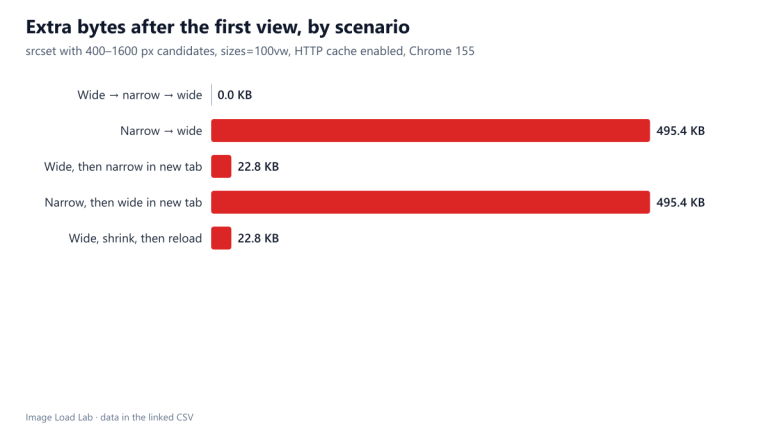
Chrome 155 never downgraded an image on the same page, but a new visit on a narrow screen downloaded the small file although the large one was cached. A reload fetched the small file and still showed the large one.
Browser Behaviour ▸ 4 min read
 Chrome’s Accept Header for Images and What It Means for Format Negotiation
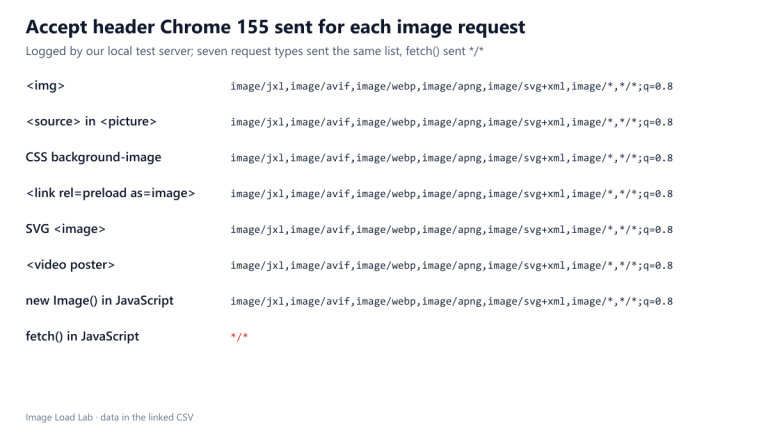
Chrome 155 sent the same Accept header, starting with image/jxl, for every image request except fetch(), which sent */*. Our WordPress host ignored the header and served the same file to all.
Browser Behaviour ▸ 4 min read
 How Chrome Chooses a Source in the picture Element
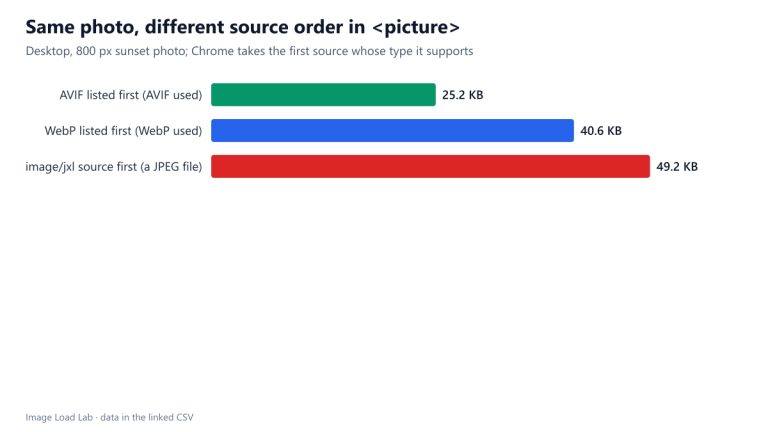
One request per picture element, always the first supported type: listing WebP before AVIF cost 61 % more bytes for the same photo. Chrome 155 also accepted a source marked image/jxl.
Browser Behaviour ▸ 4 min read
 Images in Closed details and dialog Elements: Downloaded or Not?
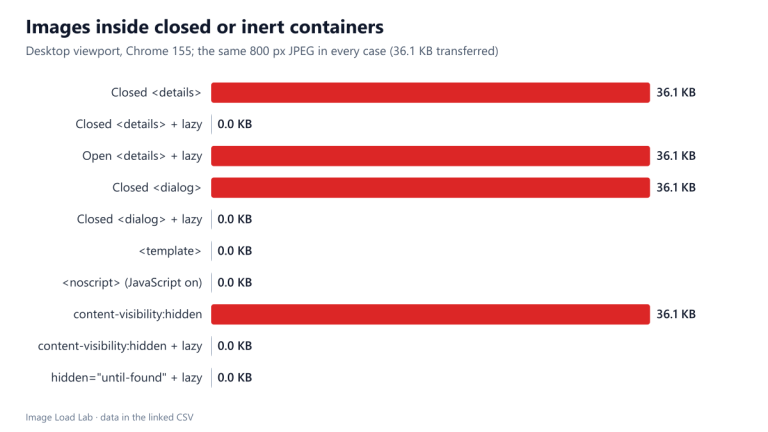
Chrome 155 downloaded images inside a closed details or dialog element at page load. With loading=lazy they were fetched only when opened, and template and noscript images never loaded.
Browser Behaviour ▸ 3 min read
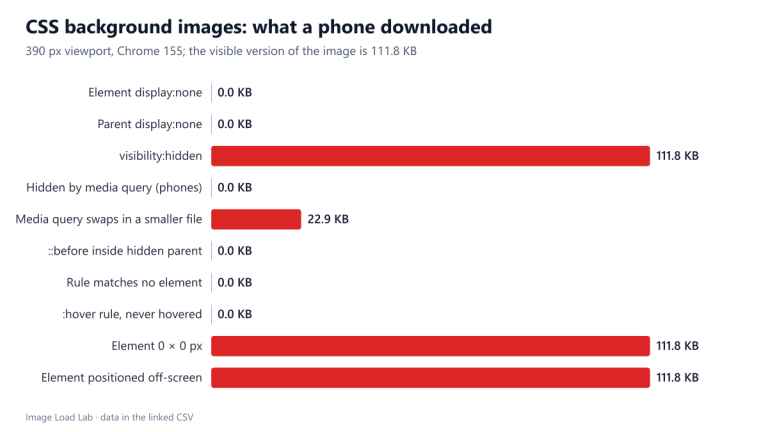 Hidden CSS Background Images: Which Ones Chrome Still Downloads
Background images on display:none elements cost nothing in Chrome 155, unlike image elements. But visibility:hidden, zero-size and off-screen elements still downloaded the full 111.8 KB image.
Browser Behaviour ▸ 4 min read
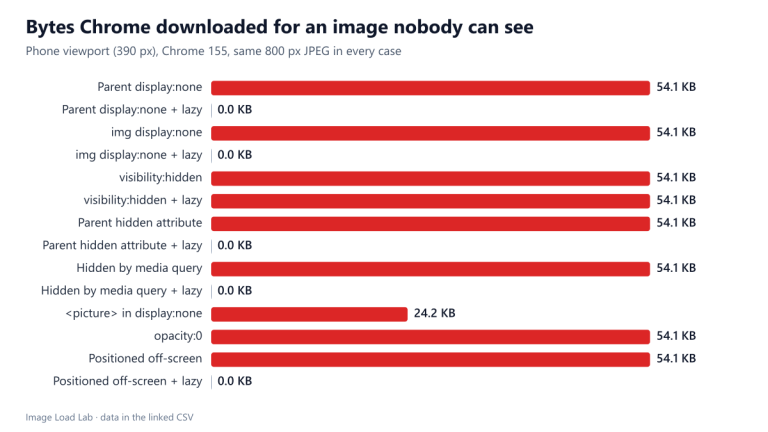 Do Hidden Images Still Download? display:none and Lazy Loading in Chrome
Every hidden image without loading=lazy downloaded in full in Chrome 155, even inside display:none. Lazy loading stopped the download for five of six hiding methods, but not for visibility:hidden.
Browser Behaviour ▸ 5 min read