How Chrome Chooses a Source in the picture Element
One request per picture element, always the first supported type: listing WebP before AVIF cost 61 % more bytes for the same photo. Chrome 155 also accepted a source marked image/jxl.
The <picture> element lets a page offer the same image in several formats and sizes. The browser is supposed to pick exactly one. Which source does Chrome choose, does the order of the sources matter, and what happens when the markup is wrong? We tested seven variations of the same photo and recorded every request.
The test
All pages show one CC0 photo of a sunset, prepared at 400, 800, 1200 and 1600 pixels wide in JPEG (MozJPEG quality 80), WebP (quality 75) and AVIF (quality 50). At 800 pixels the three files transfer 49.2 KB, 40.6 KB and 25.2 KB; these, like all byte figures below, are transfer sizes reported by Chrome, which include about 180 bytes of HTTP headers. The seven pages use: AVIF, WebP and JPEG in the usual order; WebP listed before AVIF; a source with type="image/jxl" listed first; an AVIF source with no type attribute; a WebP file wrongly labelled type="image/avif"; a phone-only source chosen with a media query; and a source with a full srcset and sizes.
Each page was loaded in Chrome 155.0.8059.82 on a phone viewport (390 pixels, 3× density) and a desktop viewport (1440 pixels, 1×), with the cache disabled. We recorded requests through the DevTools Protocol and read currentSrc to see which file was displayed. See the methodology for the general setup.
Results
| Markup | Requests | Phone downloaded | Desktop downloaded |
|---|---|---|---|
| AVIF, then WebP, then JPEG | 1 | sunset-800.avif (25.2 KB) | sunset-800.avif (25.2 KB) |
| WebP listed before AVIF | 1 | sunset-800.webp (40.6 KB) | sunset-800.webp (40.6 KB) |
| type="image/jxl" listed first | 1 | sunset-800.jpg (49.2 KB) | sunset-800.jpg (49.2 KB) |
| AVIF source with no type attribute | 1 | sunset-800.avif (25.2 KB) | sunset-800.avif (25.2 KB) |
| WebP file labelled image/avif | 1 | sunset-800.webp (40.6 KB) | sunset-800.webp (40.6 KB) |
| Media query + type (small file for phones) | 1 | sunset-400.avif (7.0 KB) | sunset-1200.avif (51.5 KB) |
| srcset + sizes inside <source> | 1 | sunset-1200.avif (51.5 KB) | sunset-800.avif (25.2 KB) |
Chrome made exactly one image request on every page. No fallback JPEG was fetched “just in case”, even when a better format was chosen. That is the main promise of <picture>, and it held in all fourteen loads.
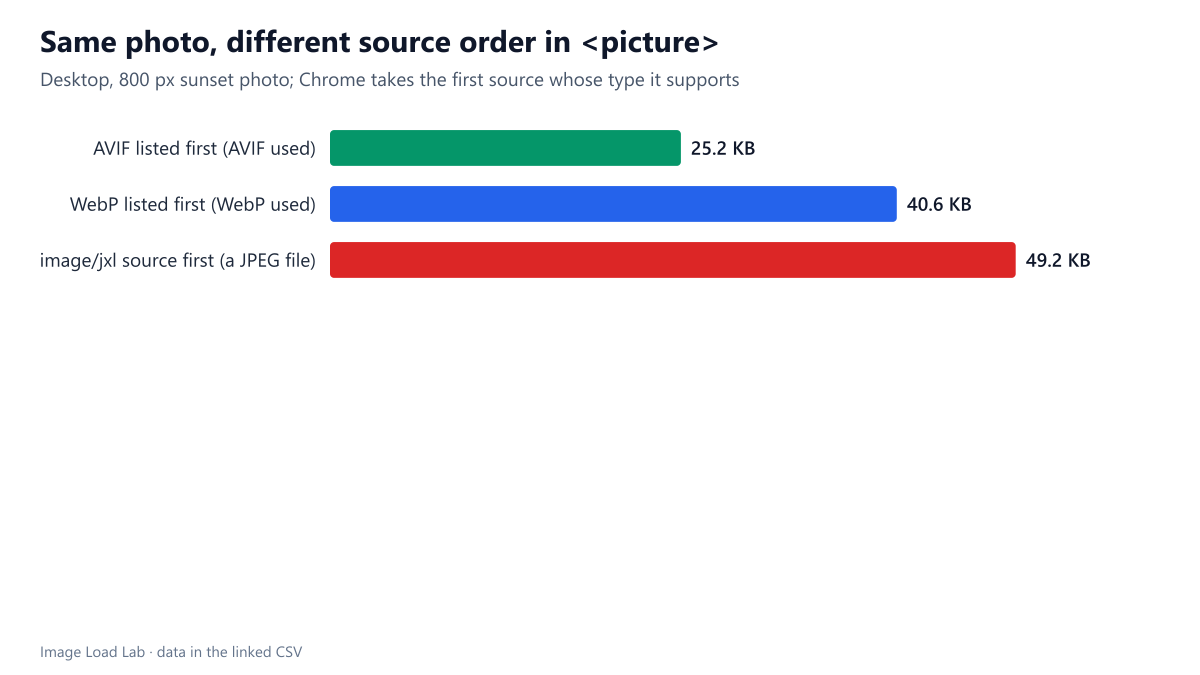
Order decides, not file size. Chrome takes the first <source> whose type it supports. With AVIF first it downloaded 25.2 KB; with WebP listed first it downloaded the 40.6 KB WebP, although the AVIF was available and 38 % smaller. The browser does not compare formats; it reads the list from the top.
Chrome 155 accepted a source labelled image/jxl. We expected that source to be skipped as an unsupported format. Instead Chrome selected it. In our page that source pointed to a JPEG file, which Chrome then displayed after recognising its real format. Together with the Accept header we recorded in our Accept header test, which lists image/jxl first, this means this Chrome build declares JPEG XL support. We did not test a real JPEG XL file in this guide.
A missing or wrong type attribute did not break Chrome, but it removes the safety net. The AVIF source without a type was downloaded and shown, and the WebP file labelled as AVIF was downloaded and shown too, because Chrome checks the file’s contents. A browser without AVIF support would have done the same and then failed to decode the image, since the type attribute is what lets it skip a source it cannot read.
Media conditions and sizes worked together with types. On the phone, the media="(max-width: 700px)" source delivered the 400-pixel AVIF (7.0 KB); the desktop got the 1200-pixel AVIF from the next source. With srcset and sizes inside the AVIF source, the phone at 3× density took the 1200-pixel file (390 × 3 = 1,170 pixels needed) and the desktop the 800-pixel one for a 700-pixel slot.
How to write picture markup
- List sources from the smallest format to the largest: AVIF, then WebP, then the JPEG
<img>. Putting WebP first made Chrome download 61 % more bytes for the same photo. - Always set
typeon format sources, and make it match the file. Chrome tolerated mistakes in our test, but the attribute is the only thing that tells older browsers to skip a format. - Put
srcsetandsizeson every<source>, not only on the<img>; each source chooses its own width. Our srcset and sizes test shows how much a wrongsizesvalue costs. - The
<img>still matters: itsalt,width,heightandloadingattributes apply to whichever source is chosen.
Practical conclusion
Chrome 155 downloaded one file per <picture> and always took the first source with a type it supports, so put AVIF first. It also accepted image/jxl, which matters if you plan to add JPEG XL sources. Keep type attributes accurate for the benefit of browsers that cannot read every format.
Limitations
We tested Chrome only, so we cannot say how browsers without AVIF or JPEG XL support behave with the faulty markup; their behaviour follows from the HTML rules but was not measured. One photo, one quality setting per format.
Data and files
Download picture-sources.csv (14 rows, 1.0 KB) · Method: testing methodology. Photo: image credits.