Chrome’s Accept Header for Images and What It Means for Format Negotiation
Chrome 155 sent the same Accept header, starting with image/jxl, for every image request except fetch(), which sent */*. Our WordPress host ignored the header and served the same file to all.
Some image CDNs and server plugins deliver AVIF or WebP to browsers that support them and JPEG to the rest, from a single URL. They decide by reading the request’s Accept header. What does Chrome actually put in that header, and is it the same for every way a page can request an image? We logged the headers of eight different image requests on our own test server.
The test
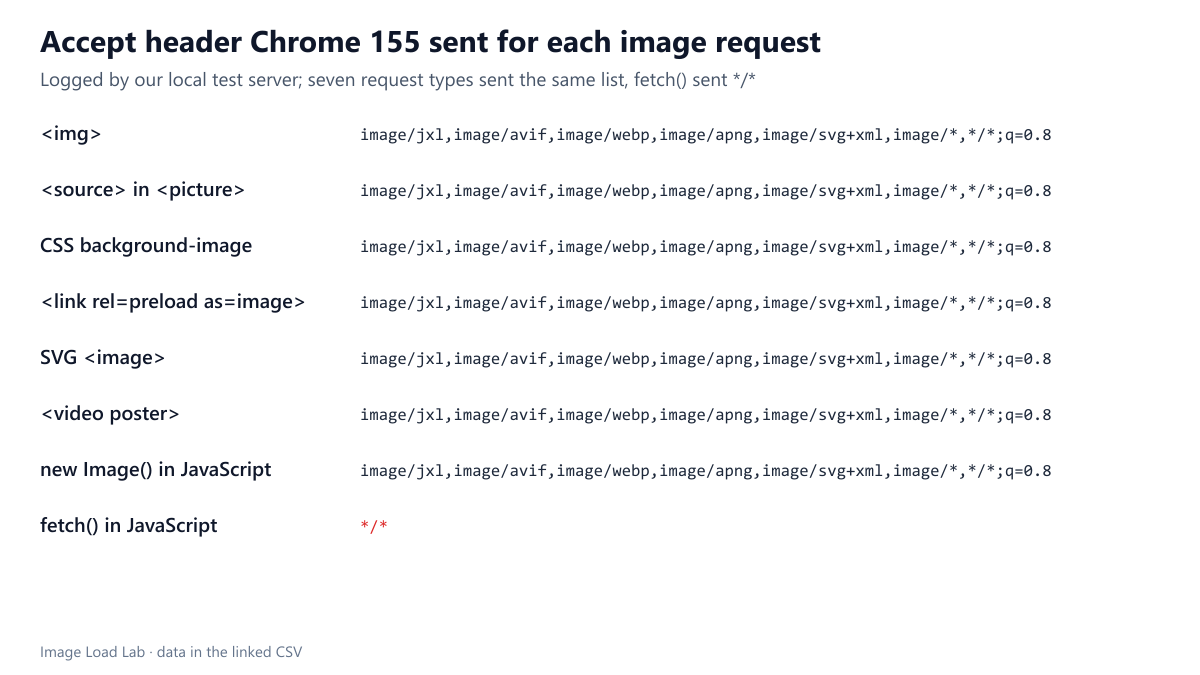
One test page requested the same small JPEG in eight ways, each with a different query string so the requests could be told apart: a plain <img>, a <source> inside <picture>, a CSS background-image, a <link rel="preload" as="image">, an <image> inside inline SVG, a <video poster>, new Image() in JavaScript and fetch(). A small Node.js server recorded the Accept and Sec-Fetch-Dest headers of every request. The browser was Chrome 155.0.8059.82, driven by Playwright on Windows 11. Our methodology page describes the rest of the bench.
Results
| How the image was requested | Accept header Chrome sent | Sec-Fetch-Dest |
|---|---|---|
| <img> | image/jxl,image/avif,image/webp,image/apng,image/svg+xml,image/*,*/*;q=0.8 |
image |
| <source> in <picture> | image/jxl,image/avif,image/webp,image/apng,image/svg+xml,image/*,*/*;q=0.8 |
image |
| CSS background-image | image/jxl,image/avif,image/webp,image/apng,image/svg+xml,image/*,*/*;q=0.8 |
image |
| <link rel=preload as=image> | image/jxl,image/avif,image/webp,image/apng,image/svg+xml,image/*,*/*;q=0.8 |
image |
| SVG <image> | image/jxl,image/avif,image/webp,image/apng,image/svg+xml,image/*,*/*;q=0.8 |
image |
| <video poster> | image/jxl,image/avif,image/webp,image/apng,image/svg+xml,image/*,*/*;q=0.8 |
image |
| new Image() in JavaScript | image/jxl,image/avif,image/webp,image/apng,image/svg+xml,image/*,*/*;q=0.8 |
image |
| fetch() in JavaScript | */* |
empty |
Seven of the eight requests sent the same header: image/jxl,image/avif,image/webp,image/apng,image/svg+xml,image/*,*/*;q=0.8, with Sec-Fetch-Dest: image. It did not matter whether the image came from HTML, CSS, SVG, a video poster, a preload hint or a script creating an Image object.
fetch() was the exception. It sent Accept: */* and Sec-Fetch-Dest: empty, because a script fetch does not know it is asking for an image. A server that negotiates formats will treat such a request as coming from a browser with no AVIF or WebP support, unless the script sets the header itself.
JPEG XL comes first. The header starts with image/jxl, ahead of AVIF and WebP. A server that picks the first listed format it can produce would therefore send JPEG XL to this Chrome build if it had such a file. In our picture element test, Chrome 155 also chose a source marked type="image/jxl". We did not decode a real JPEG XL file in this test.
What our own server does with it
We also checked whether the host behind this site negotiates image formats. We requested a PNG from our media library twice, once with an Accept header listing AVIF and WebP and once with Accept: image/jpeg. Both responses were the same 16,844-byte PNG, with Vary: User-Agent and no Vary: Accept. In other words, on a typical shared WordPress host, the Accept header is ignored: the file you upload is the file every browser gets, and modern formats have to be produced and referenced explicitly, as described in our WordPress upload workflow.
What this means for format negotiation
- Negotiation by
Acceptworks for every normal image request in Chrome, including CSS backgrounds and preloads, so one URL can serve AVIF to Chrome and JPEG elsewhere. - The response must carry
Vary: Accept. Without it, a shared cache can store the AVIF answer and hand it to a browser that asked for JPEG. - Images loaded with
fetch()(for example in a service worker or a canvas editor) arrive with*/*and will get the fallback format unless the code sends its ownAcceptheader. - Do not rely on the order of the list to rank formats by size: the order reflects what the browser supports, not which file is smallest for your image. Our format comparison is the place to make that choice.
Practical conclusion
Chrome 155 announced the same list of supported image formats for every image request except fetch(), and that list starts with JPEG XL. If you use server-side negotiation, add Vary: Accept and set the header explicitly in scripts. If your host ignores the header, as ours does, choose formats in the HTML with <picture>.
Limitations
Headers were recorded from one Chrome version on Windows. Other browsers send different lists, and Chrome may change its list in later versions. Requests made from service workers, web workers and CSS image-set() were not part of this test.
Data and files
Download accept-header.csv (8 rows, 0.7 KB) · Method: testing methodology.