Video Poster Images and LCP: Same as an img?
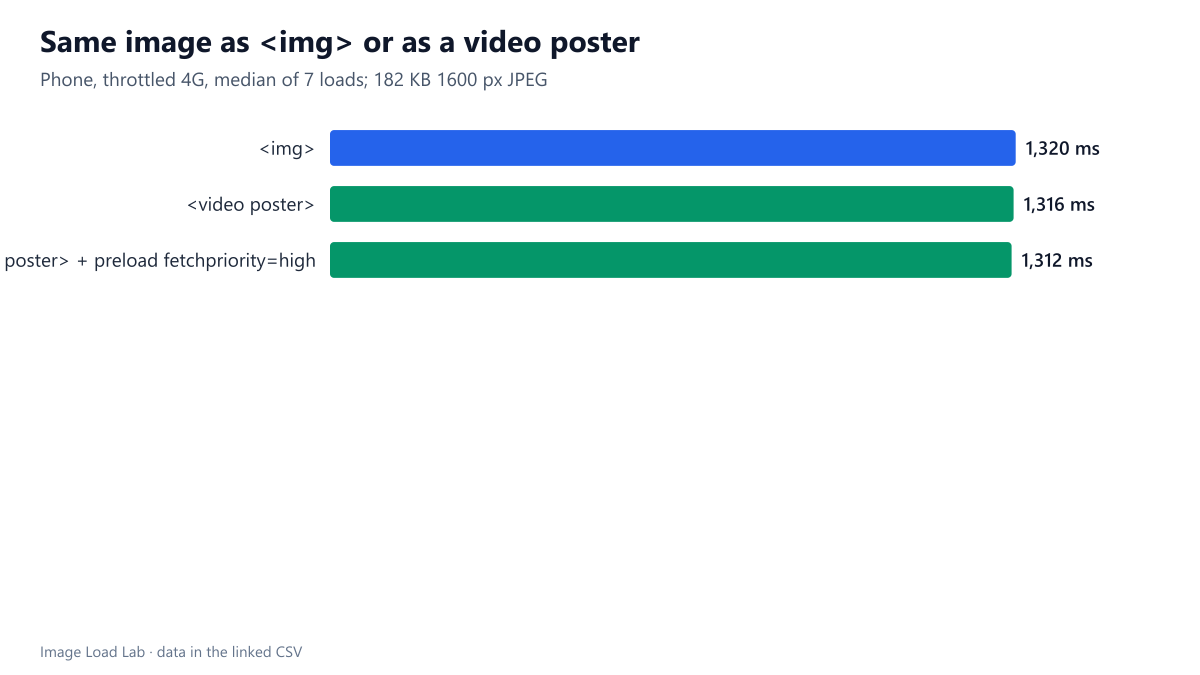
A video poster was discovered as early as an img, got the same priority and counted as the LCP element with the same timing, 1,316 ms against 1,320 ms. It cannot use srcset.
A hero video usually shows a still image, the poster, until it starts playing. For page speed metrics, that poster can be the Largest Contentful Paint. Because it is set in an attribute of <video> rather than in an <img> tag, it is easy to assume the browser finds it later or treats it with less urgency. Does a video poster load and count for LCP like a normal image, and does a preload help it? We put the same image on a page three ways.
The test
Each page had a heading, the hero and a paragraph of text. The hero was a 1600-pixel CC0 JPEG of 182 KB, displayed at full width:
- as an
<img>; - as the
posterof a<video preload="none" muted playsinline>withwidthandheight; - as the same poster plus
<link rel="preload" as="image" fetchpriority="high">.
The video element had no video file attached, so only the poster was downloaded; that isolates the poster from the video’s own loading. We loaded each page seven times in Chrome 155.0.8059.82 with a phone viewport, 150 ms latency, 1.6 Mbit/s and the CPU slowed four times. We recorded the LCP element and time, and when the image request started and finished. See our methodology.
Results
| Markup | LCP element | Median LCP | Image request starts | Image downloaded | Initial priority |
|---|---|---|---|---|---|
| <img> | IMG | 1,320 ms | 190 ms | 1,297 ms | Medium |
| <video poster> | VIDEO | 1,316 ms | 187 ms | 1,293 ms | Medium |
| <video poster> + preload fetchpriority=high | VIDEO | 1,312 ms | 187 ms | 1,292 ms | High |
The poster counted as the LCP element, reported as the VIDEO element, and its LCP was the same as the <img>: 1,316 ms against 1,320 ms.
It was discovered just as early. The poster request started at 187 ms, like the <img> at 190 ms, so Chrome’s preload scanner found it in the HTML. It also got the same initial priority, Medium.
The preload made it High priority but not faster. With fetchpriority="high" on a preload, the request started High and LCP was 1,312 ms, within the variation between loads. On this simple page, nothing else competed with the poster, so priority had nothing to win; on busier pages it can matter more.
What this means
- Treat the poster as your LCP image. Size it for the screen with the same care as an
<img>hero: our hero bytes test measured about half a second of LCP per 100 KB on a slow phone profile. - The poster attribute has no
srcset. Unlike<img>, it takes a single URL, so phones and desktops get the same file. Pick a width that suits most of your visitors. If you need responsive posters, consider an<img>layered over the video until it plays, at the cost of extra markup. - Keep
preload="none"or"metadata"on hero videos that do not autoplay, so the video file does not compete with the poster. We did not attach a video file in this test, which is the best case for the poster. - Give the video
widthandheight. As with images, that reserves space and avoids layout shifts, as tested in our image dimensions test. - A preload is optional. The poster was already found by the preload scanner. Add a preload with
fetchpriority="high"only if other early resources compete with it, as discussed in our fetchpriority guide.
Example markup
<video poster="/media/hero-poster-1200.jpg" width="1600" height="900"
       preload="none" muted playsinline controls>
  <source src="/media/hero.mp4" type="video/mp4">
</video>
Practical conclusion
In Chrome 155, a video poster was found as early as an <img>, got the same Medium priority, and counted as the LCP element with the same timing: 1,316 ms against 1,320 ms on a throttled phone profile. A high-priority preload changed the priority but not the result on this simple page. Optimise the poster like any hero image, keeping in mind that it cannot use srcset.
Limitations
No video file was attached, one page layout, Chrome only and seven loads per version. With autoplaying videos, the video’s first frame may replace the poster as the LCP candidate; we did not test that.
Data and files
Download video-poster-lcp.csv (3 rows, 0.2 KB) · Method: testing methodology. Photo: image credits.