Carousel Slides: fetchpriority=low Did Not Help, loading=lazy Did
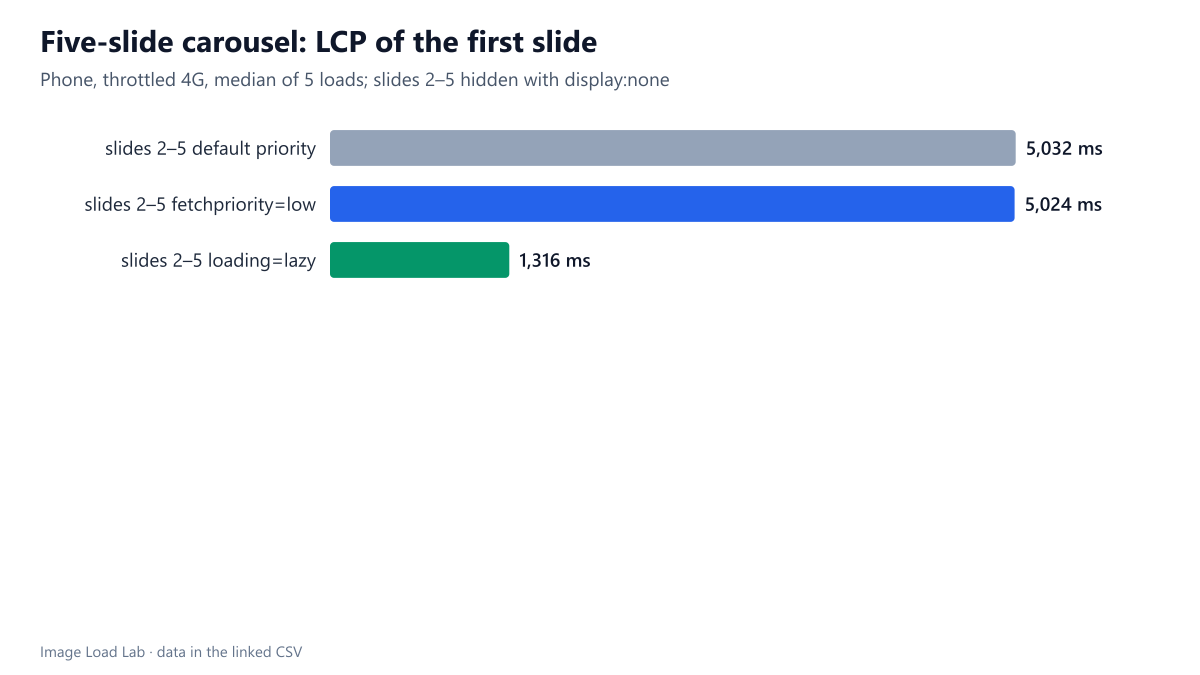
Hidden slides with fetchpriority=low still downloaded and LCP stayed at 5.0 s. With loading=lazy they were never requested, and LCP fell to 1.3 s.
Image carousels usually put every slide in the HTML and hide all but the first with CSS. Chrome downloads images hidden with display: none, as our hidden images test showed, so the hidden slides compete with the first one for bandwidth. Two attributes are often suggested to fix this: fetchpriority="low" on the hidden slides, and loading="lazy". Which one actually brings the first slide in sooner? We measured a five-slide carousel on a throttled phone profile.
The test
The carousel had five slides, each a 1600-pixel CC0 JPEG of 182 KB. The first slide was visible and carried fetchpriority="high"; slides 2 to 5 had display: none. We tested three versions of the hidden slides: no extra attribute, fetchpriority="low", and loading="lazy". Each version was loaded five times in Chrome 155.0.8059.82 with a phone viewport, 150 ms latency, 1.6 Mbit/s and the CPU slowed four times. We recorded the Largest Contentful Paint (the first slide), the images requested and the bytes transferred. The test server used HTTP/1.1. See our methodology.
Results
| Hidden slides marked with | Median LCP | Images requested | Image bytes | First slide downloaded |
|---|---|---|---|---|
| slides 2–5 default priority | 5,032 ms | 5 | 911 KB | 5,011 ms |
| slides 2–5 fetchpriority=low | 5,024 ms | 5 | 911 KB | 5,000 ms |
| slides 2–5 loading=lazy | 1,316 ms | 1 | 182 KB | 1,297 ms |
fetchpriority="low" made no difference. With or without it, Chrome requested all five slides at once (911 KB). The first slide finished at 5.0 seconds, and LCP was 5,024 ms with the hint against 5,032 ms without it.
loading="lazy" cut LCP to 1,316 ms, almost four times faster. Chrome did not request the hidden lazy slides at all during the page load, because a lazy image with display: none has no position on the page and so never comes near the viewport. Only the first slide was downloaded: 182 KB instead of 911 KB.
Why the priority hint did not help
A priority hint changes the order in which the browser sends competing requests, and, on HTTP/2 and HTTP/3, how the server is asked to share the connection. On our HTTP/1.1 server, with five images and up to six connections per host, Chrome sent all five requests at once, so there was no queue to reorder.
To check whether this was only about HTTP/1.1, we ran a related test: a 182 KB hero and four 36 KB thumbnails in the first screen, with fetchpriority="high" on different images, over both HTTP/1.1 and a local HTTP/2 server.
| Server | fetchpriority=high on | Median LCP (hero) | Hero downloaded | Last thumbnail downloaded |
|---|---|---|---|---|
| HTTP/1.1 | nothing | 2,060 ms | 2,041 ms | 1,300 ms |
| HTTP/1.1 | the hero only | 2,060 ms | 2,041 ms | 1,299 ms |
| HTTP/1.1 | the hero and 4 thumbnails | 2,052 ms | 2,032 ms | 1,291 ms |
| HTTP/1.1 | the 4 thumbnails, not the hero | 2,060 ms | 2,041 ms | 1,290 ms |
| HTTP/2 | nothing | 2,072 ms | 2,053 ms | 1,300 ms |
| HTTP/2 | the hero only | 2,072 ms | 2,053 ms | 1,298 ms |
| HTTP/2 | the hero and 4 thumbnails | 2,076 ms | 2,057 ms | 1,304 ms |
| HTTP/2 | the 4 thumbnails, not the hero | 2,076 ms | 2,058 ms | 1,303 ms |
Priorities changed nothing in either protocol. Every combination gave the same LCP within 24 ms, and the thumbnails always finished before the hero, simply because they were smaller. A likely factor is that Chrome’s network throttling, which we use to emulate a slow phone connection, shares the emulated bandwidth between active downloads without regard to priority. Lab tests like ours therefore cannot show what a priority-aware server or CDN might gain. loading="lazy" works whatever the network does, because it removes the competing requests altogether.
What to do
- Add
loading="lazy"to every slide except the first. Hidden slides are not requested until the carousel shows them, which is exactly when they are needed. - Keep
fetchpriority="high"on the first slide only, and never lazy-load it. - Expect a short delay when a lazy slide appears. When a slide becomes visible, its download only starts then. Carousels that move automatically can make the next slide eager just before showing it, for example by setting its
loadingattribute toeagerone step ahead. - For carousels that scroll sideways instead of hiding slides, lazy loading works differently. Our horizontal carousel test measured how far ahead Chrome loads in that case.
Example markup
<div class="carousel">
  <img src="slide-1.jpg" fetchpriority="high" width="1600" height="1067" alt="…">
  <img src="slide-2.jpg" loading="lazy" width="1600" height="1067" alt="…" hidden>
  <img src="slide-3.jpg" loading="lazy" width="1600" height="1067" alt="…" hidden>
</div>
The hidden attribute here works like display: none. Remove it, or change the class, when the slide becomes active, and Chrome starts the download.
Practical conclusion
On a throttled phone profile, the first slide of a five-slide carousel reached LCP at about 5.0 seconds whether the hidden slides had fetchpriority="low" or not, because all 911 KB were downloaded together. With loading="lazy" on the hidden slides, only the first slide was downloaded and LCP fell to 1,316 ms. Lazy-load hidden slides; do not rely on a low priority hint.
Limitations
Local servers, one carousel layout, Chrome only, five to seven loads per version, and Chrome’s own network throttling. On real HTTP/2 or HTTP/3 servers that respect priorities, fetchpriority="low" may help partly. We did not measure the delay when a lazy slide is shown later.
Data and files
Download carousel-priority.csv (3 rows, 0.2 KB) · Download multiple-fetchpriority-high.csv (4 rows, 0.3 KB) · Download multiple-fetchpriority-high-h2.csv (4 rows, 0.4 KB) · Method: testing methodology. Photo: image credits.