Do Hidden Images Still Download? display:none and Lazy Loading in Chrome
Every hidden image without loading=lazy downloaded in full in Chrome 155, even inside display:none. Lazy loading stopped the download for five of six hiding methods, but not for visibility:hidden.
Hiding an image with CSS is one of the most common responsive tricks: a large photo for desktop, display: none on phones, and a smaller one shown instead. The visitor never sees the hidden image. Does Chrome still download it? We built fourteen small test pages, each hiding the same 800-pixel JPEG in a different way, and recorded every network request Chrome made while loading them.
The test
Each page contains a line of text, the hidden image and another line of text. The image is the same 800 × 600 JPEG of a CC0 market photo in every case, a 53.9 KB file, with a unique query string so that each request can be identified. Byte figures below are transfer sizes as reported by Chrome, which add about 180 bytes of HTTP headers (54.1 KB for this image). The hiding methods are: display: none on a parent or on the image itself, visibility: hidden, the hidden attribute on a parent, a media query that hides the image below 700 pixels, a <picture> inside a hidden parent, opacity: 0 and absolute positioning 9,999 pixels to the left of the page. Six of the cases were repeated with loading="lazy".
Pages were served from a local server and loaded in Chrome 155.0.8059.82, driven by Playwright, with the browser cache disabled. Every page was loaded three times with a phone viewport (390 pixels wide, 3× density) and three times with a desktop viewport (1440 pixels). Requests and transferred bytes were read from the Chrome DevTools Protocol. All three runs gave the same answer in every case. The general setup is described in our testing methodology.
Results
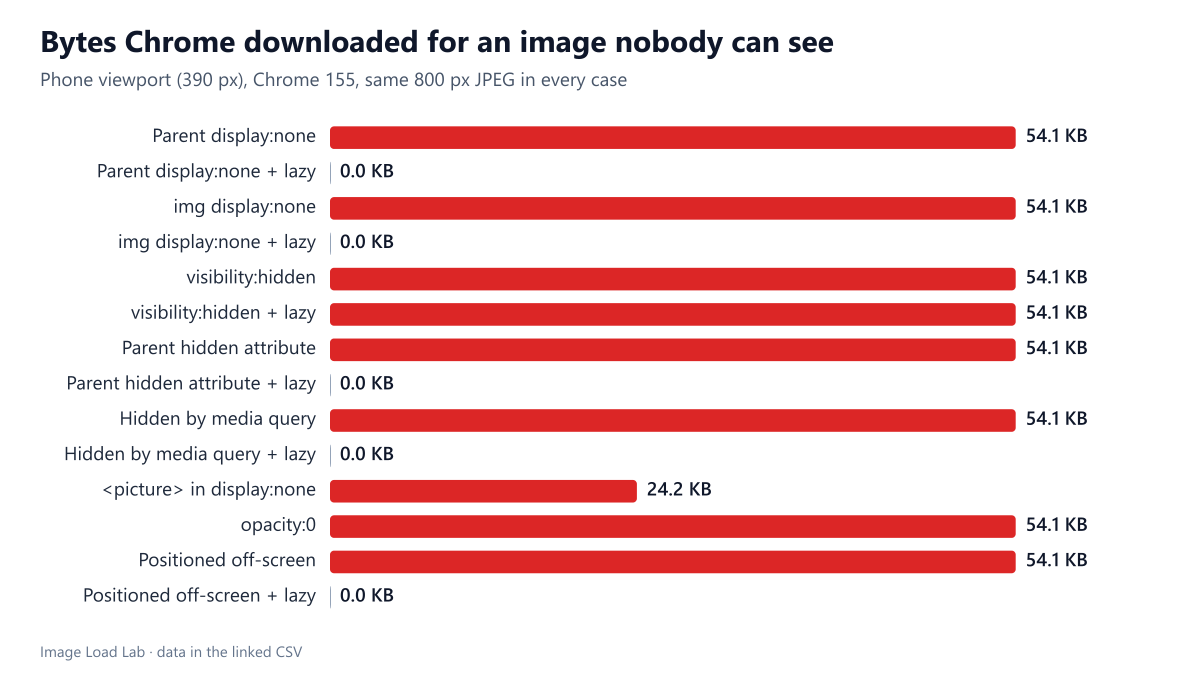
| How the image is hidden | Phone (390 px) | Desktop (1440 px) | Priority when requested |
|---|---|---|---|
| Parent display:none | Downloaded (54.1 KB) | Downloaded (54.1 KB) | Medium |
| Parent display:none + lazy | Not downloaded | Not downloaded | – |
| img display:none | Downloaded (54.1 KB) | Downloaded (54.1 KB) | Medium |
| img display:none + lazy | Not downloaded | Not downloaded | – |
| visibility:hidden | Downloaded (54.1 KB) | Downloaded (54.1 KB) | Medium |
| visibility:hidden + lazy | Downloaded (54.1 KB) | Downloaded (54.1 KB) | Low |
| Parent hidden attribute | Downloaded (54.1 KB) | Downloaded (54.1 KB) | Medium |
| Parent hidden attribute + lazy | Not downloaded | Not downloaded | – |
| Hidden by media query | Downloaded (54.1 KB) | Downloaded (54.1 KB) | Medium |
| Hidden by media query + lazy | Not downloaded | Downloaded (54.1 KB) | Low |
| <picture> in display:none | Downloaded (24.2 KB) | Downloaded (24.2 KB) | Medium |
| opacity:0 | Downloaded (54.1 KB) | Downloaded (54.1 KB) | Medium |
| Positioned off-screen | Downloaded (54.1 KB) | Downloaded (54.1 KB) | Medium |
| Positioned off-screen + lazy | Not downloaded | Not downloaded | – |
Without loading="lazy", hiding did not save a single byte. All eight eager cases downloaded the full image on both viewports: an image inside a display: none parent, an image with display: none itself, the hidden attribute, a media query, opacity: 0 and an off-screen position all cost the same 54.1 KB as a visible image. Chrome even gave these requests its normal “Medium” priority. The <picture> element inside a hidden parent also downloaded its preferred source, the 24.2 KB AVIF.
With loading="lazy", five of the six hiding methods stopped the download. An image hidden by display: none (on itself or on a parent), by the hidden attribute, by a media query on the phone viewport, or pushed off-screen was never requested during the three-second observation window. The exception was visibility: hidden: that image still occupies its place in the layout, inside the first screen, so lazy loading treated it as visible and fetched it, at “Low” priority.
The media-query case shows both sides on the desktop viewport. There the image was not hidden at all, so the lazy version downloaded normally, exactly as it should.
Why this happens
An <img> element starts fetching its file as soon as the parser sees its src, long before CSS decides whether the element will be rendered. Chrome’s preload scanner even finds image URLs before the stylesheet has arrived. CSS can hide the result, but by then the request is already on its way. Lazy loading changes the rule: the browser waits until the element’s box is near the viewport. An element with display: none has no box at all, so it never gets near the viewport and is never fetched. An element with visibility: hidden or opacity: 0 keeps its box, so it is fetched like any visible image.
CSS background images behave differently, because the stylesheet decides whether they are needed at all. We tested that separately in which hidden CSS background images Chrome downloads.
What to do with this
- “Desktop image, hidden on phones”: if both images are in the HTML as eager
<img>elements, phones download both. Use one<picture>element with amediacondition instead, so only one file is chosen, or addloading="lazy"to the image that may be hidden. - Tabs, menus and accordions built with
display: noneorhidden: give their imagesloading="lazy"and they will load only when the panel opens. Our test of images in closed details and dialog elements shows the same pattern. - Do not rely on
visibility: hiddenoropacity: 0to save bytes. Both download the image even when it is lazy. - Do not lazy-load the main image just to be safe. Lazy loading an image in the first screen delays it; our lazy-loading test measured 160–244 ms of extra Largest Contentful Paint.
Practical conclusion
In Chrome 155, CSS alone never prevented an <img> download: eight hiding methods all transferred the full file. If an image might stay hidden, mark it loading="lazy", which avoided the download for display: none, the hidden attribute, media-query hiding and off-screen positioning, but not for visibility: hidden. Better still, do not send markup for images that a layout will never show.
Limitations
We tested Chrome only; Firefox and Safari implement the same HTML rules but may schedule requests differently. The hidden image sat in the first screen of a short page; a visibility: hidden image far below the fold would follow the normal lazy-loading distance instead. We observed each page for three seconds after load, without scrolling.
Data and files
Download hidden-images.csv (28 rows, 1.3 KB) · Method: testing methodology. Photo: image credits.