Hidden CSS Background Images: Which Ones Chrome Still Downloads
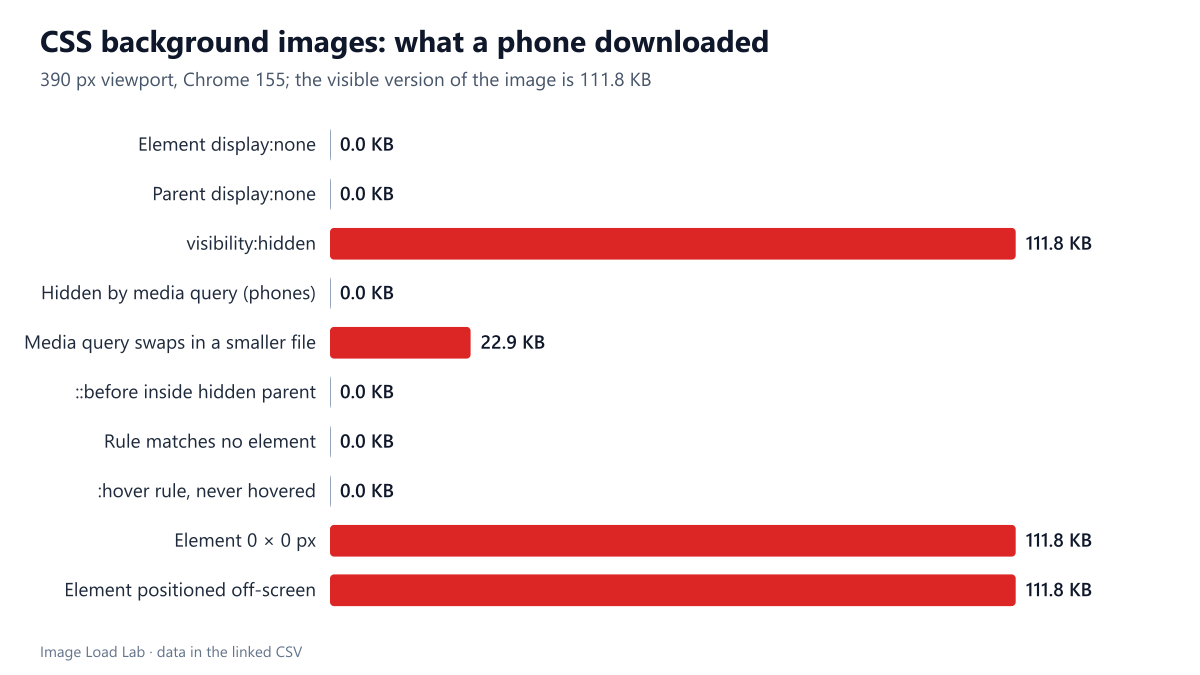
Background images on display:none elements cost nothing in Chrome 155, unlike image elements. But visibility:hidden, zero-size and off-screen elements still downloaded the full 111.8 KB image.
An <img> hidden with CSS is still downloaded, as our test of hidden images in Chrome showed. CSS background images are a different case, because the stylesheet itself decides whether the image is needed. Which hidden background images does Chrome skip, and which ones does it fetch anyway? We tested ten common patterns on a phone and a desktop viewport.
The test
Every test page holds one line of text and one element with a CSS background image: an 800-pixel JPEG of a carved street sign (CC0), a 111.6 KB file. Byte figures below are transfer sizes reported by Chrome, including HTTP headers (111.8 KB for this image). Each element was 300 × 200 pixels unless the case required otherwise. The ten cases were: display: none on the element, display: none on its parent, visibility: hidden, a media query that hides the element below 700 pixels, a media query that swaps in a 400-pixel version (22.9 KB) on small screens, a ::before pseudo-element inside a hidden parent, a CSS rule that matches no element, a :hover rule that is never triggered, an element of zero width and height, and an element positioned 9,999 pixels off the left edge.
We loaded each page three times in Chrome 155.0.8059.82 at 390 pixels (phone, 3× density) and three times at 1440 pixels (desktop), with the cache disabled, and recorded the image requests through the DevTools Protocol. The three runs always agreed. More about the setup is on the methodology page.
Results
| Case | Phone (390 px) | Desktop (1440 px) |
|---|---|---|
| Element display:none | Not downloaded | Not downloaded |
| Parent display:none | Not downloaded | Not downloaded |
| visibility:hidden | street-800.jpg (111.8 KB) | street-800.jpg (111.8 KB) |
| Hidden by media query (phones) | Not downloaded | street-800.jpg (111.8 KB) |
| Media query swaps in a smaller file | street-400.jpg (22.9 KB) | street-800.jpg (111.8 KB) |
| ::before inside hidden parent | Not downloaded | Not downloaded |
| Rule matches no element | Not downloaded | Not downloaded |
| :hover rule, never hovered | Not downloaded | Not downloaded |
| Element 0 × 0 px | street-800.jpg (111.8 KB) | street-800.jpg (111.8 KB) |
| Element positioned off-screen | street-800.jpg (111.8 KB) | street-800.jpg (111.8 KB) |
Five patterns cost nothing. A background image on an element with display: none, or inside a parent with display: none, was never requested. Neither was the image of a pseudo-element in a hidden parent, an image in a rule that matched no element, or an image in a :hover rule nobody triggered. On the phone viewport, the element hidden by a media query did not download its image either.
Three patterns downloaded the full 111.8 KB. visibility: hidden, an element of zero size and an element pushed off-screen all fetched the image, even though nothing could be seen. These elements still exist in the layout, so Chrome treats their background as needed.
The media-query swap did what it promised. On the phone, only the 22.9 KB small version was requested; the 111.8 KB desktop version was not downloaded first and then replaced. On the desktop viewport, only the large version was requested.
Background images versus <img>
The contrast with <img> is the useful part. In our earlier test, an <img> inside a display: none parent downloaded its file every time unless it had loading="lazy". A background image in the same position was skipped without any extra attribute. The reason is timing: an image element is requested as soon as the HTML parser reads its URL, while a background image is requested only after the browser has matched the style rules to the page and decided that a rendered element needs it. An element with display: none is not rendered, so its background is never needed.
The flip side is that background images are discovered late. They wait for the stylesheet and for style calculation, which is why a hero image in CSS can arrive later than the same image in HTML. Our test of responsive CSS background images measured that delay at 186 ms for a hero image defined in an external stylesheet.
What to do with this
- Decorative images that only some layouts show are safe as CSS backgrounds behind a media query: the hidden layout downloads nothing.
- To save bytes, hide with
display: none, not withvisibility: hidden, zero dimensions or off-screen positioning. The last three still downloaded the whole image. - A media query that swaps the image sends phones only the smaller file. For content images, a
<picture>element withmediaconditions does the same while keeping the image in the HTML and giving it alternative text. - Do not move the main image of a page into CSS to get this behaviour. Late discovery costs more than it saves.
Practical conclusion
For CSS background images, Chrome 155 downloaded only what a rendered element needed: display: none on the element or a parent, unused rules, hover rules and media-query hiding all transferred zero bytes. visibility: hidden, zero-size and off-screen elements still downloaded the full image. If you hide a background to save data, use display: none or a media query.
Limitations
Chrome only, one image per page and a three-second observation window without scrolling or hovering. Other browsers follow the same CSS rules but we did not measure them here. Results could differ for backgrounds set from JavaScript after load, which we did not test.
Data and files
Download hidden-backgrounds.csv (20 rows, 0.9 KB) · Method: testing methodology. Photo: image credits.