CSS Background Heroes vs img: How Much Later Does the Image Load?
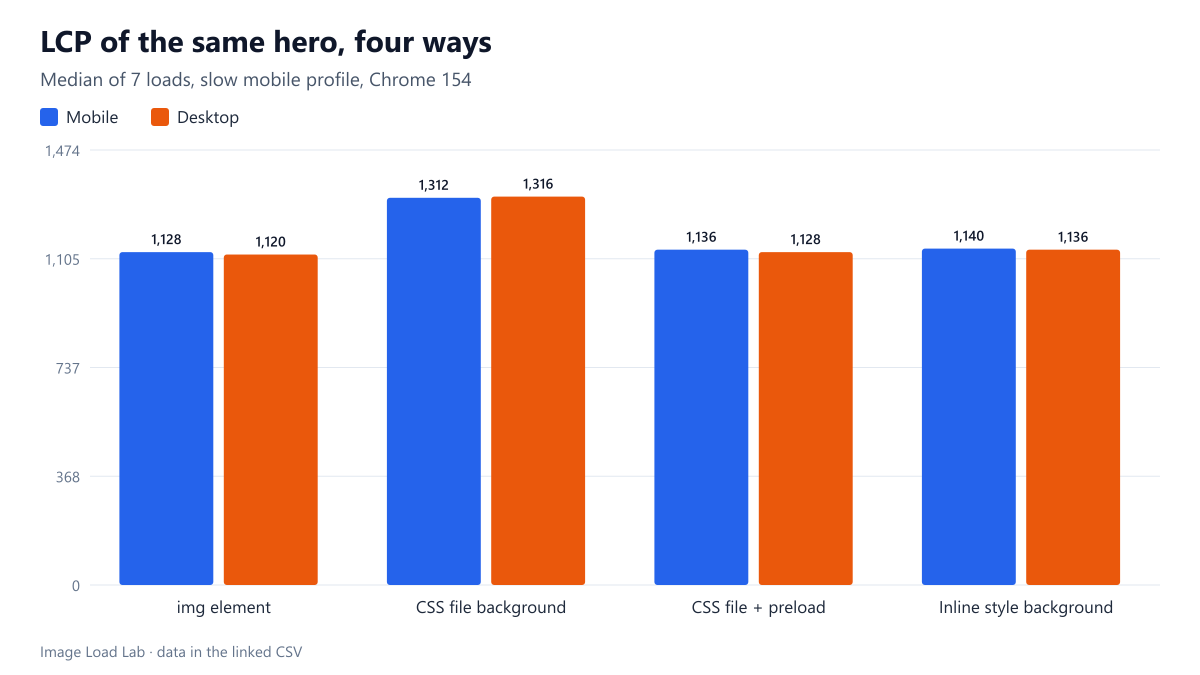
Moving the hero image into an external stylesheet delayed its download by 186 ms and LCP by about 180 ms. An inline style or a preload link removed the delay.
Hero banners are often built as a <div> with a CSS background-image instead of an <img> element. Does that make the most important image on the page arrive later? We built the same hero four ways and measured, in Chrome over a throttled mobile connection, when the image request started and when the Largest Contentful Paint happened.
Four ways to show the same hero
The hero is the CC0 beach-and-sky photo from our corpus, 1600 × 900 WebP (145 KB), displayed full width at the top of an otherwise plain article page. The four variants:
<img>element withwidth,heightandalt, the baseline.- Background in an external stylesheet:
<div class="hero">and ahero.cssfile containingbackground-image: url(...). - Same, plus preload: as variant 2, with
<link rel="preload" as="image" href="..." fetchpriority="high">in the document head. - Inline style: the
background-imagewritten in the element’sstyleattribute.
Each variant was loaded seven times on a mobile and a desktop viewport in a fresh Chrome 154 profile, with the slow mobile network profile (150 ms latency, 1.6 Mbit/s, 4× CPU) described in our methodology. We report medians with the fastest and slowest run.
Results
| Variant | Viewport | Median LCP (ms) | Fastest–slowest (ms) | Hero request start (ms) |
|---|---|---|---|---|
| img element | mobile | 1128 | 1112–1152 | 183 |
| CSS file background | mobile | 1312 | 1300–1336 | 369 |
| CSS file + preload | mobile | 1136 | 1116–1164 | 184 |
| Inline style background | mobile | 1140 | 1124–1156 | 202 |
| img element | desktop | 1120 | 1116–1136 | 181 |
| CSS file background | desktop | 1316 | 1284–1328 | 363 |
| CSS file + preload | desktop | 1128 | 1108–1148 | 178 |
| Inline style background | desktop | 1136 | 1132–1160 | 206 |
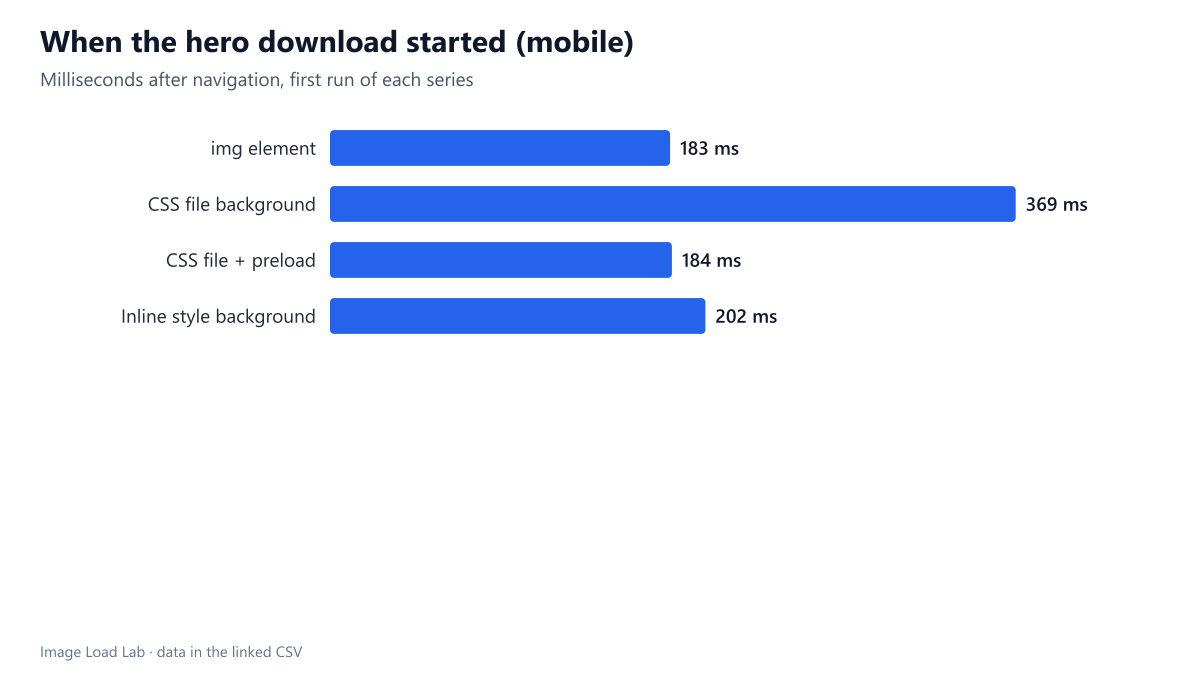
Moving the image into an external stylesheet made it start downloading 186 ms later on mobile (369 ms instead of 183 ms after navigation) and delayed LCP by about the same amount: median 1,312 ms instead of 1,128 ms. The desktop viewport gave the same result (1,316 vs 1,120 ms). All seven runs agreed: the fastest external-CSS run was slower than the slowest <img> run.
The other two variants were indistinguishable from the <img> baseline: 1,136 ms with preload and 1,140 ms with the inline style on mobile, within a few milliseconds of 1,128 ms and inside the run-to-run range.
Why the external stylesheet is slower
An <img> tag (and a preload link) are visible to the browser’s preload scanner, which reads the HTML as it arrives and starts image downloads immediately. A URL inside a CSS file is invisible until that CSS file has been downloaded and parsed, and until the browser knows which elements use it. On our throttled connection, that extra round trip for the stylesheet accounts for the 186 ms difference. The inline style avoided it because the URL was in the HTML itself.
The good news for designers: Chrome counted the CSS background as the LCP element in every variant, so a background image does not “hide” from Core Web Vitals. It is just discovered later unless you help it.
Making a CSS background responsive
A background image has no srcset. To serve different widths you need either image-set() in CSS or media queries with different URLs, and a matching <link rel="preload" imagesrcset="..." imagesizes="..."> if you preload it. That is more code to keep in sync than an <img> with srcset and object-fit: cover, which gives the same visual result.
Practical conclusion
- For a hero or any image likely to be the LCP element, prefer an
<img>(withobject-fit: coverif it must fill a box). It was the fastest option and keepssrcset,alttext and lazy-loading control. - If the design requires a CSS background, either set it inline in the HTML or add a preload link for the same URL. Both removed the delay completely in our test.
- Decorative backgrounds further down the page (textures, patterns) can stay in the stylesheet: their late discovery does not affect LCP.
- Remember that a CSS background has no alternative text. If the image carries meaning, it belongs in an
<img>or needs an accessible label on its container.
How this connects to our other tests
The 186-millisecond delay measured here is the same mechanism behind other results in the lab: the browser can only start what it can see. Lazy-loading the hero delayed its request in our lazy-loading test for the same reason, because a lazy image waits for layout just as a CSS background waits for its stylesheet. By contrast, priority hints did not change anything measurable in our priority test: in this case the preload helped not by raising priority but by making the URL visible in the HTML.
Repeat this test on your own images
To find out whether your own hero is affected, open the page in Chrome with DevTools, choose a slow network profile in the Network panel, reload and look at the waterfall. If the hero image request starts only after a CSS file has finished downloading, the browser discovered it late. The Performance panel’s LCP marker shows how much that delay matters on your page. Then try the fixes one at a time: move the URL into an inline style attribute, or add a preload link with the same URL and fetchpriority="high", and compare the request start time again. If your background is responsive, preload the right variant with imagesrcset and imagesizes, otherwise the browser may download two files. Our test pages are in build_pages.mjs and the measurement in run_loading.mjs.
Limitations
A tiny, fast stylesheet on a local server. On real sites stylesheets are larger, often come from another origin and block rendering anyway, so the discovery delay is usually bigger than what we measured. We tested one image, one browser and one network profile.
Data and files
Download loading-cssbg.csv (8 rows, 1.4 KB) · Method: testing methodology. Photo: image credits.