How Many srcset Widths Do You Need? Seven Candidate Lists Compared
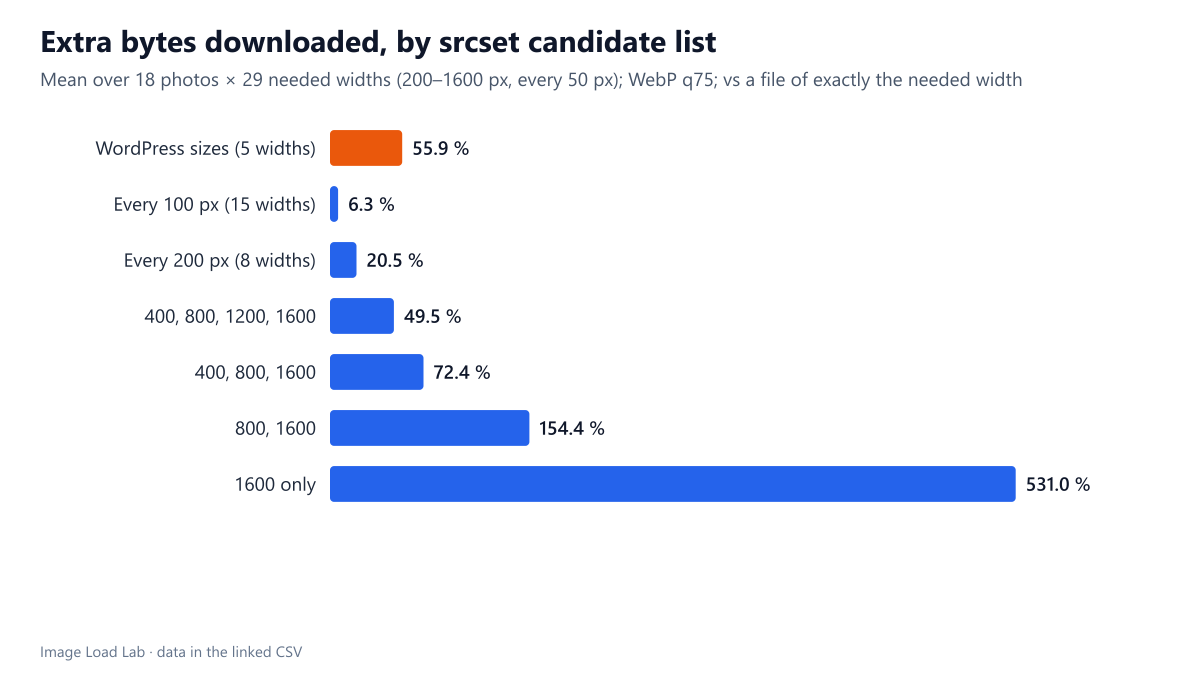
Across 18 photos, candidates every 100 px wasted 6 % extra bytes on average and every 200 px 21 %. WordPress's default list wasted 56 % because nothing sits between 300 and 768 px.
A srcset list gives the browser several widths of the same image and lets it pick one. It picks the first candidate at least as wide as the slot needs, so whenever the needed width falls between two candidates, it downloads a larger file than necessary. More candidates mean less waste, but more files to generate and store. How many widths are enough, and how does WordPress’s default list compare? We encoded 18 photos at every width from 200 to 1600 pixels and calculated what seven different candidate lists would make a browser download.
The test
We used 18 CC0 photos from our test set whose working copies are 1600 pixels wide. Two other photos in the set are only 1200 pixels wide, and we left them out so that no file was enlarged. Each photo was encoded as WebP at quality 75 with sharp 0.35.5 at every width from 200 to 1600 pixels in 50-pixel steps, plus 768, 1024 and 1536 pixels, the widths WordPress generates. That gave 622 files.
We then assumed that a visitor’s slot needs a width from 200 to 1600 pixels, every 50-pixel value equally likely. That is 29 needed widths per photo. For each candidate list, we took the file a browser would choose: the smallest candidate at least as wide as needed. We compared its size with the file of exactly the needed width. All files were measured; only the choice of file is calculated. See our methodology.
Results
| Candidate widths in srcset | Count | Mean extra | Median extra | 9 in 10 cases below | Worst case | Mean extra KB |
|---|---|---|---|---|---|---|
| WordPress sizes (300, 768, 1024, 1536 + 1600 original) | 5 | 55.9 % | 34.8 % | 128.8 % | 525 % | 27.9 |
| Every 100 px (15 widths) | 15 | 6.3 % | 0.0 % | 18.1 % | 50 % | 3.5 |
| Every 200 px (8 widths) | 8 | 20.5 % | 13.3 % | 48.2 % | 193 % | 10.7 |
| 400, 800, 1200, 1600 | 4 | 49.5 % | 31.0 % | 119.6 % | 390 % | 25.0 |
| 400, 800, 1600 | 3 | 72.4 % | 53.7 % | 167.4 % | 390 % | 47.0 |
| 800, 1600 | 2 | 154.4 % | 71.2 % | 392.1 % | 2405 % | 54.5 |
| 1600 only | 1 | 531.0 % | 157.4 % | 1431.9 % | 10642 % | 118.5 |
A candidate every 100 pixels kept the waste to 6.3 % on average, with 9 in 10 cases under 18 %. Every 200 pixels averaged 20.5 %. Four widths (400, 800, 1200, 1600) averaged 49.5 %, and two widths averaged 154 %. A single 1600-pixel file meant downloading on average more than six times the bytes needed, a mean of 118.5 KB of waste per image.
WordPress’s default list did worse than four evenly spaced widths: 55.9 % extra on average, 27.9 KB per image. The problem is the gap between the 300-pixel “medium” size and the 768-pixel “medium_large” size. A slot needing 350 pixels gets the 768 file, which was a median 307 % larger than a 350-pixel file. At 400 pixels the overshoot was still 223 %. Above 768 pixels the WordPress list behaves much like a 250- to 500-pixel step.
Why gaps cost more than they seem
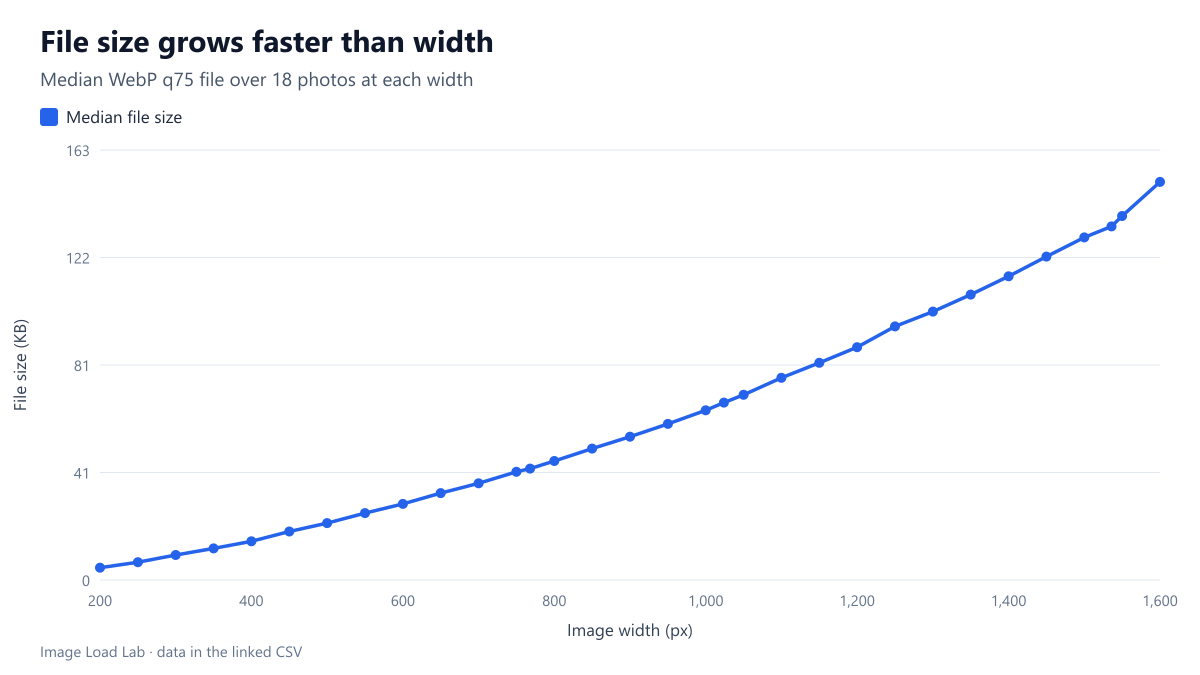
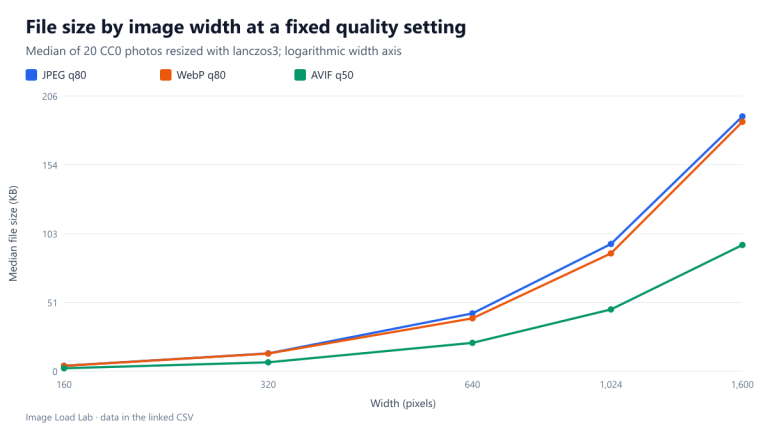
File size grows faster than width. Doubling the width doubles both dimensions, so the pixel count quadruples. Across our 18 photos, a 1600-pixel WebP was a median 3.3 times the size of the 800-pixel one, and an 800-pixel file 3.5 times the 400-pixel one. Fitted per photo, file size grew with width to the power 1.75 at the median. The exponent ranged from 1.19 for a flower with a smooth, blurred background to 2.25 for a detailed street sign. Because of that curve, a candidate that is 30 % wider than needed carries about 58 % more bytes at the median exponent, not 30 %.
How to choose your widths
- Cover the range your layout actually needs, from the smallest slot on a 1× screen to the largest on a 2× or 3× screen. Our high-density displays guide explains the multiplication.
- Use steps of 100 to 200 pixels where most visitors are. In our data, going from 8 to 15 candidates cut the average waste from 20.5 % to 6.3 %. Going below 4 candidates cost far more.
- On WordPress, fill the 300–768 gap. A custom size of about 500 pixels, registered with
add_image_size()without cropping, sits in the biggest hole in the default list. WordPress adds it tosrcsetautomatically when the proportions match. - Get
sizesright first. A perfect candidate list does not help ifsizestells the browser the wrong slot width. Our grid layout test shows that mistake costing more than any candidate gap. - Weigh storage and build time. Each extra width is one more file per upload and per format. If you also serve AVIF and WebP, 15 widths means 45 files per image.
Example markup
A list with roughly 200-pixel steps, generated once at build time or by an image service:
<img src="photo-800.webp"
     srcset="photo-400.webp 400w, photo-600.webp 600w, photo-800.webp 800w,
             photo-1000.webp 1000w, photo-1200.webp 1200w, photo-1600.webp 1600w"
     sizes="(max-width: 700px) calc(100vw - 32px), 640px"
     width="1600" height="1067" alt="…">
Our free srcset builder writes this markup from a list of widths.
Practical conclusion
With candidates every 100 pixels, browsers downloaded only about 6 % more than needed in our model; every 200 pixels, about 21 %. WordPress’s default list averaged 56 % extra because nothing sits between 300 and 768 pixels. Four or more well-spaced widths, plus one between 300 and 768 on WordPress, remove most of the waste.
Limitations
The needed widths were assumed equally likely from 200 to 1600 pixels. Real traffic clusters around a few phone and desktop sizes, so your own waste depends on where those clusters fall relative to your candidates. One format and quality (WebP 75), 18 photos, and widths only up to 1600 pixels. Browsers may also choose a smaller candidate when bandwidth is limited, or reuse a larger cached one, as our cache test shows.
Data and files
Download srcset-width-ladder.csv (622 rows, 14.6 KB) · Download srcset-candidate-sets.csv (7 rows, 0.4 KB) · Method: testing methodology. Photos: image credits.