Lazy Loading Measured: Bytes Saved and the Cost of a Lazy Hero
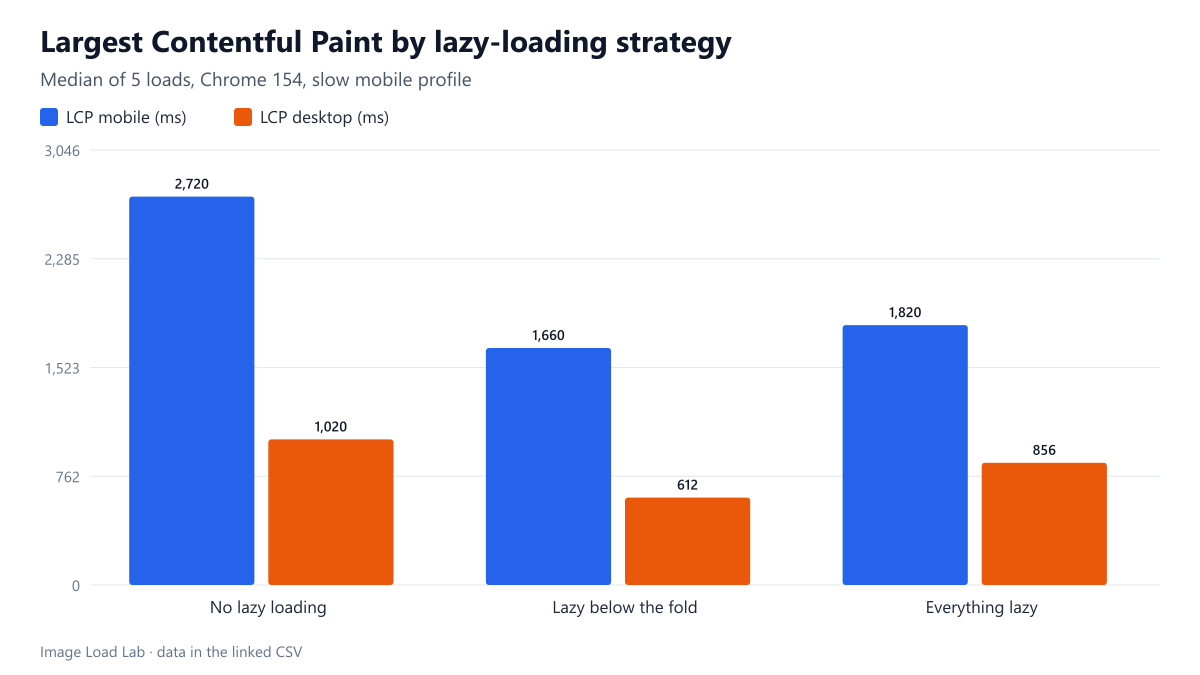
Lazy-loading the 12 photos below the fold cut initial image bytes from 1,652 KB to 372 KB and LCP by 39 % on mobile. Lazy-loading the hero too cost 160–244 ms.
The question: how much does native lazy loading (loading="lazy") actually save on an image-heavy article, and what does it cost when it is also applied to the main image at the top of the page? We built one article page with a hero photo and twelve more photos further down, and loaded three versions of it in Chrome over a throttled mobile connection, five times each.
The test page and the three variants
The fixture is a plain article (system fonts, no scripts) with a 16:9 hero photo at the top, followed by twelve 16:9 photos separated by paragraphs of text. All thirteen images are CC0 photos from our corpus, encoded as WebP quality 75 in four widths (480 to 1600 pixels) with a correct srcset and sizes, plus width and height. Only the loading attribute changes between the variants:
- No lazy loading: no
loadingattribute on any image. - Lazy below the fold: the hero is left alone, the other twelve images get
loading="lazy". - Everything lazy: all thirteen images, hero included, get
loading="lazy". This is what a blanket “lazy-load all images” setting does.
Each variant was loaded five times per viewport in a fresh Chrome 154 profile with the cache disabled, on our slow mobile profile (150 ms latency, 1.6 Mbit/s, 4× CPU slowdown). We recorded Largest Contentful Paint and every image request until the page had been idle for four seconds, without scrolling. Full conditions are on the methodology page.
What went wrong first: our first run used a stylesheet with max-width: 100% but without height: auto, so every image kept its attribute height and was drawn stretched and too tall. That pushed the photos further down the page and changed which ones counted as “near the screen”. We fixed the stylesheet and re-ran every loading experiment; the numbers below are from the corrected run.
Results
| Variant | Viewport | Median LCP (ms) | Fastest–slowest (ms) | Image KB before scrolling | Image requests |
|---|---|---|---|---|---|
| No lazy loading | mobile | 2720 | 2704–2748 | 1652 | 13 |
| Everything lazy | mobile | 1820 | 1776–1828 | 372 | 4 |
| Lazy below the fold | mobile | 1660 | 1620–1684 | 372 | 4 |
| No lazy loading | desktop | 1020 | 980–1024 | 453 | 13 |
| Everything lazy | desktop | 856 | 848–872 | 106 | 4 |
| Lazy below the fold | desktop | 612 | 568–660 | 106 | 4 |
On the mobile viewport (390 × 844 at 3× density), the page without lazy loading downloaded all thirteen images straight away, 1,652 KB, and its median LCP was 2,720 ms. The hero image was sharing a 1.6 Mbit/s connection with twelve other downloads.
With loading="lazy" on the twelve images below the fold, the images downloaded before any scrolling fell to 372 KB and the median LCP to 1,660 ms, 39 % faster. The desktop viewport showed the same pattern at smaller sizes: 453 KB and 1,020 ms without lazy loading, 106 KB and 612 ms with it.
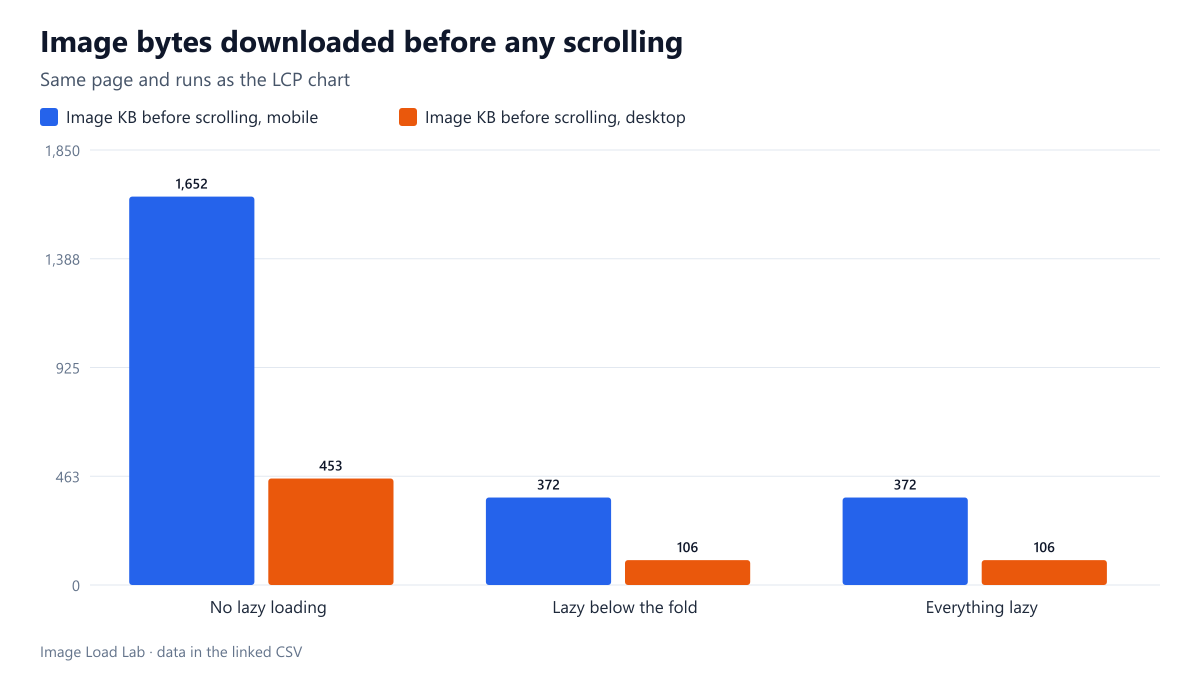
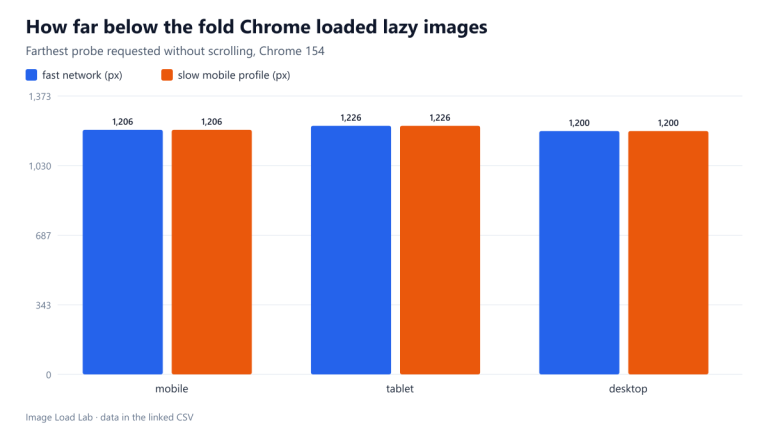
Lazy loading did not reduce the initial download to the hero alone: four images were requested at load time in both lazy variants. The three photos right below the hero were within the distance Chrome treats as “about to be seen”, which we measured separately in a lazy-loading distance test: about 1,250 pixels below the screen.
The cost of lazy-loading the hero
Making the hero lazy too added no bytes, because the hero is on screen and Chrome loads it anyway. But it delayed it: the median LCP rose from 1,660 to 1,820 ms on mobile (+160 ms) and from 612 to 856 ms on desktop (+244 ms). All five runs agreed on the direction; on desktop the slowest “lazy below the fold” run (660 ms) was still faster than the fastest “everything lazy” run (848 ms).
The request log shows why. A normal image is found by the browser’s preload scanner as soon as the HTML arrives; its download started 191 ms after navigation on mobile. A lazy image is only requested after layout, once the browser knows it is near the viewport; the lazy hero started at 254 ms on mobile and 276 ms instead of 193 ms on desktop. On a real page with render-blocking CSS and web fonts, layout happens later still, so the gap is usually larger.
Practical conclusion
- Lazy-load images that start below the first screen. On this 13-image article it cut the initial image bytes by 77 % on mobile and made LCP 39 % faster.
- Never lazy-load the image that is likely to be the LCP element (hero, featured image, first product photo). It cost 160–244 ms in our fixture and saved nothing.
- Expect images within roughly 1,250 pixels of the first screen to load immediately even when marked lazy.
- Keep
widthandheighton lazy images (withheight: autoin CSS) so they do not cause layout shifts when they arrive; see our layout shift test. - WordPress skips
loading="lazy"for the first images it considers likely to be visible. Check your theme’s hero or featured image, which is often output outside the content and may still be marked lazy.
Repeat this test on your own images
To audit lazy loading on your own pages, load a long article in Chrome with DevTools open, choose a slow network profile and, before scrolling, look at which images the Network panel has already requested. Every image in that list that is not visible is a candidate for loading="lazy", unless it is within about 1,250 pixels of the first screen, in which case Chrome will load it anyway. Then select your hero image and check that it does not carry loading="lazy": in the console, document.querySelectorAll('img[loading=lazy]') lists every lazy image, and the first entries should not include anything visible on arrival. In WordPress, the lazy attribute on the first content images is removed automatically, but images printed by the theme (featured images, sliders, logos) need checking. Our script run_loading.mjs contains the three-variant test used here.
Limitations
A single fixture page, one browser engine (Chrome 154) and a simulated network. Real pages with heavier CSS, web fonts and scripts will show larger absolute times. Lazy loading does not reduce bytes for readers who scroll to the end; it moves them later.
Data and files
Download loading-lazy.csv (6 rows, 0.6 KB) · Method: testing methodology. Photos: image credits.