A Base64 Image Inside Your CSS: What It Does to First Paint
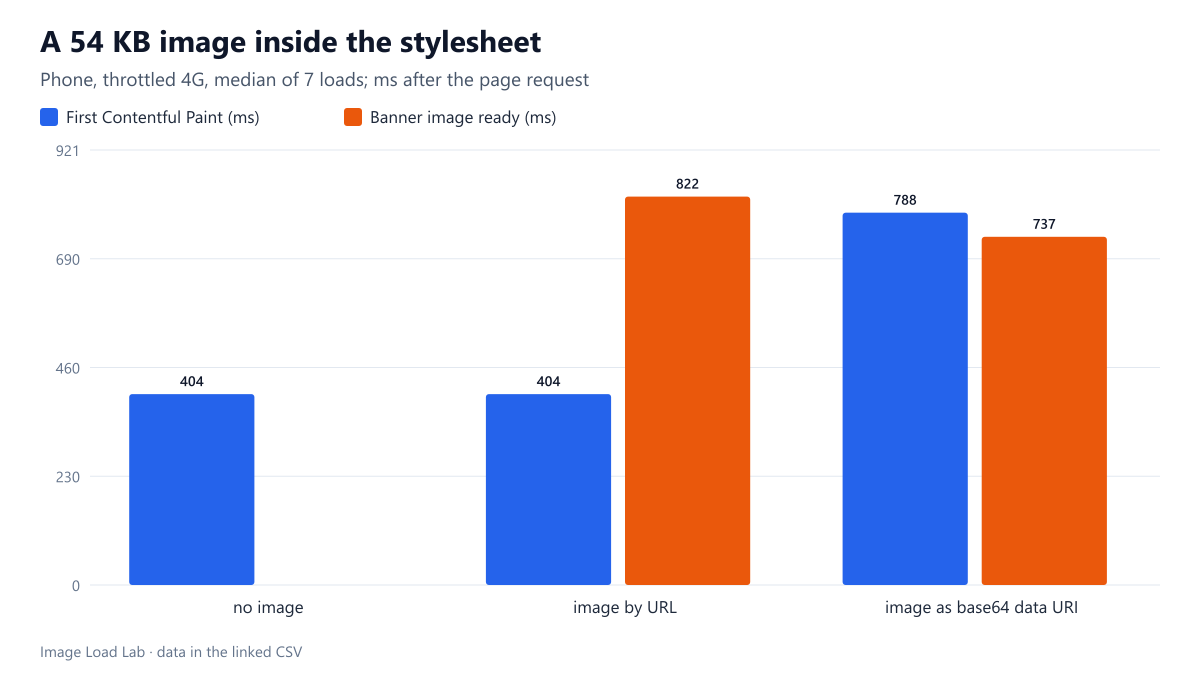
Embedding a 54 KB photo in the stylesheet delayed the first paint of the whole page from 404 to 788 ms on a throttled phone. The image itself appeared only 85 ms sooner.
Embedding an image in a stylesheet as a base64 data URI saves one request, and build tools often do it automatically for “small” files. The catch is that the stylesheet blocks rendering: nothing on the page is painted until all of it has arrived. Our base64 overhead test measured how much bigger images get when encoded this way. What does an embedded image do to the moment the page first appears? We loaded the same page with three versions of its stylesheet.
The test
The page had a heading, a paragraph of text and a 300-pixel-tall banner whose background was an 800 × 600 CC0 photo of a market entrance (55,182 bytes as JPEG). The stylesheet was linked in the <head> in three versions:
- without the banner image (129 bytes), as a reference;
- with the image referenced by URL (187 bytes);
- with the same image embedded as a base64 data URI (73,759 bytes).
We loaded each version seven times in Chrome 155.0.8059.82 with a phone viewport, 150 ms latency, 1.6 Mbit/s and the CPU slowed four times. The local server sent files without compression. We recorded when the stylesheet finished, the First Contentful Paint, and when the banner image was available. See our methodology.
Results
| Stylesheet | Stylesheet size | Stylesheet downloaded | First Contentful Paint | Banner image ready |
|---|---|---|---|---|
| no image | 129 B | 370 ms | 404 ms | – |
| image by URL | 187 B | 363 ms | 404 ms | 822 ms |
| image as base64 data URI | 73,759 B | 737 ms | 788 ms | 737 ms |
The embedded image delayed everything on the page. With the image referenced by URL, the stylesheet arrived at 363 ms and the heading and text were painted at 404 ms, the same as with no image at all. With the image embedded, the stylesheet grew to 74 KB and took until 737 ms, and the first paint moved to 788 ms: 384 ms later, almost twice as long.
The image itself was ready only 85 ms sooner. Embedded, it arrived with the stylesheet at 737 ms. By URL, it was requested once the stylesheet had been applied and finished at 822 ms. Saving one request bought 85 ms for the banner and cost 384 ms for the whole page.
The data URI was 34 % larger than the file, 73,759 bytes of stylesheet against 55,182 bytes of JPEG plus a short URL. Base64 turns every 3 bytes into 4 characters. HTTP compression recovers part of that, as our overhead test showed, but this test server sent everything uncompressed.
What this means
- Never embed images in render-blocking CSS unless they are tiny. A 1 KB icon costs little; a 54 KB photo here cost 384 ms of blank screen on a slow phone.
- Check what your build tools do. Bundlers and CSS tools can inline every image under a size limit. Set that limit low, a few kilobytes at most, or turn the feature off.
- Embedded images cannot be cached separately. Change one rule in the stylesheet and visitors download the image again with it. An image referenced by URL is cached once and reused across pages and stylesheet versions.
- The same applies to inline styles in the HTML. A data URI in a
<style>block or astyleattribute makes the HTML heavier and delays everything after it, as our inline CSS test shows for the text of the stylesheet itself. - For a placeholder, keep it small. If you embed a blurred preview, a few hundred bytes is enough, as measured in our placeholder size test.
How to find embedded images
Search your built CSS files for data:image. In Chrome DevTools, the Coverage panel and the Network panel show the stylesheet’s size: a stylesheet of tens of kilobytes on a simple site often contains embedded images or fonts. The Sources panel lets you search across all loaded files for base64, to see how long each embedded string is.
Practical conclusion
Embedding a 54 KB photo in the stylesheet as base64 made the stylesheet 74 KB and delayed the first paint of the whole page from 404 ms to 788 ms on a throttled phone profile. The image itself appeared only 85 ms sooner than when it was referenced by URL. Keep images out of render-blocking CSS, except for icons and placeholders of a few hundred bytes.
Limitations
One page, one image size, a local server without compression, Chrome only and seven loads per version. With gzip or Brotli, the embedded stylesheet would be smaller, but still far larger than one without the image.
Data and files
Download base64-css-fcp.csv (3 rows, 0.2 KB) · Method: testing methodology. Photo: image credits.