Inline CSS vs an External Stylesheet: First Paint on a Throttled Phone
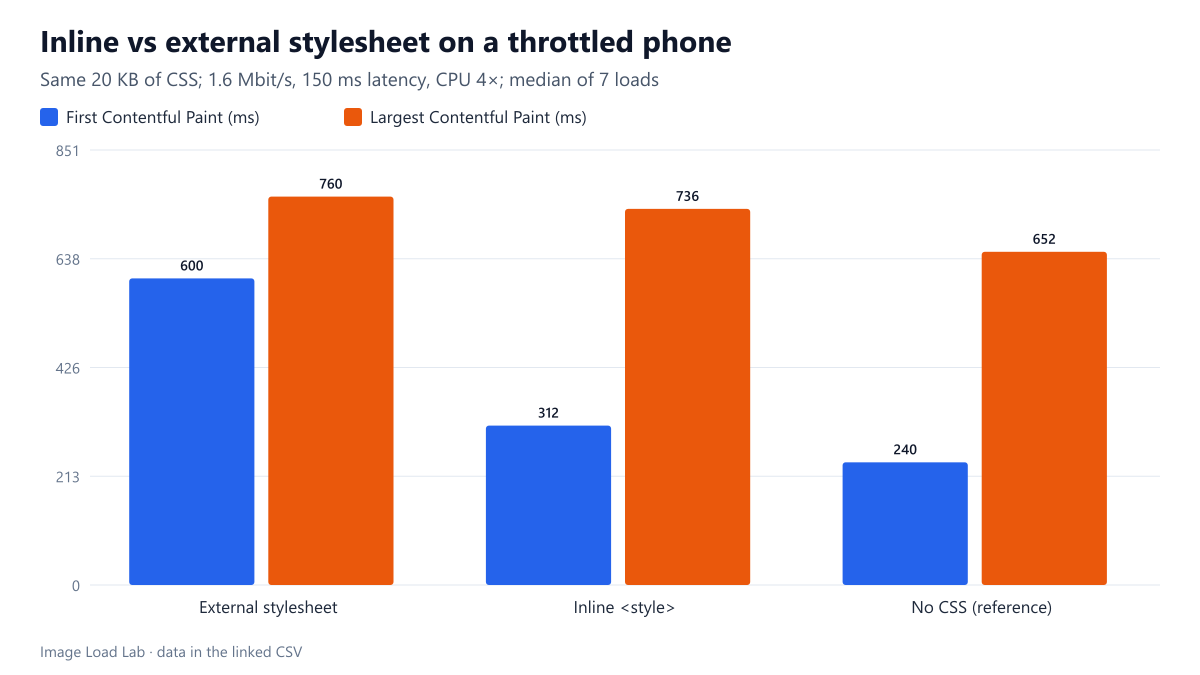
Inlining our 20 KB stylesheet cut first paint from 600 to 312 ms on a throttled phone profile, but the main image appeared only 24 ms sooner.
Most WordPress themes load their CSS with a <link rel="stylesheet">. The browser will not paint the page until that file has arrived, so on a slow connection the stylesheet sits between the visitor and the first pixel. Printing the same CSS inside a <style> element removes that extra request but makes every HTML page heavier. We switched this site to inline CSS to fix a layout shift problem, so we wanted to know the speed side too. How much earlier does a page paint with inline CSS, and does the main image appear any sooner?
The test
We built one simple page: a heading, an introduction paragraph and an 800 × 600 CC0 market photo of 54 KB, which becomes the Largest Contentful Paint (LCP) element. We made three versions. The first links our theme’s real stylesheet (20,184 bytes) as an external file. The second puts the same CSS in an inline <style>, which makes the HTML 20,909 bytes instead of 757. The third has no CSS at all, as a reference.
Each version was loaded seven times in Chrome 155.0.8059.82 with a phone viewport. We used two network settings: a throttled profile (150 ms latency, 1.6 Mbit/s, CPU slowed four times) and the unthrottled local network. We recorded the median First Contentful Paint (FCP) and LCP. The files came from a local test server without compression, so the stylesheet travelled at its full 20 KB. See our methodology.
Results
| CSS | Network | HTML size | First Contentful Paint | Largest Contentful Paint |
|---|---|---|---|---|
| External stylesheet | throttled 4G | 757 B | 600 ms | 760 ms |
| External stylesheet | fast | 757 B | 84 ms | 88 ms |
| Inline <style> | throttled 4G | 20,909 B | 312 ms | 736 ms |
| Inline <style> | fast | 20,909 B | 60 ms | 84 ms |
| No CSS (reference) | throttled 4G | 710 B | 240 ms | 652 ms |
| No CSS (reference) | fast | 710 B | 52 ms | 72 ms |
Inline CSS halved the time to first paint on the throttled profile: 312 ms instead of 600 ms. The page without any CSS painted at 240 ms. That was the floor for this HTML, and inline CSS came within 72 ms of it.
The main image barely moved: LCP was 736 ms with inline CSS against 760 ms with the external file, a gain of only 24 ms. The page without CSS reached LCP at 652 ms.
On the fast network the differences shrank to tens of milliseconds: first paint at 60 ms inline against 84 ms external, and LCP within 4 ms.
Why first paint improved but LCP did not
The external stylesheet costs one more request. On the throttled profile that means at least one 150 ms round trip plus the time to download 20 KB at 1.6 Mbit/s, roughly another 100 ms. That adds up to about the 288 ms difference we measured in first paint.
The image is a different story. It is listed in the HTML after the CSS. With inline styles, the browser has to download those 20 KB of CSS inside the HTML before it reaches the <img> tag and requests the photo. With the external file, the HTML is tiny, so the browser finds the image at once and downloads it while the stylesheet is still on its way. Either way, the photo’s own download dominated LCP. The no-CSS page shows the cost of those extra 20 KB in the HTML: its image appeared 84 ms before the inline version.
So inline CSS helps whatever is painted first, such as headings, text and backgrounds. An image LCP gains little unless the image can be found early. A preload or fetchpriority hint placed before the styles is the usual way to make that happen.
The cost: every page carries the CSS
An external stylesheet is downloaded once and then served from the browser cache on later pages. Inline CSS travels again inside every HTML page. We did not measure repeat visits in this test, but we can state the byte cost for this site. Our stylesheet is 18,910 bytes once comments and spaces are removed, which is how the theme prints it. Compressed, that is 4,739 bytes with gzip at level 9, or 4,092 bytes with Brotli at quality 11. This was calculated with Python’s compression libraries, not measured on the server. A few kilobytes per page is a small price for this site. For a theme with 100 KB or more of CSS, the trade-off is very different.
When to inline
- Small, single-file themes: inlining the whole stylesheet is simple and, in our test, cut first paint almost in half on a slow phone.
- Large stylesheets: inline only the rules for the first screen (“critical CSS”) and load the rest later. We did not test that approach here.
- Image-led pages: inline CSS will not rescue a slow hero image. Fix the image’s size and discovery first; our hero bytes test shows how strongly its size drives LCP.
- With a caching plugin, check that its CSS minification or combining options do not undo or duplicate your inline block. On this site we left those options off.
Practical conclusion
Moving our theme’s 20 KB stylesheet inline cut first paint from 600 ms to 312 ms on a throttled phone profile, close to the 240 ms of a page with no CSS. The main image appeared only 24 ms sooner, because its own download, not the CSS, set the LCP time. Inline small stylesheets for a faster first paint. Treat the hero image as a separate problem.
Limitations
One simple page served from a local server without compression, so real servers would send less CSS over the wire and would add their own connection costs. Seven loads per case, first visits only. The CSS was our own theme’s. Pages with web fonts, scripts or larger stylesheets will show different numbers.
Data and files
Download inline-vs-external-css.csv (6 rows, 0.3 KB) · Method: testing methodology. Photo: image credits.