A CLS of 1.0 From Our Own Stylesheet: What We Measured and Fixed
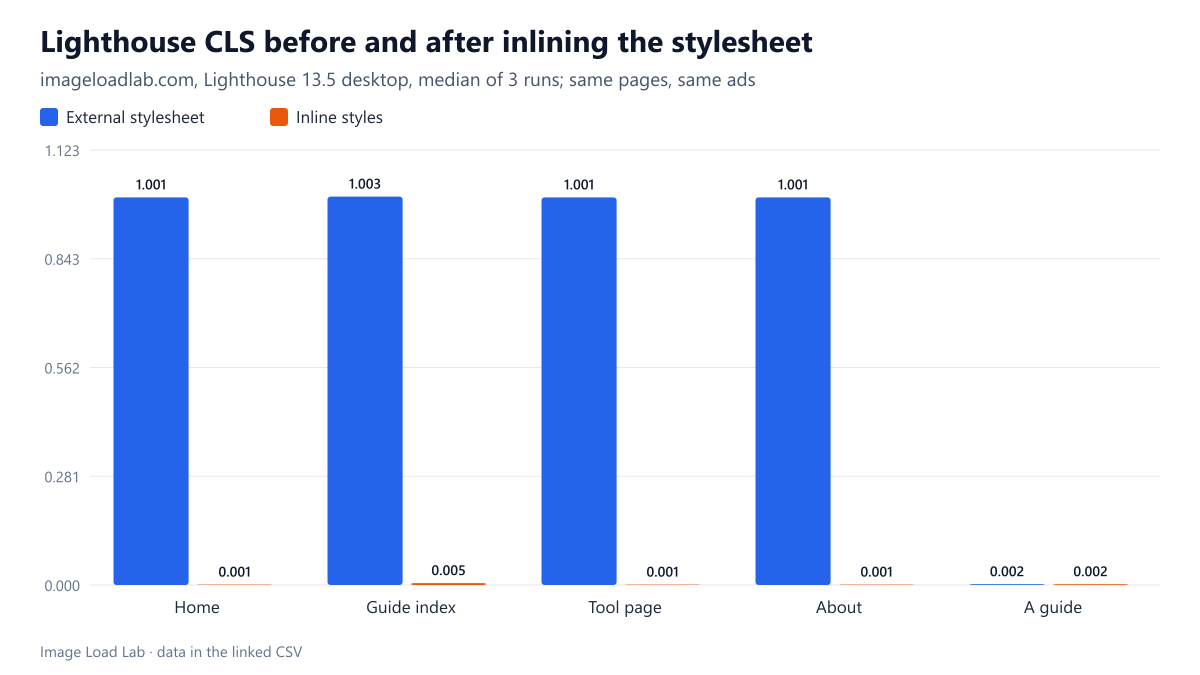
An external stylesheet plus the async AdSense script gave four of our pages a Lighthouse CLS of about 1.0. Inlining the same CSS brought it to 0.005 or less with the ads still loading.
On the evening of October 17, 2026, a routine Lighthouse check of this site returned a Cumulative Layout Shift (CLS) of about 1.0 on desktop and 0.50 to 0.59 on mobile for four of the five pages we test. Google calls anything above 0.25 “poor”. None of our images caused it: they all carry width and height, as described in our image dimensions test. Lighthouse named the page body, the main content area and the navigation as the elements that moved. In other words, the whole page jumped. We moved the theme’s stylesheet from a <link> into an inline <style> block, and the problem went away. Was the stylesheet really the cause, and what part did the advertising script play? This page shows the before and after numbers and a reproduction on the live site.
What we measured
Before the change, the theme (version 2.0.2) loaded one 20 KB stylesheet with a normal <link rel="stylesheet"> in the <head>. Google AdSense’s script loads async on every page. Version 2.0.3 printed the same CSS into a <style> element in the head instead. That was the only change between the two Lighthouse runs. The ad code was not touched: same script, same position, no delay.
We ran Lighthouse 13.5.0 three times per page and profile (mobile and desktop) on five pages before the change and again after it, and kept the median. Then, on October 18, we reproduced both versions on the live home page in Chrome 155.0.8059.82 driven by Playwright. Each load either kept the current inline styles or had them replaced on the fly with a link to the same style.css file, and either let the ad script load or blocked it. We ran six loads per combination and recorded every layout shift. See our methodology.
Lighthouse before and after
| Page | Profile | CLS, external stylesheet | CLS, inline styles | Score before → after |
|---|---|---|---|---|
| Home | mobile | 0.589 | 0.000 | 61 → 97 |
| Home | desktop | 1.001 | 0.001 | 66 → 96 |
| A guide | mobile | 0.065 | 0.065 | 97 → 98 |
| A guide | desktop | 0.002 | 0.002 | 95 → 98 |
| Guide index | mobile | 0.506 | 0.004 | 53 → 91 |
| Guide index | desktop | 1.003 | 0.005 | 66 → 97 |
| Tool page | mobile | 0.502 | 0.000 | 62 → 98 |
| Tool page | desktop | 1.001 | 0.001 | 69 → 98 |
| About | mobile | 0.502 | 0.000 | 63 → 98 |
| About | desktop | 1.001 | 0.001 | 69 → 98 |
The fix took CLS from about 1.0 to 0.001–0.005 on desktop for the home page, the guide index, a tool page and the About page. On mobile those four pages went from 0.50–0.59 to 0.000–0.004. Their Lighthouse performance scores rose from 53–69 to 91–98, almost all of it from CLS.
One page never had the problem. The guide we test measured 0.002 on desktop and 0.065 on mobile, both before and after. That remaining 0.065 is a different shift: there, Lighthouse reported the article moving and listed a web font as one possible cause. It is under the 0.1 threshold Google calls “good”, and inlining the CSS did not change it. We do not know why the guide escaped the large shift that hit the other four pages.
Reproducing it on the live site
| Viewport | Theme styles | Advertising script | Loads with CLS above 0.1 | Worst CLS |
|---|---|---|---|---|
| desktop | external stylesheet | ads loading | 2 of 6 | 1.001 |
| desktop | external stylesheet | ads blocked | 0 of 6 | 0.001 |
| desktop | inline | ads loading | 0 of 6 | 0.002 |
| desktop | inline | ads blocked | 0 of 6 | 0.001 |
| mobile | external stylesheet | ads loading | 0 of 6 | 0.000 |
| mobile | external stylesheet | ads blocked | 0 of 6 | 0.000 |
| mobile | inline | ads loading | 0 of 6 | 0.000 |
| mobile | inline | ads blocked | 0 of 6 | 0.000 |
The large shift came back only when both ingredients were present. With the external stylesheet and the ad script loading, two of six desktop loads measured a CLS of about 1.0. In both, the largest shift was again attributed to the body, main and navigation elements. Blocking the ad script made those shifts disappear (worst load 0.001). With inline styles, no load went above 0.002, with or without ads.
It is intermittent. Four of the six “bad” desktop loads were clean. A single test run can therefore catch the problem or miss it, which matches what we saw in our Lighthouse variance test.
On mobile we could not reproduce it. All 24 mobile loads measured 0.000, although Lighthouse had reported 0.50–0.59 on mobile the evening before. Our reproduction did not throttle the network or the CPU, and ad behaviour differs between loads and devices, so this is not a contradiction. Our reproduction just did not trigger the shift on mobile.
A minimal reproduction that failed
We also tried to rebuild the problem without real ads. On a local test page with the same stylesheet, we delayed the CSS by 800 ms and added a small async script that forces a layout calculation (it reads document.body.offsetHeight). We tested six combinations: slow or fast stylesheet, async or deferred script, layout-reading or harmless script, and inline CSS. Each ran five times on desktop and five on mobile. CLS was 0 in all 60 loads. So “an async script runs before the stylesheet arrives” is not enough on its own. Something specific in what the ad script does triggered it, and we could not isolate what.
Our interpretation, which we have not proven: a shift of about 1.0 where the body, main area and navigation all move looks like a page painted once without its styles and then re-laid out when the stylesheet arrived. Chrome normally waits for stylesheets in the head before painting. Inlining the CSS removes that window entirely, because the styles arrive with the HTML.
What this means
- If Lighthouse blames body, main or nav for a big shift, suspect how the CSS is delivered, not the images. Image shifts are usually attributed to the image or to the content right below it.
- Test with the real third-party scripts loading. Our minimal page and our ad-blocked loads looked perfect. Only the full page with ads showed the shift.
- Run several loads. With two bad loads in six, the 75th-percentile value that Google uses for field data would fall in the “poor” range, while a single lucky run would have passed.
- Inlining a small stylesheet is a legitimate fix. Its cost, a larger HTML document on every page, is measured in our inline vs external CSS test.
- Do not “fix” CLS by delaying or hiding ads. We left the ad code exactly as Google provides it, and the fix did not need any change to it.
Practical conclusion
On this site, an external 20 KB stylesheet plus the asynchronous AdSense script produced intermittent whole-page shifts with a CLS of about 1.0. Moving the same CSS inline brought CLS to 0.005 or less on every affected page, with the ads still loading. A minimal reproduction without the real ad script did not show the problem, so test layout stability on the real page, with its real scripts, several times.
Limitations
One site, one theme and one ad configuration. Three Lighthouse runs per page before and after, and six live loads per combination, all from the same machine and connection. Ad responses vary between loads, so another day may give other proportions. We did not test critical-CSS tools that inline only part of a stylesheet.
Data and files
Download lighthouse-cls-before-after.csv (10 rows, 0.4 KB) · Download async-script-cls-live.csv (48 rows, 3.3 KB) · Download async-script-cls.csv (12 rows, 0.8 KB) · Method: testing methodology.