How Far Below the Fold Does Chrome Start Loading Lazy Images?
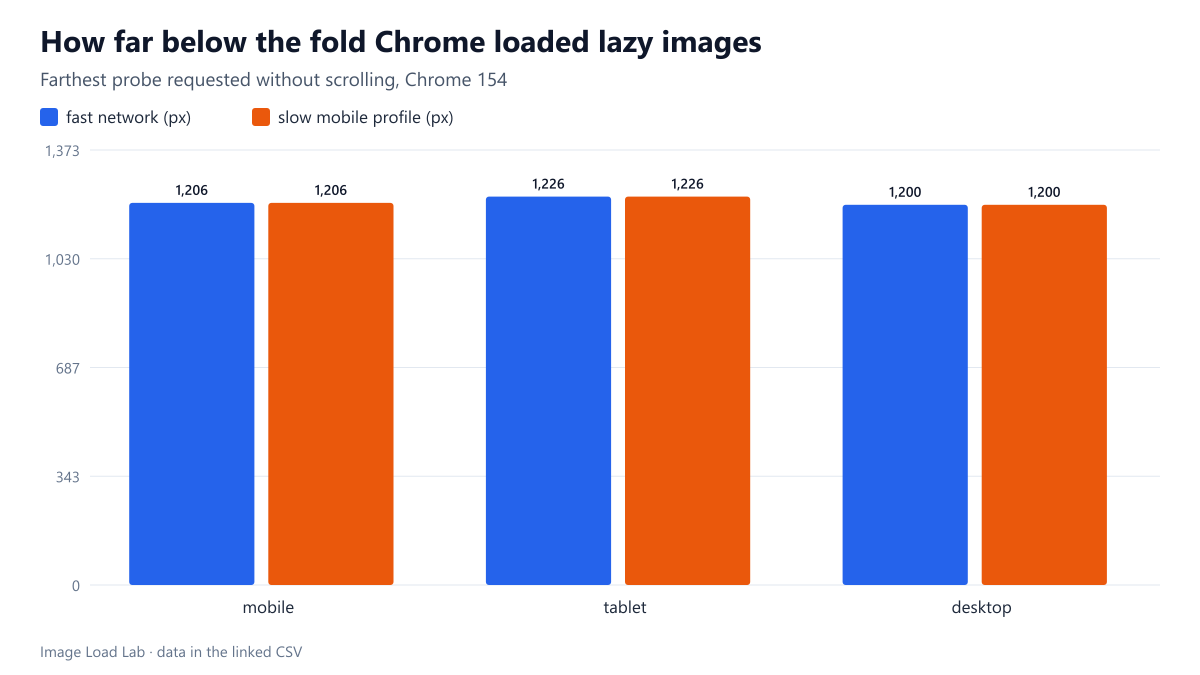
Chrome 154 requested lazy images up to about 1,200 pixels below the fold on phone, tablet and desktop, and DevTools throttling did not change that distance.
A lazy-loaded image is not loaded when it enters the screen; the browser starts it earlier, while it is still some distance below. How far below the visible area does Chrome start downloading loading="lazy" images, and does a slow connection change that distance? We measured it with a page of 50 small probe images spaced 50 pixels apart.
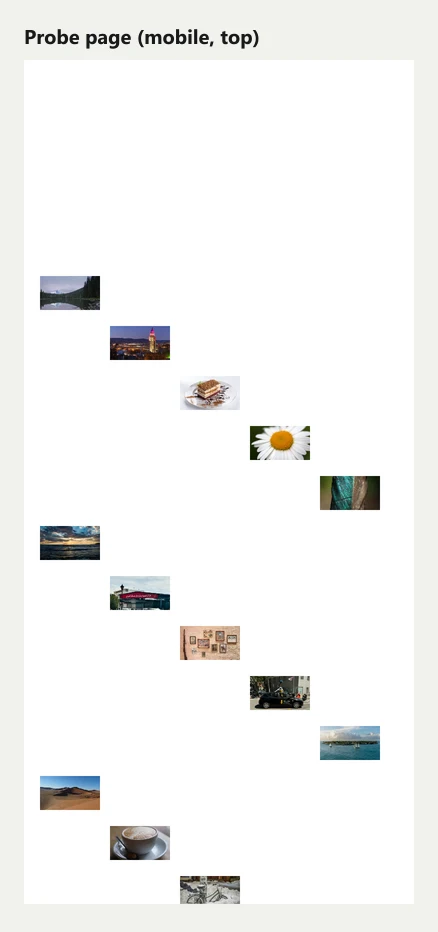
The probe page
The test page is 6,000 pixels tall and contains 50 lazy-loaded thumbnail images placed every 50 pixels, from 1,500 to 3,950 pixels from the top. Each probe has a unique URL, so the network log shows exactly which ones the browser requested. The page was loaded without any scrolling and left alone for 2.5 seconds.
We repeated the load three times for each combination of viewport (phone 390 × 844, tablet 768 × 1024, desktop 1440 × 900) and network (a fast 20 Mbit/s profile and our slow mobile profile: 150 ms latency, 1.6 Mbit/s, 4× CPU), in fresh Chrome 154 profiles. See the methodology for details. An earlier, coarser version of the page with probes every 250 pixels gave the same picture.
Results
| Viewport | Network | Farthest probe loaded (px below the fold) | Nearest probe not loaded (px) |
|---|---|---|---|
| desktop | fast | 1200 | 1250 |
| desktop | slow mobile | 1200 | 1250 |
| mobile | fast | 1206 | 1256 |
| mobile | slow mobile | 1206 | 1256 |
| tablet | fast | 1226 | 1276 |
| tablet | slow mobile | 1226 | 1276 |
On every viewport and both networks, Chrome requested the probes up to about 1,200 pixels below the bottom of the screen and none beyond 1,250 pixels. The exact last probe was 1,206 pixels below the fold on the phone, 1,226 on the tablet and 1,200 on the desktop; the next probe, 50 pixels further down, was never requested. All three runs of each combination gave identical results.
This matches the distance given in Chrome’s lazy-loading documentation on web.dev for fast connections, 1,250 pixels. The documentation also describes a larger distance, 2,500 pixels, for slow connections such as 3G.
What surprised us: throttling did not change it
Our slow profile is roughly what a weak 4G or a good 3G connection feels like, yet Chrome kept the 1,250-pixel threshold. The likely reason is that Chrome chooses the threshold from its own estimate of the connection’s quality, and the bandwidth limits we applied through the DevTools Protocol did not change that estimate in our runs. So a lab test with DevTools throttling may not show the behaviour a real visitor on a slow network gets. That is worth knowing before you draw conclusions about lazy loading from throttled tests, including our own.
What 1,250 pixels means for a page
- On a phone, that is about one and a half screens of content below the visible area. Images in that zone download during the initial page load even though they are marked lazy, so they still compete with the main image for bandwidth.
- In our lazy-loading test, the first three photos below the hero fell inside that distance and were downloaded at load time, which is why lazy loading reduced the initial image bytes to 372 KB rather than to the hero alone.
- Images placed further than about 1,250 pixels below the first screen are not requested until the reader scrolls towards them.
Practical conclusion
- In Chrome, plan on lazy images within roughly 1,250 pixels of the first screen being loaded immediately. Do not count them as “saved” bytes.
- The distance does not depend on the viewport size, so on a phone it covers more screens’ worth of content than on a desktop.
- Do not rely on DevTools network throttling to see slow-connection behaviour of lazy loading; test on a real slow connection if it matters.
How this connects to our other tests
This threshold explains a detail in our lazy-loading test that would otherwise look like a bug: with lazy loading enabled below the fold, the phone still downloaded four images at load time, not one. It also connects to the layout shift test: images loaded early because they are within the threshold usually arrive before the reader reaches them, while images further down arrive during scrolling and must have their space reserved.
For page design, the number is also a useful planning unit: on a typical phone, the first screen plus about one and a half more screens of images will be downloaded during page load, whatever the loading attribute says.
Repeat this test on your own images
You can reproduce the probe test with a single HTML file. Create a page whose body is 6,000 pixels tall and place small images with loading="lazy" at known vertical positions, each with a unique URL (for example by adding ?p=1500, ?p=1550 to the same file name). Open it in Chrome with the Network panel open, reload without scrolling, and note the highest position that appears in the request list. Subtract your window’s height to get the distance below the fold. To check whether a real slow connection changes the result, repeat it on a phone using a slow mobile network rather than DevTools throttling; in our runs the throttled profile did not change the distance. Our page is lazydist/fine.html in build_pages.mjs, and the measurement is the lazydistfine step of run_loading.mjs.
One practical use of this number: if a long article has a gallery that starts within the first screen and a half on phones, its first few images will be downloaded during page load even when they are lazy. Moving the gallery further down, or showing fewer images until the reader taps, keeps those bytes out of the initial load.
Limitations
Chrome 154 only; Firefox and Safari use their own distances. We did not test a real 3G network or data-saver mode, and Chrome can change these thresholds in future versions.
Data and files
Download loading-lazydistfine.csv (18 rows, 1.1 KB) · Method: testing methodology.