Hero Image Bytes vs LCP: About Half a Second per 100 KB on Slow 4G
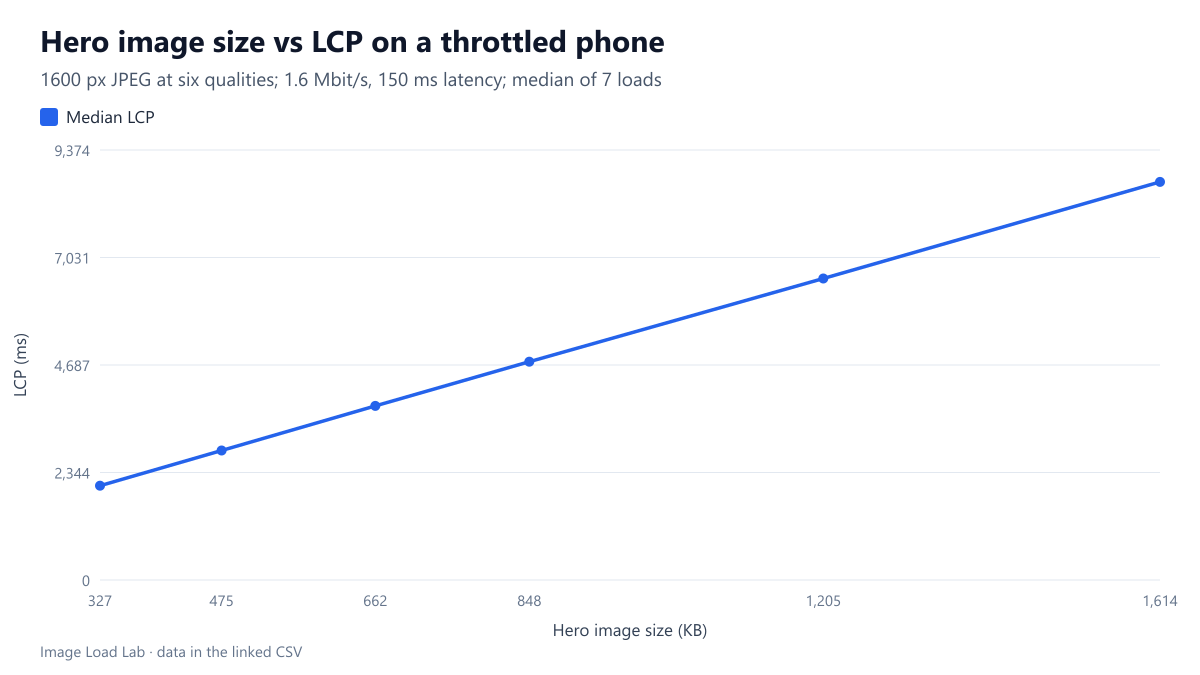
On a 1.6 Mbit/s phone profile, LCP rose 5.14 ms per kilobyte of hero image, from 2,056 ms at 327 KB to 8,680 ms at 1,614 KB.
Advice about hero images usually says “make it smaller”, rarely “by how much, and what will it buy?” We loaded the same hero photo at six JPEG qualities on a throttled phone profile and measured when it became the Largest Contentful Paint (LCP). How does LCP grow with the hero’s file size, and how big can a hero be before LCP leaves Google’s 2.5-second “good” range?
The test
The hero was a detailed CC0 photo of a waterfall, enlarged from our 1200 × 1600 working copy to 1600 × 2133 pixels and encoded with MozJPEG through sharp 0.35.5 at qualities 30, 50, 70, 80, 90 and 95. That gave files from 327 KB to 1,614 KB. Each test page contained only a short heading and the hero, marked with fetchpriority="high", width and height, so nothing else competed for bandwidth and the browser found the image at once.
We loaded each page seven times in Chrome 155.0.8059.82 with a phone viewport. The throttled profile used 150 ms latency, 1.6 Mbit/s and a CPU slowed four times. We recorded the median LCP. See our methodology.
Results
| JPEG quality | Hero size | Median LCP | Fastest / slowest load |
|---|---|---|---|
| 30 | 327 KB | 2,056 ms | 2,044 / 2,068 ms |
| 50 | 475 KB | 2,824 ms | 2,812 / 2,840 ms |
| 70 | 662 KB | 3,796 ms | 3,780 / 3,808 ms |
| 80 | 848 KB | 4,760 ms | 4,736 / 4,772 ms |
| 90 | 1,205 KB | 6,572 ms | 6,564 / 6,584 ms |
| 95 | 1,614 KB | 8,680 ms | 8,660 / 8,720 ms |
LCP grew in a straight line with the file size. The fit is almost perfect: no point is more than 14 ms from the line. The 327 KB hero reached LCP at 2,056 ms. The 1,614 KB version took 8,680 ms, more than four times longer.
Each kilobyte cost 5.14 ms. That is no coincidence. At 1.6 Mbit/s, 200,000 bytes arrive per second, so 1,024 bytes take 5.12 ms. On a connection limited by bandwidth, the hero’s LCP is simply its download time plus a fixed part. Here the fixed part was about 384 ms: the HTML request, the latency of the image request and rendering.
Even quality 30 missed 2.5 seconds. On this profile, a hero must stay under about 410 KB to reach LCP within 2.5 seconds: (2,500 − 384) ÷ 5.14 ≈ 412 KB. That only holds when nothing else downloads at the same time. On real pages, scripts, fonts and other images share the connection and push LCP later.
The loads were very consistent. The fastest and slowest of seven loads were never more than 60 ms apart. That is a property of emulated throttling, not of real mobile networks, where the same file can take very different times from one load to the next.
What this means
- On slow connections, bytes are time. Every 100 KB you remove from the hero brought LCP about half a second earlier on this profile.
- Quality is only one lever, and not the biggest. This 1600-pixel image was far wider than a phone needs. Our test viewport was 412 CSS pixels at 1.75× density, about 720 device pixels. Serving a narrower file through
srcset, as covered in our srcset and sizes guide, cuts more bytes than lowering quality. Our dimensions vs file size test shows how fast bytes fall with width. - Format matters too. At equal perceived quality, AVIF photos were a median 29.4 % smaller than MozJPEG in our format comparison, while WebP was not reliably smaller. On this kind of connection, every saved kilobyte shows up in LCP.
- Check the budget per image. Detailed subjects such as this waterfall produce large files even at low quality: quality 30 still weighed 327 KB at this width. A smoother photo at the same settings would be lighter, so measure your own heroes rather than assuming a size.
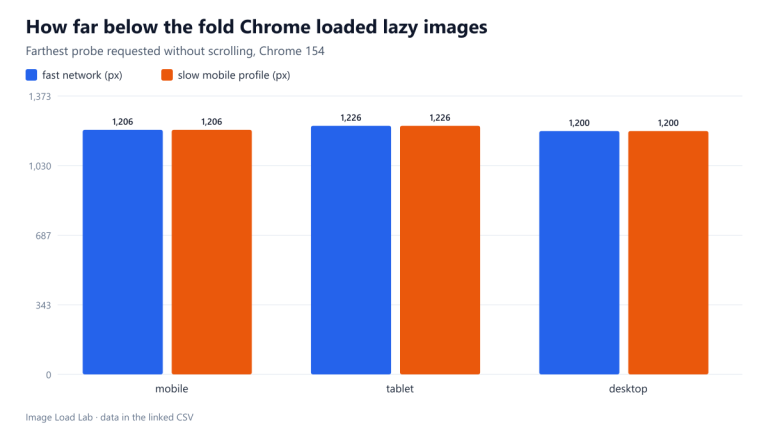
- Do not lazy-load the hero. The fixed part of LCP only stays small when the browser requests the image immediately. See our lazy-loading test.
A quick way to set a byte budget
You can repeat this on your own page in a few minutes. In Chrome DevTools, choose a throttling profile, load the page with a small and a large version of the hero, and note the LCP of each. The slope between the two points is your cost per kilobyte under that profile. The value where the line crosses zero bytes is your page’s fixed cost. Divide the time you have left before your LCP target by the slope, and you have the hero budget for that page and that profile. Recheck it when you add scripts or fonts above the hero, because they raise the fixed part.
Practical conclusion
On a 1.6 Mbit/s phone profile, the hero’s LCP rose by 5.14 ms per kilobyte, almost exactly its download time, from 2,056 ms at 327 KB to 8,680 ms at 1,614 KB. To keep LCP under 2.5 seconds on that profile, the hero had to stay below about 410 KB with nothing else competing. Choose the image’s width first, then its format and quality, and measure the result.
Limitations
One photo, one throttling profile, emulated in Chrome rather than on a real phone network, with seven loads per size. The page had nothing else to download. Real pages share bandwidth and add server and connection time, so treat the 410 KB figure as an upper bound for this profile, not a target.
Data and files
Download hero-bytes-vs-lcp.csv (6 rows, 0.2 KB) · Method: testing methodology. Photo: image credits.