Blurred Image Placeholders (LQIP and BlurHash): How Small Can They Be?
A 24-pixel WebP placeholder took a median 160 bytes, less than half a JPEG or AVIF of the same size, while a BlurHash string took only 28 characters.
While a large photo loads, many sites show a blurred low-quality preview (often called LQIP) or a BlurHash, a short text code that a script turns into a blurry image. Both are meant to be tiny and are usually embedded in the HTML. How small are these placeholders in practice, and which format makes the smallest one? We generated eight kinds of placeholder for each of our 20 test photos.
The test
For every CC0 photo in our corpus we created tiny versions 16, 24 and 32 pixels wide as JPEG (MozJPEG quality 40), WebP (quality 40), AVIF (quality 40) and palette PNG, and measured both the file and the length of the data URI that would sit in the HTML. We also computed BlurHash strings with 4 × 3 and 6 × 4 components from a 32-pixel version, using the blurhash 2.0.5 library, and the photo’s dominant colour as a CSS value. Everything ran on sharp 0.35.5. See our methodology.
Results
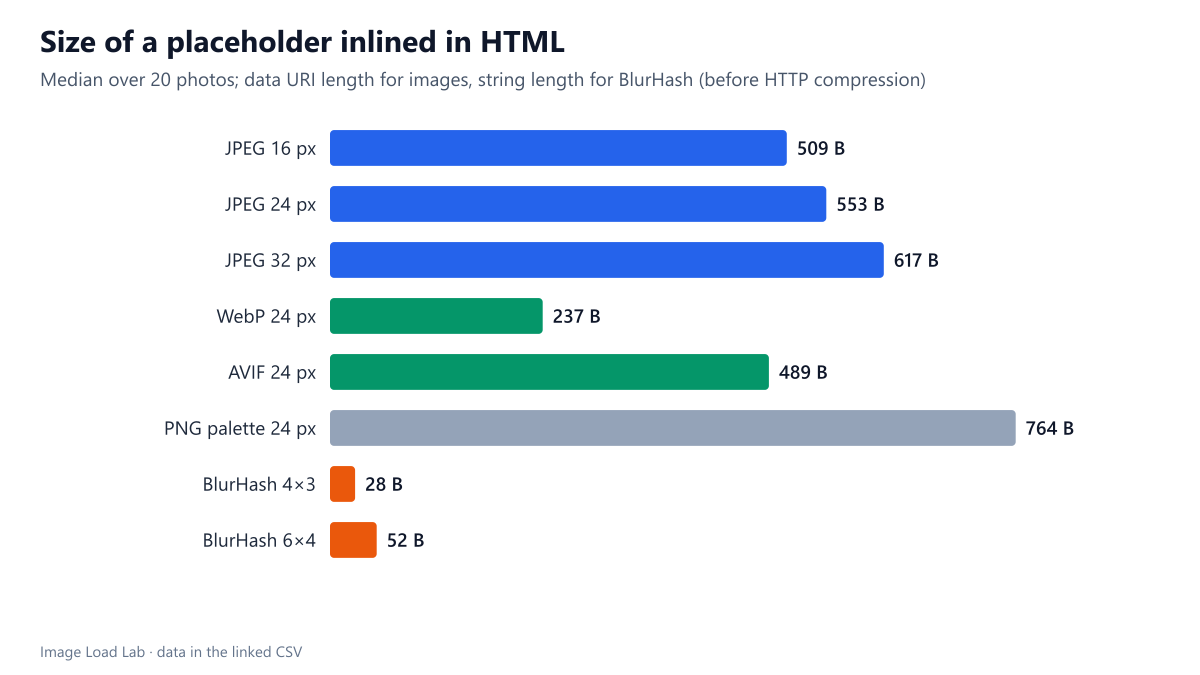
| Placeholder | Median characters in the HTML |
|---|---|
| JPEG 16 px | 509 |
| JPEG 24 px | 553 |
| JPEG 32 px | 617 |
| WebP 24 px | 237 |
| AVIF 24 px | 489 |
| PNG palette 24 px | 764 |
| BlurHash 4×3 | 28 |
| BlurHash 6×4 | 52 |
| Dominant colour (CSS) | about 20 |
WebP made the smallest image placeholders. A 24-pixel WebP took a median of 160 bytes, 237 characters as a data URI. The same placeholder as JPEG took 397 bytes (553 characters), and as AVIF 350 bytes (489 characters). At 16 pixels WebP needed only 104 bytes.
JPEG and AVIF carry fixed overhead. Their headers and containers take a few hundred bytes regardless of the picture, which dominates at this size: a JPEG placeholder grew only from 364 to 445 bytes between 16 and 32 pixels. WebP’s container is much lighter. That is the opposite of the ranking for large photos, where AVIF is clearly the smallest, as our format comparison found.
BlurHash was an order of magnitude smaller still. A 4 × 3 BlurHash is 28 characters, and a 6 × 4 one 52. The trade-off is that it needs a script to decode it into an image, and it carries only a few smooth colour blobs, not shapes.
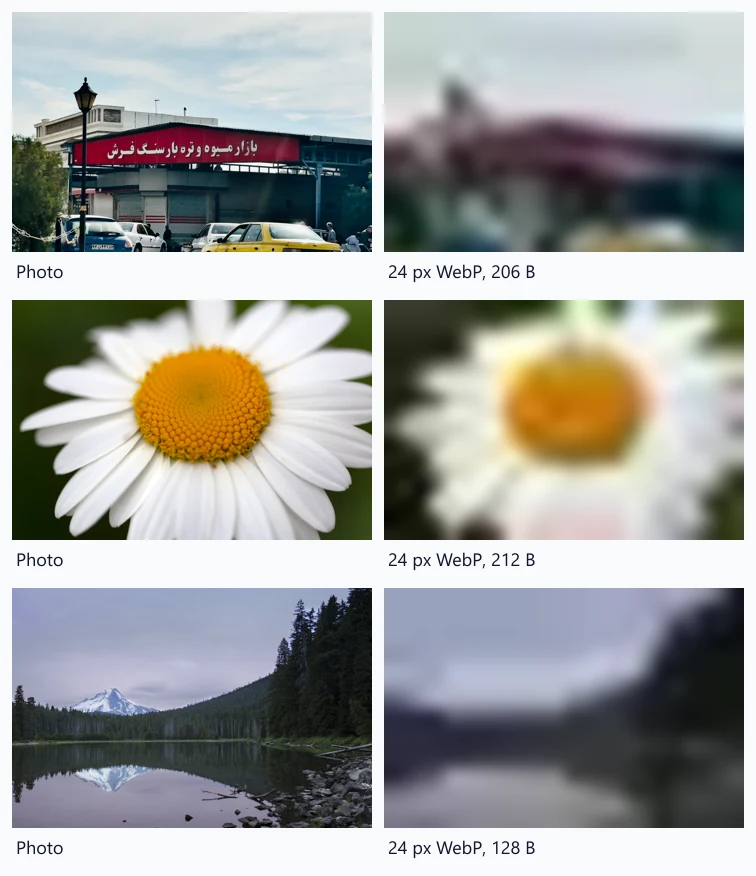
The preview shows what 24-pixel WebP placeholders look like when scaled up with a blur: the main colours and the layout of each scene survive, which is all a placeholder has to do.
Placeholders and Largest Contentful Paint
A placeholder improves how loading feels, not the Largest Contentful Paint metric. In our test of blurred placeholders and LCP, Chrome never counted a placeholder as the LCP element, because images with very little data per pixel are excluded, and the LCP time stayed that of the full photo.
Choosing a placeholder
- Without JavaScript: a 16–24 pixel WebP as a data URI, scaled up with CSS blur. About 160–240 characters per image.
- With a framework that decodes BlurHash: 28 characters per image, ideal for long lists and APIs.
- Cheapest of all: a dominant background colour, about 20 characters of CSS. It prevents a white flash and costs nothing to decode.
- Always set width and height on the real image, so the placeholder reserves the right space; a placeholder does not prevent layout shift by itself.
Practical conclusion
For placeholders, WebP was the smallest image format (a median 160 bytes at 24 pixels) and BlurHash the smallest overall (28 characters). Placeholders change how loading looks, not your LCP time, so keep them tiny and do not let them delay the real image.
Limitations
One quality setting per format; lower settings shrink JPEG and AVIF a little but cannot remove their fixed overhead. Data URI lengths are before HTTP compression; as our Base64 test showed, Brotli removes most of Base64’s extra third. We did not measure the decoding cost of BlurHash in the browser.
Data and files
Download lqip-placeholders.csv (20 rows, 2.8 KB) · Method: testing methodology. Photos: image credits.