Native Lazy Loading vs lazysizes vs IntersectionObserver
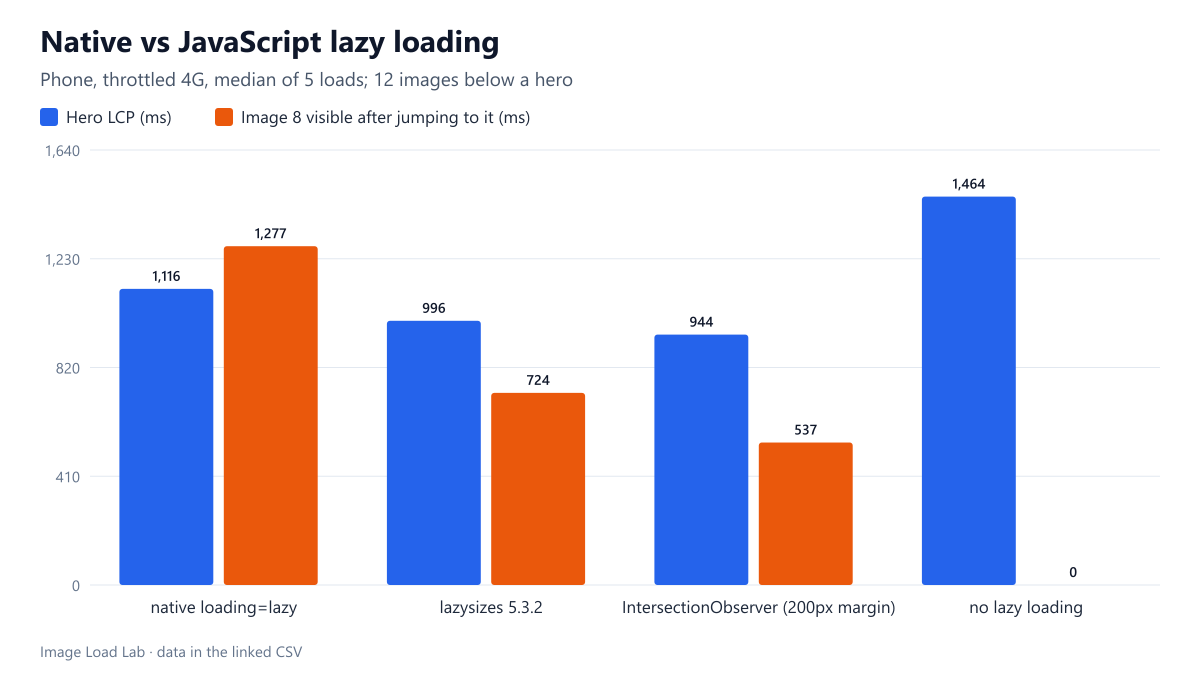
All three cut LCP from 1,464 ms to 944 to 1,116 ms. Native lazy loading fetched one image more up front and was slowest after a long jump; it needs no JavaScript.
Before browsers supported loading="lazy", lazy loading meant JavaScript: a library such as lazysizes, or a few lines with IntersectionObserver, swapping a data-src into src as images approach the screen. Many themes and plugins still ship such scripts. Is native lazy loading better than the JavaScript approaches, in bytes, in Largest Contentful Paint and in how quickly images appear when the visitor scrolls? We compared four versions of the same page on a throttled phone profile.
The test
Each page had a 1200-pixel CC0 hero with fetchpriority="high", followed by twelve 800 × 800 photos of 36 KB, separated by 200-pixel blocks of text. We tested four versions of the twelve photos:
- native
loading="lazy"; - lazysizes 5.3.2 (7.9 KB minified, loaded
async) withdata-srcandclass="lazyload"; - a short inline
IntersectionObserverscript with a 200-pixel margin; - no lazy loading.
We loaded each version five times in Chrome 155.0.8059.82 with a phone viewport, 150 ms latency, 1.6 Mbit/s and the CPU slowed four times. We recorded the hero’s LCP and the bytes of the twelve photos downloaded before any scrolling. Then we jumped straight to the eighth photo and timed how long it took to appear. See our methodology.
Results
| Method | Hero LCP | Image bytes before scrolling | Image 8 visible after jump |
|---|---|---|---|
| native loading=lazy | 1,116 ms | 108 KB | 1,277 ms |
| lazysizes 5.3.2 | 996 ms | 72 KB | 724 ms |
| IntersectionObserver (200px margin) | 944 ms | 72 KB | 537 ms |
| no lazy loading | 1,464 ms | 433 KB | already loaded |
Every lazy method beat no lazy loading. Without it, all twelve photos (434 KB) downloaded at once alongside the hero, and LCP was 1,464 ms. With any lazy method, LCP was between 944 and 1,116 ms.
Native lazy loading downloaded one photo more up front. Before any scrolling, native loading fetched three photos (108 KB). Both scripts fetched two (72 KB). Chrome starts native lazy images about 1,250 pixels before they enter the screen, as measured in our distance threshold test, a wider margin than the two scripts used. The extra photo competed with the hero, and LCP was 120 to 170 ms later than with the scripts.
After a jump, native lazy loading was the slowest to show the target. The eighth photo appeared 1,277 ms after the jump with native loading, against 724 ms with lazysizes and 537 ms with the observer. The likely reason is the same wide margin: after the jump, Chrome started every photo within 1,250 pixels of the new position at once, so the target shared the bandwidth with its neighbours.
What this means
- Use native lazy loading unless you have a specific reason not to. It needs no script, works with the browser’s preload scanner, and keeps working when JavaScript fails. Images that only have a
data-srcstay blank without JavaScript. - The differences between methods were small compared with not lazy-loading at all, which cost 350–520 ms of LCP here and 325–361 KB more data on page load.
- A script with a narrow margin can win on slow connections for both LCP and jump-scrolling, because fewer images compete. But during normal scrolling a narrow margin means images arrive later, and the visitor may see empty boxes. We did not measure smooth scrolling.
- Never lazy-load the hero, with any method. Our lazy-loading test measured that cost, and a script-based lazy hero is also invisible to the preload scanner, as our discovery timing test shows.
- Do not combine both. If a theme already uses a lazy-loading script, adding
loading="lazy"to the same images is redundant. Removing the script and keeping the attribute is simpler.
Moving from a script to native lazy loading
Replace data-src and data-srcset with src and srcset, add loading="lazy", and remove the library and its class names. Keep width and height so the space is reserved before the image arrives. In WordPress, core already adds loading="lazy" to content images and leaves out the first ones, so a separate lazy-loading plugin is usually unnecessary.
Practical conclusion
All three lazy-loading methods brought LCP down from 1,464 ms to between 944 and 1,116 ms on a throttled phone profile. The scripts were slightly faster in this test because they loaded fewer images up front, while native lazy loading loaded one more and was slower after a long jump. Native lazy loading needs no JavaScript and is the safer default; the scripts’ small advantage came from a narrower margin, not from the scripts themselves.
Limitations
One page layout, identical images, a local server, Chrome only and five loads per version. We measured a jump, not continuous scrolling. On fast connections, Chrome’s native threshold and the scripts’ margins matter less.
Data and files
Download js-lazy-vs-native.csv (4 rows, 0.2 KB) · Method: testing methodology. Photos: image credits.