When Does Chrome Request an Image? Six Ways to Reference It, Timed
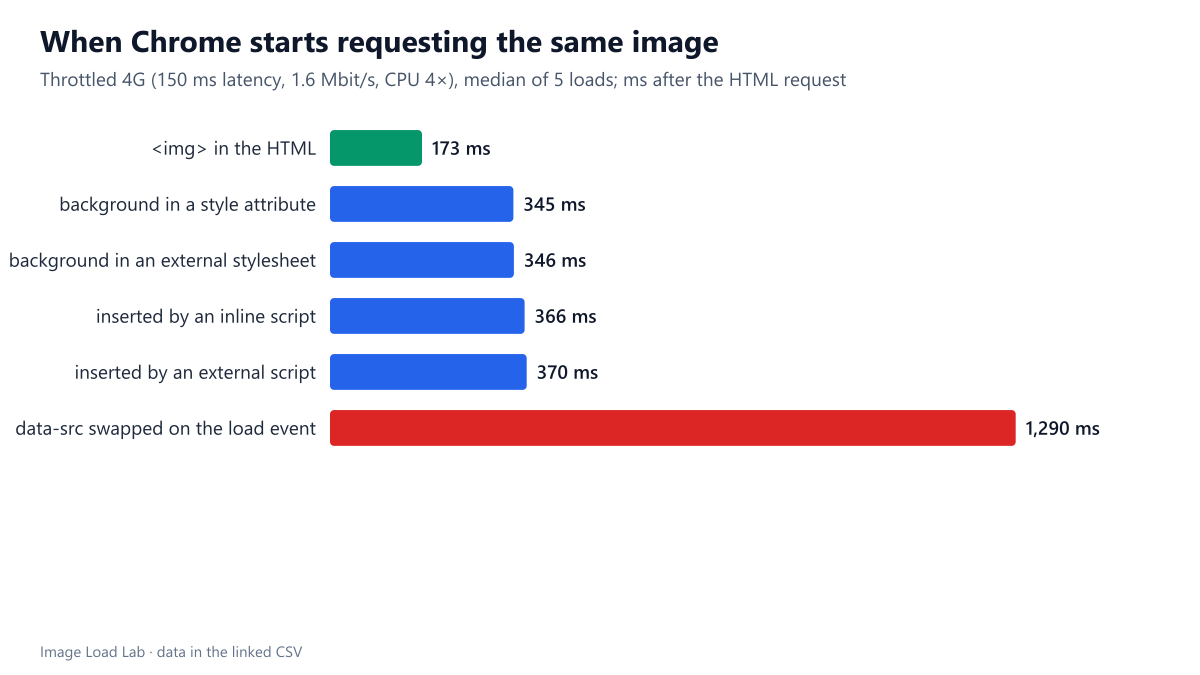
An img tag in the HTML was requested at 173 ms. The same image as a CSS background or inserted by a script waited for the stylesheet until 345 to 370 ms, and a data-src swap until 1,290 ms.
An image can only start downloading once the browser knows it exists. Put an <img> tag in the HTML and Chrome’s preload scanner finds it while the page is still arriving. Reference the same file from CSS or a script, and the browser has to get further into building the page first. How much later does the request start for each common way of referencing an image? We put the same image on one page six ways and timed each request.
The test
One local test page referenced the same 36 KB CC0 JPEG six times, each with a different query string so that every reference was a separate request:
- an
<img>tag in the HTML; - a CSS background in an inline
styleattribute; - a CSS background in an external stylesheet linked in the
<head>; - an image created by an inline script;
- an image created by an external script;
- an
<img>whosedata-srcis copied tosrcon theloadevent, a pattern used by older lazy-loading scripts.
We loaded the page five times in Chrome 155.0.8059.82 on a throttled profile (150 ms latency, 1.6 Mbit/s, CPU slowed four times). For each image, we recorded when its request started, measured from the start of the HTML request, along with its initial priority. See our methodology.
Results
| Image referenced by | Request starts | Download finished | Initial priority |
|---|---|---|---|
| <img> in the HTML | 173 ms | 619 ms | Medium |
| background in a style attribute | 345 ms | 1,251 ms | Low |
| background in an external stylesheet | 346 ms | 1,271 ms | Low |
| inserted by an inline script | 366 ms | 1,282 ms | Low |
| inserted by an external script | 370 ms | 1,286 ms | Low |
| data-src swapped on the load event | 1,290 ms | 1,667 ms | Low |
The <img> in the HTML was requested first, 173 ms after the page request, as soon as the first bytes of HTML arrived. It was also the only image that started at Medium priority, and it finished at 619 ms.
Everything else waited for the stylesheet. The two CSS backgrounds and the two script-created images all started between 345 and 370 ms. That is just after the small external stylesheet finished downloading, at about 340 ms. The browser needs the finished stylesheet before it can work out styles and run scripts, so even a background in an inline style attribute waited. These four images also started at Low priority and shared the connection, finishing at 1.25 to 1.29 seconds.
The data-src pattern was by far the latest: 1,290 ms, because it waits until every other resource on the page has loaded. On a real page with more images, fonts and scripts, that wait would be longer still.
What this means
- Put important images in the HTML as
<img>or<picture>. In this test, that alone made the request start about 170 ms earlier than any other method, and finish twice as soon. - Every render-blocking stylesheet delays CSS backgrounds and script-inserted images. Our stylesheet was tiny and still set the start time for four of the six images. A larger or slower stylesheet would push them later.
- If a hero must be a CSS background, preload it with
<link rel="preload" as="image" fetchpriority="high">, as tested in our preload and fetchpriority guide. Our responsive background guide coversimage-set()as well. - Avoid lazy-loading scripts that wait for the
loadevent, and never use them on images in the first screen. Nativeloading="lazy"needs no script; we compared it with JavaScript libraries in our lazy-loading methods test. - Lighthouse checks this for the LCP image. Its “LCP request discovery” insight flags a hero that is not in the initial HTML, as shown in our Lighthouse discovery test.
How to check your own page
Open Chrome DevTools, go to the Network panel, choose a slow throttling profile and reload. Add the “Initiator” and “Priority” columns, then sort by the Waterfall column. Images found by the preload scanner list the HTML document as their initiator and start right after it. Images listed with a stylesheet or a script as initiator were discovered later, and their bars start further to the right. Our DevTools image audit guide walks through the panel in more detail.
Practical conclusion
An <img> in the HTML was requested 173 ms after the page request. The same image as a CSS background or inserted by a script was requested at 345–370 ms, after the stylesheet had loaded and at Low priority. Swapping data-src on the load event delayed it to 1,290 ms. Keep the images that matter in the HTML.
Limitations
One simple page on a local HTTP/1.1 server with a small, fast stylesheet. Five loads, Chrome only. On real pages, the gaps depend on how many stylesheets and scripts come first and how large they are.
Data and files
Download image-discovery.csv (6 rows, 0.3 KB) · Method: testing methodology. Photo: image credits.