Lighthouse LCP Request Discovery: What Each Hero Setup Gets
The insight passed only heroes with fetchpriority=high and flagged lazy and script-inserted ones, but simulated throttling reported the lazy hero 600 ms faster, the opposite of applied throttling.
Lighthouse 13 bundles its advice about the main image into one insight, “LCP request discovery”. It runs three checks on the image that becomes the Largest Contentful Paint: whether it carries fetchpriority="high", whether the browser can find it in the initial HTML, and whether it avoids loading="lazy". What does each common way of placing a hero image get from these checks, and do the reported LCP times agree with real loading? We tested six setups.
The test
Six local pages showed the same 1200-pixel CC0 JPEG as the hero: a plain <img>; the same with fetchpriority="high"; the same with loading="lazy"; a CSS background in an inline style attribute; that background plus a <link rel="preload"> with fetchpriority="high"; and an <img> inserted by a script. Each was tested twice with Lighthouse 13.5.0’s default mobile profile (simulated throttling) in Chrome 155.0.8059.82. Because one result looked implausible, we also tested the plain and the lazy versions three times each with applied (DevTools) throttling. See our methodology.
Results
| LCP image set up as | fetchpriority=high applied | Discoverable in HTML | Not lazy-loaded | Insight result | LCP, simulated | LCP, applied throttling |
|---|---|---|---|---|---|---|
| Plain <img> in HTML | ✗ | ✓ | ✓ | flagged | 1,354 ms | 1,736 ms |
| <img fetchpriority=high> | ✓ | ✓ | ✓ | passed | 1,353 ms | – |
| <img loading=lazy> | ✗ | varied between runs | ✗ | flagged | 753 ms | 1,772 ms |
| CSS background (inline style) | ✗ | ✓ | ✓ | flagged | 1,353 ms | – |
| CSS background + preload fetchpriority=high | ✓ | ✓ | ✓ | passed | 1,353 ms | – |
| <img> inserted by script | ✗ | ✗ | ✓ | flagged | 1,353 ms | – |
A plain image was flagged only for missing fetchpriority. It passed the other two checks. Adding fetchpriority="high" made the insight pass, without changing the simulated LCP on this simple page (1,353 ms against 1,354 ms).
The lazy hero failed the lazy-loading check, as intended. Its “discoverable” check came out differently in the two runs, so we do not draw a conclusion from it.
An inline-style background counted as discoverable, because its URL is in the HTML, but was flagged for lacking priority. Adding a preload with fetchpriority="high" made it pass. The script-inserted image failed the discoverability check, which is the one that matters most on real pages with several scripts in front of it.
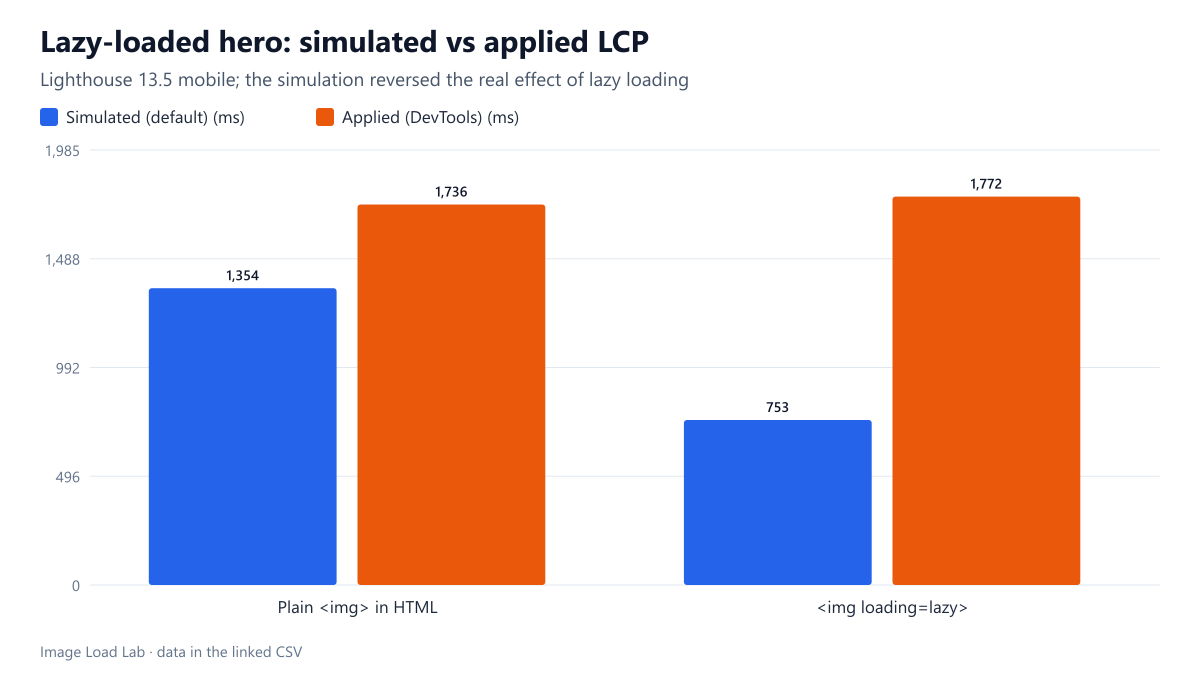
The simulated LCP of the lazy hero was wrong. With the default simulation, the lazy-loaded hero reported an LCP of 753 ms, much faster than the 1,354 ms of the plain image. Applied throttling told the real story: 1,772 ms for the lazy hero against 1,736 ms for the plain one, slightly slower, consistent with our own lazy-loading test, where lazy-loading the hero cost 160–244 ms. Lighthouse flagged the lazy hero in the checklist, but its simulated LCP number pointed the opposite way.
What to do with the insight
- Put the hero image in the HTML as an
<img>(or a<picture>), never inserted by a script. - Never lazy-load it, whatever a simulated LCP number suggests.
- Add
fetchpriority="high"to it. It satisfied the insight here; its effect on real LCP depends on competition for bandwidth, as discussed in our fetchpriority test. - For a CSS background hero, add a preload with
fetchpriority="high", or better, turn it into an<img>. - Verify timing changes with applied throttling or field data; the simulation reversed the effect of lazy loading in our test, as our throttling comparison also warns.
Practical conclusion
Lighthouse 13.5’s LCP request discovery insight passed only heroes with fetchpriority="high" (directly or through a preload) and flagged script-inserted and lazy-loaded heroes as it should. But its default simulation reported the lazy hero 600 ms faster than a normal one, while applied throttling showed it slightly slower. Follow the checklist; do not trust simulated LCP for lazy-loading decisions.
Limitations
Simple pages with one hero and little else, two simulated runs per setup and applied throttling for two setups only. On busier pages, priority and discovery have larger effects than here.
Data and files
Download lighthouse-lcp-discovery.csv (6 rows, 0.4 KB) · Method: testing methodology. Photo: image credits.