Does Lighthouse Catch Bad Alt Text? Ten Cases Tested
Lighthouse 13.5 failed only the image with no alt attribute. File names, the word image and alt text starting with Photo of all passed; redundant alt text was noted without affecting the score.
Alternative text describes an image for people who cannot see it and for search engines. Lighthouse’s accessibility category checks it with two audits: “Image elements have [alt] attributes” and “Image elements do not have [alt] attributes that are redundant text”. Do these audits catch bad alt text, or only missing alt text? We wrote ten versions of the same image, from correct to useless.
The test
One test page showed the same 400 × 300 CC0 market photo ten times: with no alt attribute; with an empty alt="", the correct way to mark a decorative image; with a descriptive text; with the file name as alt; with the single word “image”; with alt text starting “Photo of”; with role="presentation" and no alt; with aria-hidden="true" and no alt; inside a link whose visible text repeats the alt; and inside a figure whose caption repeats the alt. We ran Lighthouse 13.5.0 with the accessibility and best-practices categories in Chrome 155.0.8059.82 and read the two audits. See our methodology.
Results
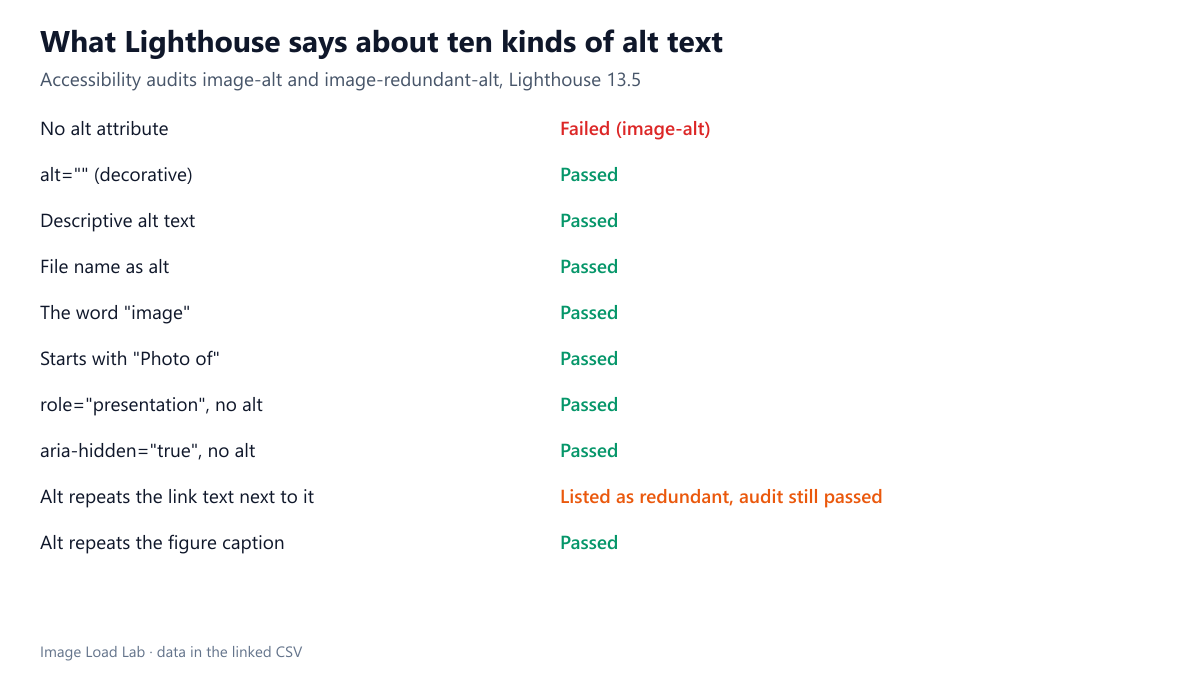
| Case | Alt text used | Lighthouse result |
|---|---|---|
| No alt attribute | – | Failed (image-alt) |
| alt="" (decorative) | – | Passed |
| Descriptive alt text | Fruit and vegetable stall under a red sign | Passed |
| File name as alt | market-stall-400.jpg | Passed |
| The word "image" | image | Passed |
| Starts with "Photo of" | Photo of a fruit stall | Passed |
| role="presentation", no alt | – | Passed |
| aria-hidden="true", no alt | – | Passed |
| Alt repeats the link text next to it | Fresh market prices | Listed as redundant, audit still passed |
| Alt repeats the figure caption | A market stall in Tehran | Passed |
Only the missing attribute failed. The image without any alt attribute was the only one listed by “Image elements have [alt] attributes”, and it brought the page’s accessibility score down to 88.
Useless alt text passed. A file name (“market-stall-400.jpg”), the word “image” and “Photo of a fruit stall” all passed. So did the two images hidden from assistive technology with role="presentation" or aria-hidden="true" without an alt attribute, which is acceptable for purely decorative images.
Redundancy was noticed but not scored. The image in a link whose alt repeated the link text was listed under the redundant-text audit as a failing element, with an impact marked “minor”, yet the audit itself passed and did not affect the score. The figure whose alt repeated its caption was not listed at all.
What this means
- A perfect accessibility score does not mean good alt text. Lighthouse checks that the attribute exists, not what it says.
- Empty alt is not an error. Decorative images should have
alt=""so screen readers skip them; Lighthouse accepted it, as it should. - Write alt text for the context: what the image shows that matters for the page, without “image of” or “photo of”, and without repeating the caption or link text next to it.
- Audit content, not only templates. In WordPress, alt text is stored per media item; images inserted before alt text was written keep an empty or missing value until edited.
Better alt text for the same photo
Our own “descriptive” alt text was wrong, and Lighthouse could not tell. When we later looked at the photo at full size for another test, we saw that it does not show a stall. It shows the entrance of a fruit and vegetable market: a large red sign in Persian over a roofed entrance, a street lamp, and parked cars, including a yellow taxi. “Fruit and vegetable stall under a red sign” sounded plausible and passed the audit. So did the caption test text “A market stall in Tehran”, although the photo’s source does not say where it was taken. Only a person looking at the image can catch errors like these.
Depending on where the photo appears, good alternative text differs:
- In an article about markets: “Entrance of a fruit and vegetable market under a large red sign, with cars parked in front”.
- As a link to a guide about image formats: the link text already names the guide, so the image can take
alt="", or the alt can carry the link’s purpose if there is no other text. - Next to a caption that already describes it: a short alt that adds what the caption does not say, or
alt=""if the caption says it all. - As pure decoration behind a heading:
alt="".
None of these choices would change the Lighthouse result, which is exactly why they need a human decision.
Practical conclusion
Lighthouse 13.5 failed only the image with no alt attribute. File names, the word “image”, “Photo of…” and a plausible but inaccurate description all passed, and alt text duplicating a link’s text was noted without affecting the score. Use Lighthouse to find missing attributes, and review the wording yourself.
Limitations
One run on one test page. Lighthouse uses the axe-core accessibility engine; other tools built on it may report the “minor” findings differently. We did not test images used as buttons or in <input type="image">, which have their own audit.
Data and files
Download lighthouse-alt-text.csv (10 rows, 0.7 KB) · Method: testing methodology. Photo: image credits.