Lighthouse ‘Avoid Enormous Network Payloads’: Where the Warning Starts
Lighthouse 13.5 warned from about 2.7 MB of transfer, with no extra penalty for heavier pages, and the performance score stayed at 75 from 1.6 to 13 MB while LCP reached 26 seconds.
Lighthouse warns about pages that transfer too much data with “Avoid enormous network payloads”. Image-heavy pages are the usual offenders: galleries, long articles with full-size photos, product pages with many views. At what page weight does the warning appear, and what does the weight do to the performance score? We built fifteen pages from 0.8 to 13 MB of images.
The test
Each test page holds a heading, a paragraph and a number of large photos, all loaded at once: one to sixteen copies of a 1600-pixel JPEG of snow (813 KB each, quality 92), and for the pages around the expected threshold, three of those photos plus one extra image chosen to land at 2,541, 2,640, 2,701, 2,774, 2,841 and 3,003 KiB in total. We ran Lighthouse 13.5.0 once per page on its default mobile profile in Chrome 155.0.8059.82 and recorded the total transfer size, whether the total-byte-weight audit warned, the performance score and the simulated LCP. See our methodology.
Results
| Page weight | Payload warning | Performance score | LCP (simulated) |
|---|---|---|---|
| 814 KiB | no | 82 | 4,955 ms |
| 1,628 KiB | no | 75 | 9,456 ms |
| 2,441 KiB | no | 75 | 13,206 ms |
| 2,541 KiB | no | 75 | 13,808 ms |
| 2,640 KiB | no | 75 | 14,414 ms |
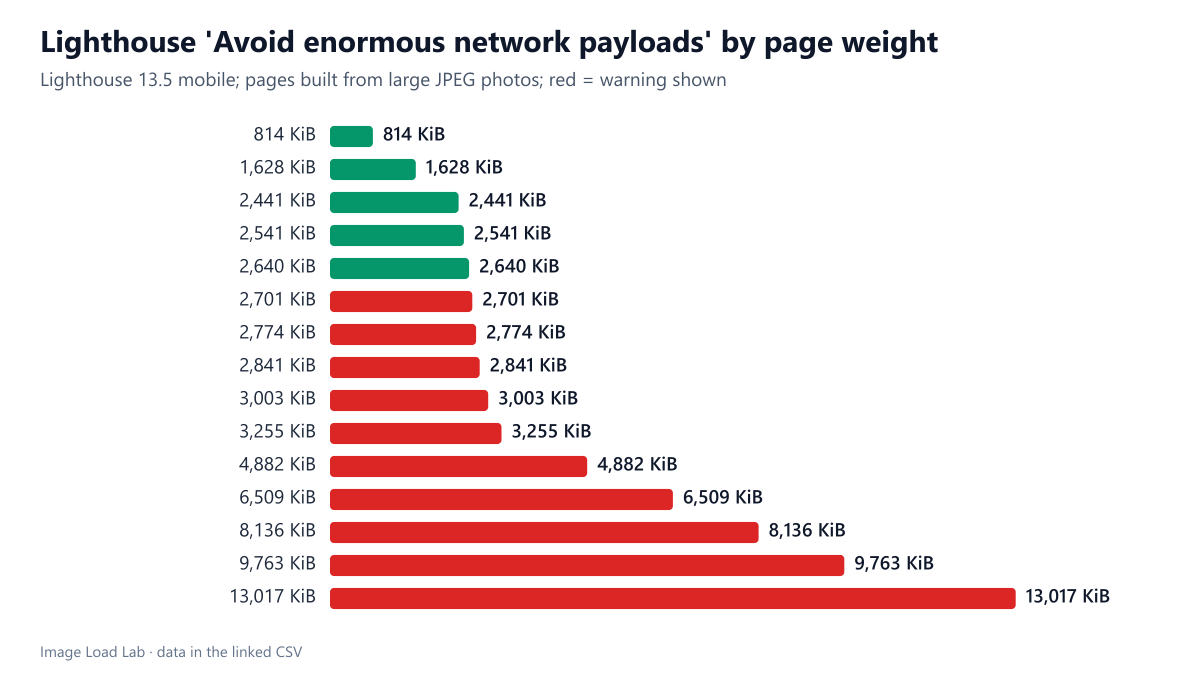
| 2,701 KiB | yes | 75 | 14,707 ms |
| 2,774 KiB | yes | 75 | 15,157 ms |
| 2,841 KiB | yes | 75 | 15,609 ms |
| 3,003 KiB | yes | 75 | 16,507 ms |
| 3,255 KiB | yes | 75 | 18,008 ms |
| 4,882 KiB | yes | 75 | 25,885 ms |
| 6,509 KiB | yes | 75 | 25,889 ms |
| 8,136 KiB | yes | 75 | 25,891 ms |
| 9,763 KiB | yes | 75 | 25,902 ms |
| 13,017 KiB | yes | 75 | 25,902 ms |
The warning started between 2,640 and 2,701 KiB. Every page up to 2,640 KiB passed; every page from 2,701 KiB upward was flagged, with the same partial score however heavy it was: 13 MB was flagged no more strongly than 2.7 MB. A threshold of about 2.6 to 2.7 MB of transfer, roughly 2.7 to 2.8 million bytes, is what the warning means in practice.
The performance score stopped falling long before the payload got extreme. One photo gave a score of 82. From two photos onward, every page scored 75, whether it weighed 1.6 MB or 13 MB, although the simulated LCP grew from 9.5 to 25.9 seconds. The reason is how the score is built: LCP is worth a quarter of it, and once LCP is far beyond the slow threshold it scores zero and cannot fall further, while these pages had no layout shift, no blocking scripts and an early first paint, which kept the other three quarters intact.
LCP itself scaled with weight until it hit a ceiling. Up to about 5 MB, every additional photo added roughly four seconds of simulated LCP, because all images competed for the same connection. Above 4.9 MB the value stayed at 25.9 seconds; we did not investigate why the simulation stopped there.
What to do with this
- Do not use the score to judge an image-heavy page. A page with a 26-second LCP scored 75 here; read LCP and the payload directly.
- Aim far below 2.6 MB. The warning is a ceiling, not a target. Most of the weight on pages like these disappears with right-sized, modern-format images, as our format comparison and dimensions test show.
- Lazy-load everything below the first screen. Lighthouse counts what is transferred during its load; images that never load during the test are not in the payload. Our lazy-loading test cut initial image bytes from 1,652 KB to 372 KB.
Practical conclusion
Lighthouse 13.5 warned about network payload from about 2.7 MB of transfer (between 2,640 and 2,701 KiB), with no further penalty for heavier pages, and the performance score stuck at 75 from 1.6 MB to 13 MB while simulated LCP reached 26 seconds. Watch the payload and LCP numbers themselves; the score hides how bad a heavy page is.
Limitations
Synthetic pages made only of photos, one run each, mobile profile only. Real pages also carry scripts and fonts that affect the other parts of the score. The exact threshold lies in the 61 KiB gap between our two closest pages.
Data and files
Download lighthouse-total-byte-weight.csv (15 rows, 0.5 KB) · Method: testing methodology. Photo: image credits.