Which JPEGs Does Lighthouse Still Flag for Format or Compression?
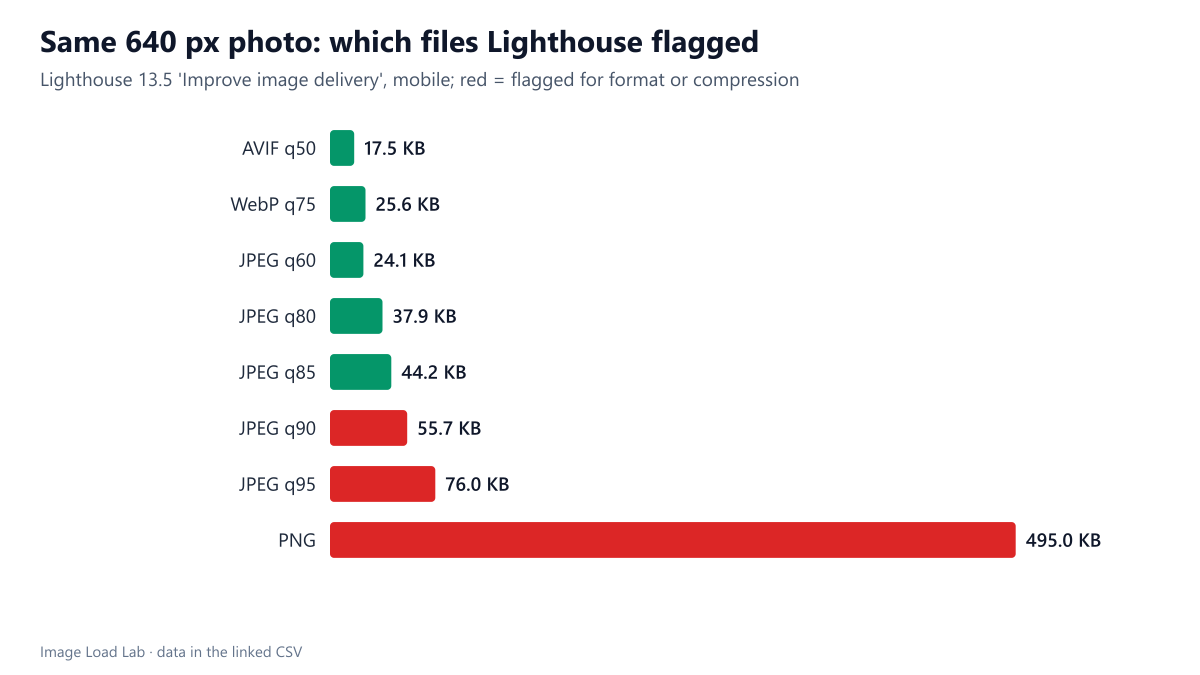
Lighthouse 13.5 passed JPEGs up to quality 85 and flagged them from quality 90, plus PNG photos. A quality-80 JPEG passed although AVIF would have saved 54 %.
Lighthouse used to have two separate audits for image bytes: “Serve images in next-gen formats”, which flagged almost every JPEG, and “Efficiently encode images”, which flagged poorly compressed ones. Lighthouse 13 merged them into the “Improve image delivery” insight. Which correctly sized images does it still flag for format or compression, and how do its estimates compare with real conversions? We tested eight encodings of the same photo.
The test
Each test page shows a CC0 market photo at 360 CSS pixels, which on Lighthouse’s mobile profile needs 630 device pixels. The file was always 640 pixels wide, so size was not an issue, and was encoded as AVIF (quality 50), WebP (75), MozJPEG at quality 60, 80, 85, 90 and 95, and PNG. We ran Lighthouse 13.5.0 in Chrome 155.0.8059.82 and recorded whether the image was listed and the bytes Lighthouse estimated a modern format or more compression would save. As a reality check we re-encoded the photo at 630 pixels as MozJPEG 80, WebP 75 and AVIF 50 and measured what each conversion would really save. See our methodology.
Results
| File (640 px) | KB | Flagged | Lighthouse format/compression estimate | Real saving → JPEG q80 | → WebP q75 | → AVIF q50 |
|---|---|---|---|---|---|---|
| AVIF q50 | 17.5 | no | – | 0.0 KB | 0.0 KB | 0.1 KB |
| WebP q75 | 25.6 | no | – | 0.0 KB | 0.0 KB | 8.2 KB |
| JPEG q60 | 24.1 | no | – | 0.0 KB | 0.0 KB | 6.7 KB |
| JPEG q80 | 37.9 | no | – | 0.0 KB | 12.3 KB | 20.5 KB |
| JPEG q85 | 44.2 | no | – | 6.2 KB | 18.6 KB | 26.8 KB |
| JPEG q90 | 55.7 | yes | 5.7 KB | 17.7 KB | 30.1 KB | 38.3 KB |
| JPEG q95 | 76.0 | yes | 26.0 KB | 38.0 KB | 50.4 KB | 58.6 KB |
| PNG | 495.0 | yes | 445.0 KB | 457.0 KB | 469.4 KB | 477.6 KB |
JPEG up to quality 85 passed. Lighthouse did not list the JPEGs at quality 60, 80 or 85, nor the WebP and AVIF files. That is a big change from the old “next-gen formats” audit: our quality-80 JPEG could have been 54 % smaller as AVIF (20.5 KB saved), and Lighthouse said nothing.
From quality 90, JPEG was flagged. The quality-90 file (55.7 KB) was listed with an estimated saving of 5.7 KB, and the quality-95 file (76.0 KB) with 26.0 KB. A PNG of the photo (495 KB) was flagged with an estimated 445 KB.
The estimates were conservative. For the quality-95 JPEG, Lighthouse estimated 26.0 KB, while re-encoding at quality 80 saved 38.0 KB, as WebP 50.4 KB and as AVIF 58.6 KB. For quality 90 it estimated 5.7 KB against 17.7 to 38.3 KB in reality. Only for the PNG was the estimate close to a real conversion.
What this means
- A clean Lighthouse report does not mean your images are efficient. Normally compressed JPEGs pass, even though AVIF or WebP would save a third to a half; our format comparison measured AVIF 29 % smaller than MozJPEG at equal quality across 20 photos.
- The insight now catches clear waste: very high JPEG quality and photos saved as PNG. If it fires, the real saving is probably larger than shown.
- Use your own measurements for format decisions, and Lighthouse to catch mistakes. Our quality equivalence table gives settings that match visual quality across formats.
Practical conclusion
Lighthouse 13.5 flagged correctly sized JPEGs only from quality 90 upward, plus photos saved as PNG, and its estimates for the flagged JPEGs were well below what a real re-encode saved. A quality-80 JPEG passed although AVIF would have saved 54 %. Do not rely on Lighthouse to tell you when to adopt modern formats.
Limitations
One photo and one run per encoding. Lighthouse sees only the file, not the quality setting used to make it, so the cut-off between quality 85 and 90 may fall elsewhere for photos with other content. Mobile profile only.
Data and files
Download lh-image-delivery.csv (18 rows, 0.9 KB) · Method: testing methodology. Photo: image credits.