Matching Quality Settings Across JPEG, WebP and AVIF
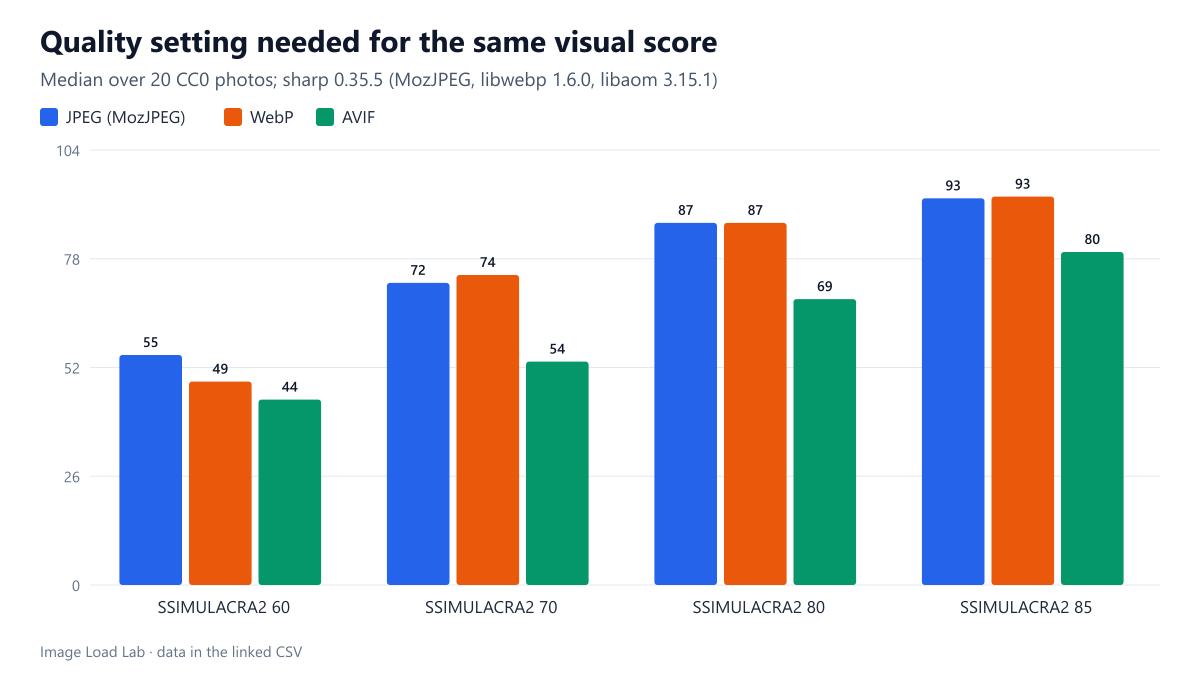
For the same visual quality on 20 photos, MozJPEG and WebP needed nearly the same quality number, about 73 to 74, while AVIF needed a setting 15 to 20 points lower, about 54.
“WebP at 80 equals JPEG at 85” and similar rules of thumb are everywhere, usually without a source. Quality numbers are not comparable between formats: each encoder maps its 0–100 scale to compression in its own way. Which quality setting in JPEG, WebP and AVIF gives the same visual quality, and how much does that vary from photo to photo? We worked it out from 620 encodes of 20 photographs.
The test
Each of our 20 CC0 photos (1600 pixels on the long edge, lossless reference; see image credits) was encoded with sharp 0.35.5 as MozJPEG at ten quality settings from 30 to 95, WebP (libwebp 1.6.0, effort 4) at the same ten settings, and AVIF (libaom 3.15.1, effort 4) at eleven settings from 20 to 90. Every file was scored with SSIMULACRA2 against the reference. For each photo and format we interpolated the quality setting at which the score reached 50, 60, 70, 80 and 85, then took the median across photos and the 10th and 90th percentiles to show the spread. These encodes are the same ones behind our format comparison; this guide reads them from the other direction. See the methodology.
Results
| Target score | JPEG quality (10th–90th percentile) | WebP quality | AVIF quality | Median KB: JPEG / WebP / AVIF |
|---|---|---|---|---|
| 60 | 55 (44–63) | 49 (39–68) | 44 (33–50) | 111 / 117 / 78 |
| 70 | 72 (64–79) | 74 (62–82) | 54 (44–59) | 157 / 176 / 114 |
| 80 | 87 (82–94) | 87 (80–91) | 69 (62–72) | 264 / 255 / 185 |
| 85 | 93 (89–94) | 93 (88–95) | 80 (75–84) | 319 / 408 / 281 |
JPEG (MozJPEG) and WebP needed almost the same quality number. For a score of 70, which we treat as high quality for web photos, the median photo needed JPEG quality 72.5 and WebP quality 74.4. For a score of 80 both needed 86.9. The common advice to set WebP several points lower than JPEG did not hold for these encoders: at the same number, WebP was not better.
AVIF needed numbers 15 to 20 points lower. A score of 70 took AVIF quality 53.6 and a score of 80 took 68.6. Anyone who copies their JPEG quality of 80 or 85 into an AVIF setting will get files far larger than necessary: AVIF at 80 reached a median score of about 85.
The spread between photos was large. For a score of 70, the middle 80 % of photos needed JPEG quality between 64 and 79 and AVIF quality between 44 and 59. A single fixed setting therefore gives some photos visibly more compression than others. That is why the bytes needed for the same quality differ so much between photos, as our format comparison’s per-photo table shows.
At those equal scores, the median files weighed 157 KB as JPEG, 176 KB as WebP and 114 KB as AVIF for a score of 70, and 264, 255 and 185 KB for a score of 80.
Screenshots behave differently
We ran the same calculation on four screenshots of this site. Text and flat colour need higher settings in JPEG: a score of 70 took JPEG quality 86 and WebP 82, but AVIF only 39. Neither JPEG nor WebP reached a score of 80 on screenshots within our ladders, while AVIF reached it at quality 56. Our WebP quality by image type test looks at that difference in detail.
Settings to start from
- High quality for photos (score about 70): MozJPEG 72–75, WebP 75, AVIF 50–55.
- Very high quality (score about 80): MozJPEG 87, WebP 87, AVIF 65–70.
- Check a few of your own images at the chosen setting, especially ones with fine texture or smooth gradients; the spread above means a setting that is right for most photos will be too low for some.
Practical conclusion
For equal visual quality on our photos, MozJPEG and WebP needed nearly the same quality number (about 73–74 for a score of 70), while AVIF needed a number 15 to 20 points lower (about 54). Do not reuse JPEG quality numbers for AVIF.
Limitations
The mapping depends on the encoder and its version: other JPEG encoders, cwebp’s command-line defaults or other AVIF encoders such as SVT-AV1 will map differently. One metric (SSIMULACRA2), one image size and effort 4 for WebP and AVIF. Interpolating between ladder steps adds small errors; photos whose ladder never reached a score are left out of that row.
Data and files
Download codecs.csv (1036 rows, 105.3 KB) · Method: testing methodology. Photos: image credits.