AVIF Encoder Effort: Speed vs File Size on 20 Photos
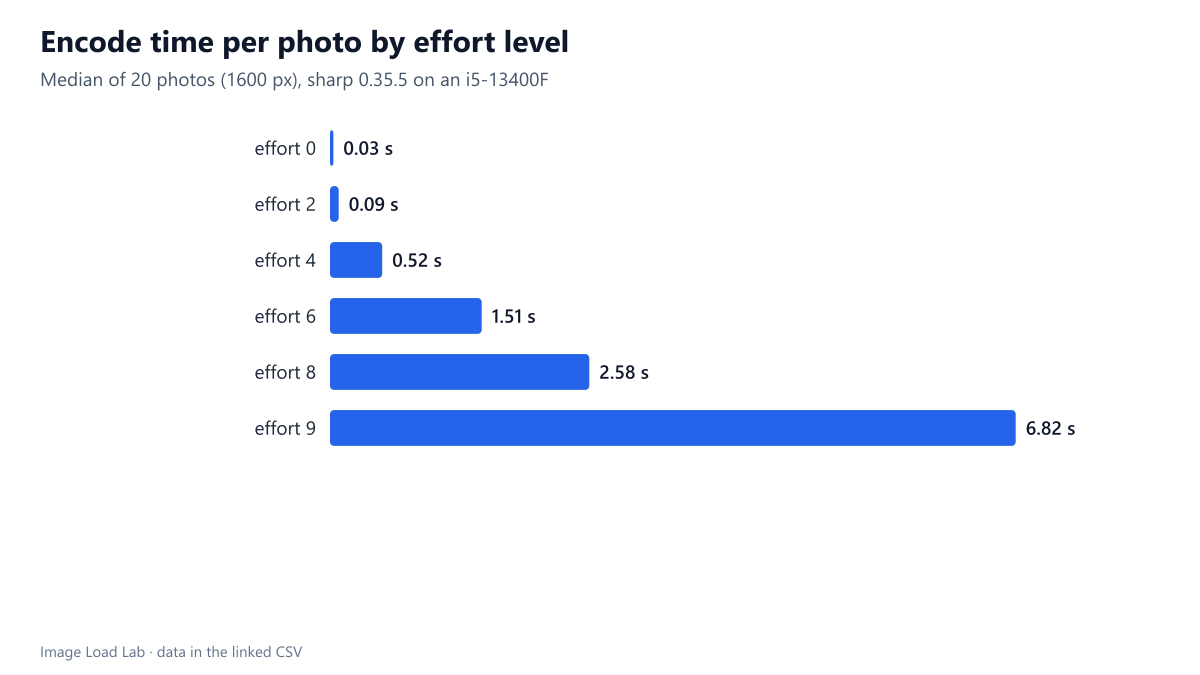
AVIF effort 9 took 13.8 times as long as the default effort 4 for files only 0.4 % smaller. Effort 0 encoded a photo in 34 ms at a 10 % size cost.
AVIF encoders have a speed setting; in sharp it is called effort, from 0 (fastest) to 9 (slowest), with 4 as the default. Slower settings search harder for a compact encoding. How much smaller do the files get for each step, and how much time does it cost? We encoded 20 photographs at every second effort level and timed each encode three times.
The test
Each of our 20 CC0 photos (1600-pixel long edge, lossless reference) was encoded as AVIF at quality 50 with sharp 0.35.5 (libaom 3.15.1) at effort 0, 2, 4, 6, 8 and 9. Quality stays fixed so that effort is the only variable. Every encode was timed with a high-resolution clock three times in a row and the median kept; the encoder used its default multithreading on our 16-thread Intel Core i5-13400F. Each file was then scored with SSIMULACRA2 against the reference. See the methodology.
Results
| Effort | Median encode time (ms) | Time vs effort 4 | Median size (KB) | Size vs effort 4 | Median SSIMULACRA2 |
|---|---|---|---|---|---|
| 0 | 34 | 0.07× | 102.5 | +10.3 % | 65.14 |
| 2 | 87 | 0.17× | 101.8 | +7.7 % | 66.13 |
| 4 | 520 | 1.0× | 94.4 | +0.0 % | 66.61 |
| 6 | 1,510 | 2.88× | 93.5 | -1.0 % | 67.51 |
| 8 | 2,580 | 5.19× | 93.4 | -0.6 % | 67.72 |
| 9 | 6,824 | 13.84× | 93.0 | -0.4 % | 67.76 |
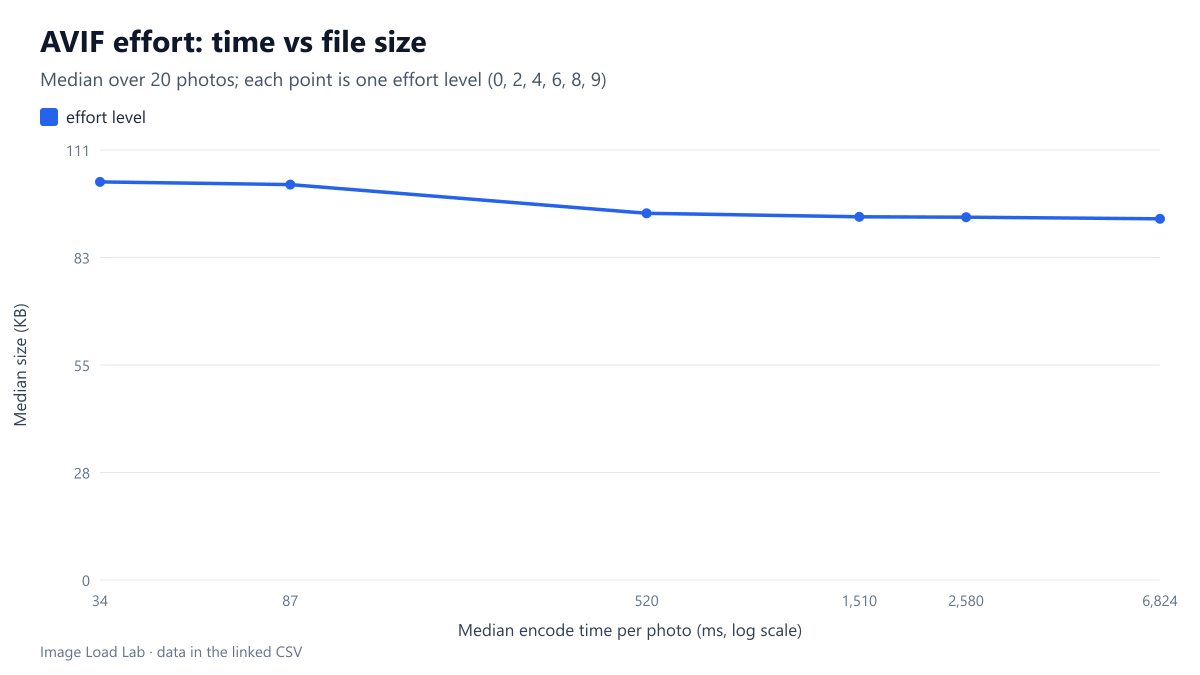
Most of the benefit comes by effort 4. Effort 0 encoded a photo in a median of 34 ms but produced files 10.3 % larger than effort 4. Effort 2 was 7.7 % larger. Effort 4, the default, took a median of 0.52 seconds.
Beyond effort 4, time explodes while size barely moves. Effort 6 took 2.9 times as long as effort 4 for files 1.0 % smaller. Effort 8 took 5.2 times as long and effort 9 13.8 times as long (6.8 seconds per photo) for savings of 0.6 % and 0.4 %, slightly less than effort 6 at the median.
The quality score rose a little with effort, from 65.1 at effort 0 to 66.6 at effort 4 and 67.8 at effort 9, because slower settings spend the same quality budget more cleverly. That gain is real but small: about one point between effort 4 and the slowest setting.
What this means in practice
- Encoding once at upload or build time: effort 4 to 6 is the sensible range. Effort 6 bought a further 1 % and one point of quality for about 1.5 seconds per photo on our machine.
- Encoding on demand (image CDNs, on-the-fly resizing): effort 0 to 2 keeps encoding under a tenth of a second per photo; the files were 8–10 % larger than at effort 4, and still far smaller than JPEG in our format comparison.
- Effort 8 and 9: not worth it for this kind of content. On a shared host’s single slow core, 6.8 seconds per photo could easily become a minute.
Practical conclusion
Keep sharp’s default effort 4, or use 6 for build pipelines with time to spare. Fast settings are acceptable when encoding speed matters, at a cost of about a tenth more bytes. The slowest settings multiplied encoding time by up to 13.8 for less than half a percent of extra saving.
How this connects to our other tests
Encoding speed is the main practical cost of AVIF that the other tests in the lab do not show. Our format comparison found AVIF about 29 % smaller than JPEG at equal quality, at effort 4, with a median encode time of about half a second per photo, against 0.12 s for MozJPEG and 0.14 s for WebP. This test shows that you can bring AVIF close to JPEG’s speed with effort 0 to 2 and still keep most of the size advantage, or spend more time for almost nothing. If your WordPress host cannot encode AVIF at all, as in our AVIF upload test, the encoding has to happen before upload or on a CDN.
Finally, effort only matters at the moment of encoding: the files from all six levels are ordinary AVIF images that any AVIF-capable browser displays, so the choice can be changed later without touching your markup.
Repeat this test on your own images
To find the right setting for your own server, time a batch of typical images at two or three effort levels. With sharp:
for (const effort of [2, 4, 6]) {
  console.time('effort ' + effort);
  await sharp('photo.png').avif({ quality: 50, effort }).toFile(`photo-e${effort}.avif`);
  console.timeEnd('effort ' + effort);
}
With libavif’s command-line tool the equivalent setting is the speed, which runs the other way round (0 is slowest, 10 fastest): avifenc -q 50 -s 6 photo.png photo.avif. Run it on the same server that will do the work in production; a shared host with one slow core can be ten times slower than the desktop used here. If encoding happens at upload time, the user waits for it, and a few seconds per image quickly adds up on a gallery upload. Our script run_lossless_effort.mjs (the effort step) contains the timing loop used for this guide, with three runs per image and the median kept.
A related question is whether a higher effort could replace a higher quality setting. In our data the answer was mostly no. Moving from effort 4 to effort 9 raised the median score by about 1.2 points at the same file size, while moving from quality 50 to 55 at effort 4 raised it by 4.5 points but made the files 22 % larger. Effort buys a little quality without bytes but costs time; quality is still the main control.
Limitations
One quality setting (50), one encoder (libaom via sharp) and one desktop CPU with 16 threads. Other AVIF encoders (SVT-AV1, rav1e) scale differently, and absolute times on servers with fewer cores will be several times longer.
Data and files
Download avif-effort.csv (120 rows, 5.4 KB) · Method: testing methodology. Photos: image credits.