Images in Closed details and dialog Elements: Downloaded or Not?
Chrome 155 downloaded images inside a closed details or dialog element at page load. With loading=lazy they were fetched only when opened, and template and noscript images never loaded.
FAQ accordions, “read more” sections, modal galleries and HTML templates all hold images that the visitor may never open. Does Chrome download images inside a closed <details>, a closed <dialog>, a <template> or a <noscript> block? We tested ten containers, with and without lazy loading, and then opened the closed ones to see what happened next.
The test
Each test page has a line of text followed by one container holding the same 800 × 800 JPEG of a CC0 coffee photo, a 35.9 KB file (36.1 KB transferred with HTTP headers, the figure used below). The containers were: a closed <details> element, an open one, a closed <dialog>, a <template>, a <noscript> block (with JavaScript enabled, as for nearly all visitors), an element with content-visibility: hidden, and an element with hidden="until-found". Several were tested both with a normal image and with loading="lazy".
Pages were served locally and loaded three times each in Chrome 155.0.8059.82 at a 1440-pixel desktop viewport, cache disabled, with requests recorded through the DevTools Protocol. For the closed <details> and <dialog> cases we then loaded the page once more, opened the element from a script, waited 1.5 seconds and counted new image requests. See the methodology for the shared setup.
Results
| Container | Downloaded at page load | After opening it |
|---|---|---|
| Closed <details> | Yes | Nothing new (already loaded) |
| Closed <details> + lazy | No | Requested when opened |
| Open <details> + lazy | Yes | – |
| Closed <dialog> | Yes | Nothing new (already loaded) |
| Closed <dialog> + lazy | No | Requested when opened |
| <template> | No | – |
| <noscript> (JavaScript on) | No | – |
| content-visibility:hidden | Yes | – |
| content-visibility:hidden + lazy | No | – |
| hidden="until-found" + lazy | No | – |
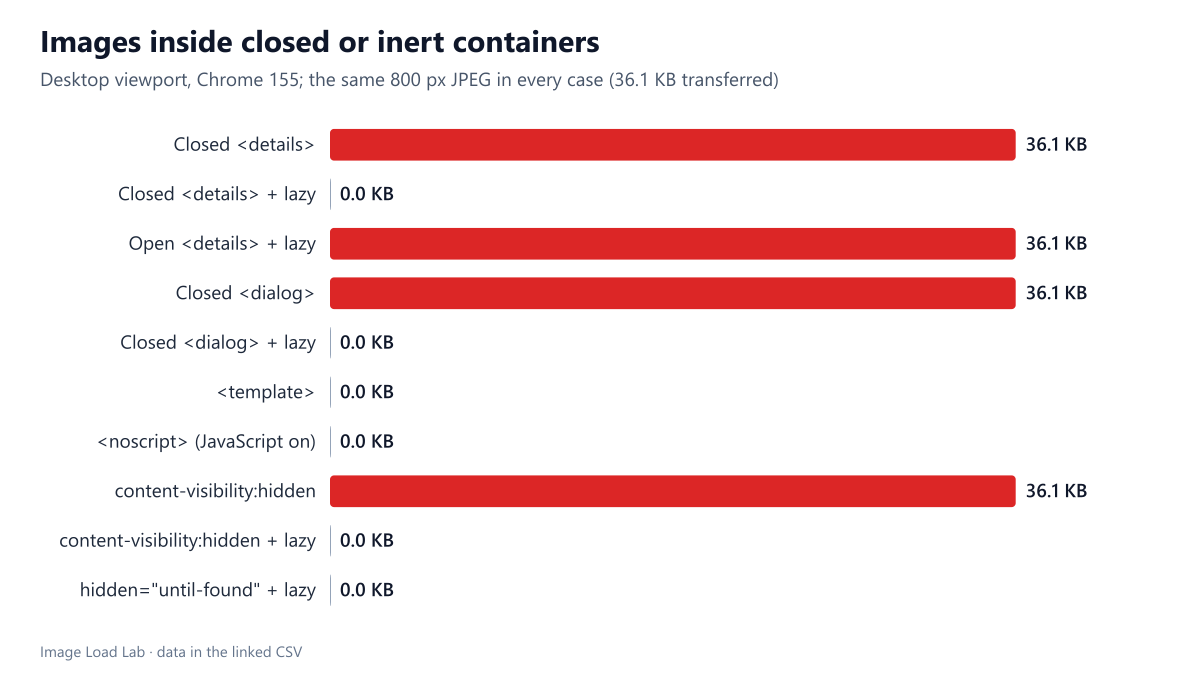
Closed does not mean “not downloaded”. A normal image inside a closed <details> was downloaded at page load in all three runs, and so was an image inside a closed <dialog> and inside an element with content-visibility: hidden. Opening the details element or the dialog later caused no new request: the file was already there.
loading="lazy" turned these images into on-demand downloads. With the attribute, the image in the closed details element, the closed dialog, the content-visibility: hidden element and the hidden="until-found" element was not requested at page load. When we opened the details element or the dialog, Chrome requested the image within the 1.5-second window. An open <details> with a lazy image behaved like any visible image and loaded straight away.
<template> and <noscript> never downloaded anything. The contents of a template are inert until a script copies them into the page, and with JavaScript enabled the browser does not parse a <noscript> block as markup.
What this means in practice
- FAQ and “read more” sections built with
<details>: addloading="lazy"to their images. On our page that saved the full 36.1 KB for every visitor who never opened the section, and the image still arrived when the section was opened. - Modal galleries in
<dialog>: the same rule applies. A gallery of twenty photos in a closed dialog would otherwise be downloaded in full on every page view. - Templates for client-side rendering are free until used, which makes
<template>a safe place for markup that may never be needed. - Do not use
<noscript>as a lazy-loading fallback for visible images unless the script really loads them: visitors with JavaScript will get nothing from it.
The same principle explains our results for images hidden with display: none: the HTML parser starts every eager image download, and only lazy loading lets the browser wait until the image is actually about to be shown.
Practical conclusion
In Chrome 155, images inside closed <details> and <dialog> elements and under content-visibility: hidden were downloaded at page load unless they had loading="lazy". With the attribute they were fetched only when opened. Add loading="lazy" to every image inside collapsible or modal content.
Limitations
One browser (Chrome), one desktop viewport and one image per container. We opened elements from a script rather than with a real click; a click triggers the same state change. We did not test how quickly the lazy image appears on a slow network after opening, which depends on the connection.
Data and files
Download closed-containers.csv (10 rows, 0.4 KB) · Method: testing methodology. Photo: image credits.