Lazy Loading in a Horizontal Carousel: How Far Ahead Chrome Loads
In a sideways-scrolling carousel, Chrome 155 fetched lazy images only about 600 pixels beyond the visible edge: 4 of 24 slides on a phone and 7 on a desktop before any swipe.
Carousels and horizontally scrolling product rows often hold dozens of images, most of them outside the visible area. Native lazy loading was designed around vertical scrolling. In a horizontal scroller, how many loading="lazy" images does Chrome fetch before the visitor swipes, and how far to the side does it look? We measured it with a 24-slide carousel and with a row of small probes.
The test
The carousel is a display: flex row with overflow-x: auto, placed just below a line of text in the first screen. It holds 24 slides, each a 300 × 200-pixel <img loading="lazy"> with a 10-pixel gap, so slide n starts at (n − 1) × 310 pixels. Every slide requests the same 400-pixel JPEG with its own query string. We loaded the page three times on a phone viewport (390 pixels wide) and a desktop viewport (1440 pixels), on a fast connection and on a throttled 4G profile (1.6 Mbit/s, 150 ms latency, CPU slowed 4×), counted the requests, then scrolled the carousel sideways by 1,240 pixels and counted again.
To find the distance more precisely, a second page placed 80 probes, each 40 pixels wide, every 50 pixels to the right of the visible area inside a horizontal scroller, with no vertical distance at all. Chrome 155.0.8059.82 was used throughout, with the cache disabled. See the methodology for the general setup.
Results
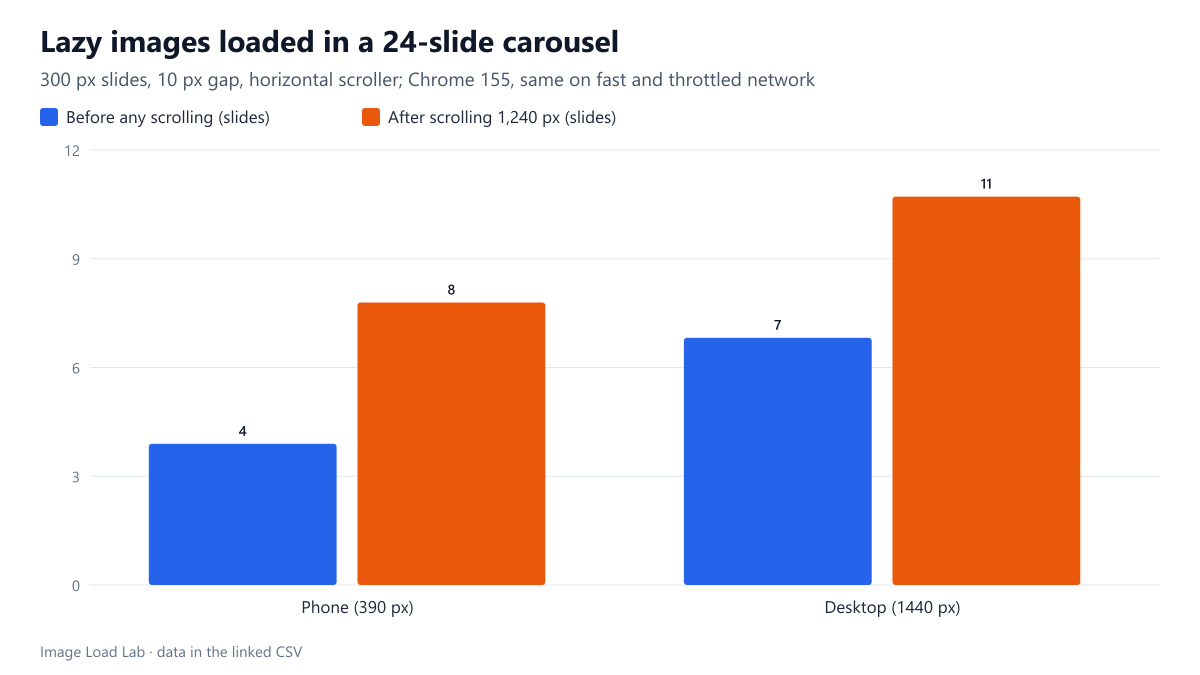
Chrome loaded only the first few slides. On the phone it requested 4 of the 24 slides before any scrolling, and 7 on the desktop. The other 17 to 20 slides waited. After the carousel was scrolled 1,240 pixels, the count rose to 8 and 11. Network speed made no difference: the fast and throttled runs requested exactly the same slides, in all three repetitions.
| Viewport | Farthest probe loaded (beyond right edge) | Nearest probe not loaded | Runs with this result |
|---|---|---|---|
| Phone, 390 px | 600 px | 650 px | 3 of 3 |
| Desktop, 1440 px | 600 px | 650 px | 3 of 3 |
The sideways look-ahead was about 600 pixels. With the fine probes, the farthest image Chrome requested sat 600 pixels beyond the right edge of the viewport, and the probe at 650 pixels was never requested, on both the phone and the desktop viewport and in all three runs. That matches the carousel: on the phone, slide 4 starts 540 pixels past the visible edge and was loaded, while slide 5 starts 850 pixels past it and was not.
For comparison, lazy images below the fold were loaded up to 1,200 pixels away in our vertical distance test, the same distance we found in our earlier test of Chrome’s lazy-loading threshold. Inside a horizontal scroller the margin was about half of that.
What this means for carousels
- Native lazy loading works in carousels. On the phone, the 20 slides beyond the look-ahead cost nothing until the visitor swiped. A JavaScript lazy-loading library is not needed for this.
- Do not lazy-load the first visible slide if the carousel is the main content of the page. It is in the viewport, so Chrome loads it anyway, but lazy images are requested later than eager ones; mark the first slide
loading="eager"and give itfetchpriority="high"only if it is the largest element on screen. - Fast swipes can outrun 600 pixels. A slide is about one swipe away when it is fetched. On a slow connection, the next slide may still be loading when it comes into view; giving slides fixed dimensions avoids layout shifts while they arrive.
- Autoplaying carousels that move slides with
transformrather than by scrolling a container were not part of this test and may behave differently.
Practical conclusion
In a horizontally scrolling carousel, Chrome 155 fetched lazy images only within about 600 pixels to the side of the visible area: 4 of 24 slides on a phone and 7 on a desktop before any interaction. Use loading="lazy" on every slide except the first, and set width and height on all of them.
Limitations
Chrome only, one carousel built with native scrolling, and scrolling done from a script. The 600-pixel figure is precise to 50 pixels. Carousel libraries that move slides with transforms, or that clone slides for infinite loops, need their own test.
Data and files
Download lazy-carousel.csv (12 rows, 0.4 KB) · Download lazy-carousel-fine.csv (6 rows, 0.2 KB) · Method: testing methodology. Photo: image credits.