Lazy-Loaded iframes: Chrome Loads Them Twice as Far Ahead as Images
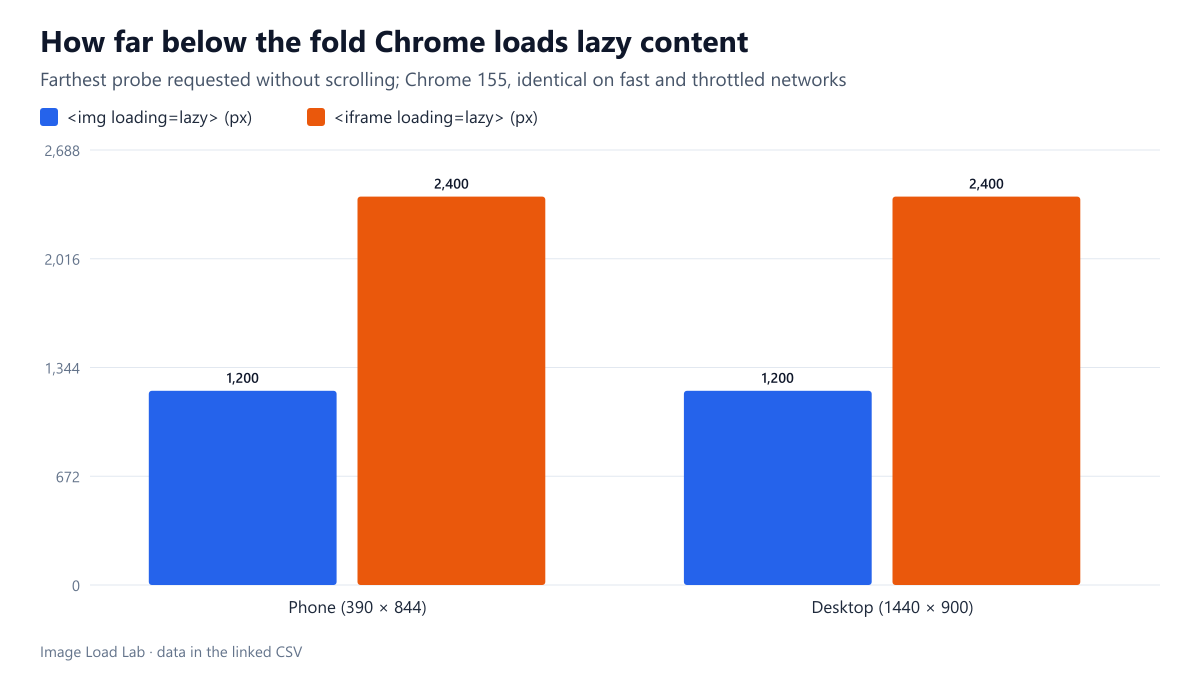
Chrome 155 loaded lazy iframes up to 2,400 pixels below the fold and lazy images up to 1,200 pixels, identically on phone and desktop and on fast and throttled networks.
Video players, maps, social posts and comment widgets usually arrive in an <iframe>, and each one can pull in hundreds of kilobytes of its own scripts and images. Iframes support loading="lazy" just like images. How far below the fold does Chrome start loading a lazy iframe, and is that the same distance it uses for lazy images? We placed probes at measured distances and recorded which ones were requested without any scrolling.
The test
Each test page has an empty first screen and a column of probes placed with absolute positioning at fixed distances below the bottom of the viewport. In the first round, probes sat at 0, 250, 500, 750, 1,000, 1,250, 1,500, 2,000, 2,500, 3,000, 4,000 and 5,000 pixels. Once the boundaries were clear, a second round used finer steps: iframe probes every 100 pixels from 1,500 to 3,500, and image probes every 50 pixels from 700 to 1,450. Iframes loaded a tiny local HTML document; images loaded a small JPEG. Every probe used loading="lazy" and had a unique URL, so our local server could log exactly which ones were requested.
Pages were loaded in Chrome 155.0.8059.82 on a phone viewport (390 × 844, 3× density) and a desktop viewport (1440 × 900), on a fast connection and on a throttled 4G profile (1.6 Mbit/s, 150 ms latency, CPU 4× slower), three times each, and observed for three seconds without scrolling. See the methodology.
Results
| Element | Viewport | Network | Farthest loaded | Nearest not loaded | Runs agreeing |
|---|---|---|---|---|---|
| <img> | Phone | Fast | 1200 px | 1250 px | 3/3 |
| <img> | Phone | Throttled 4G (1.6 Mbit/s, 150 ms) | 1200 px | 1250 px | 3/3 |
| <img> | Desktop | Fast | 1200 px | 1250 px | 3/3 |
| <img> | Desktop | Throttled 4G (1.6 Mbit/s, 150 ms) | 1200 px | 1250 px | 3/3 |
| <iframe> | Phone | Fast | 2400 px | 2500 px | 3/3 |
| <iframe> | Phone | Throttled 4G (1.6 Mbit/s, 150 ms) | 2400 px | 2500 px | 3/3 |
| <iframe> | Desktop | Fast | 2400 px | 2500 px | 3/3 |
| <iframe> | Desktop | Throttled 4G (1.6 Mbit/s, 150 ms) | 2400 px | 2500 px | 3/3 |
Lazy iframes were loaded twice as far ahead as lazy images. Chrome requested every iframe probe up to 2,400 pixels below the fold and none from 2,500 pixels onward. For images, the farthest request was 1,200 pixels below the fold, and the probe at 1,250 pixels was never fetched. The two boundaries were identical on the phone and the desktop viewport, on the fast and the throttled network, and in all 24 runs.
In the coarse first round, the farthest iframe requested was the one at 2,000 pixels and the farthest image the one at 1,000 pixels, which is consistent with the fine result: those were simply the last probes before each boundary.
The image distance matches what we measured in our earlier test of Chrome’s lazy-loading distance, and also our sideways measurement in a horizontal carousel, where the look-ahead was about 600 pixels.
What this means for embeds
- A lazy embed placed about two to three phone screens below the fold still loads at page load. On a 844-pixel-tall phone screen, 2,400 pixels is less than three screens. A video or map in the middle of a typical article will therefore load immediately, lazy attribute or not.
- Embeds near the end of long pages benefit most. Comment widgets and “related videos” blocks beyond 2,500 pixels were not loaded until the visitor scrolled closer.
- For heavy embeds that are not needed right away, a click-to-load placeholder (a static image with a play button that inserts the iframe on click) avoids the load entirely. Native lazy loading only postpones it.
- Do not lazy-load an embed that is in the first screen. It will load anyway, slightly later than an eager one.
Practical conclusion
Chrome 155 loaded lazy iframes up to 2,400 pixels below the fold and lazy images up to 1,200 pixels, regardless of viewport or network speed. Add loading="lazy" to every embed below the first screen, but expect it to help only for embeds more than about 2,500 pixels down the page; for heavier embeds closer to the top, use a click-to-load placeholder.
Limitations
Chrome only. Our probes were tiny local pages, so we measured when the iframe request started, not how much a real third-party embed would download afterwards. Distances were measured to the top edge of each probe, with a resolution of 100 pixels for iframes and 50 pixels for images.
Data and files
Download lazy-iframes.csv (18 rows, 0.6 KB) · Download lazy-iframes-fine.csv (24 rows, 0.8 KB) · Method: testing methodology.