EXIF Orientation: Why Stripped or Converted Photos Turn Sideways
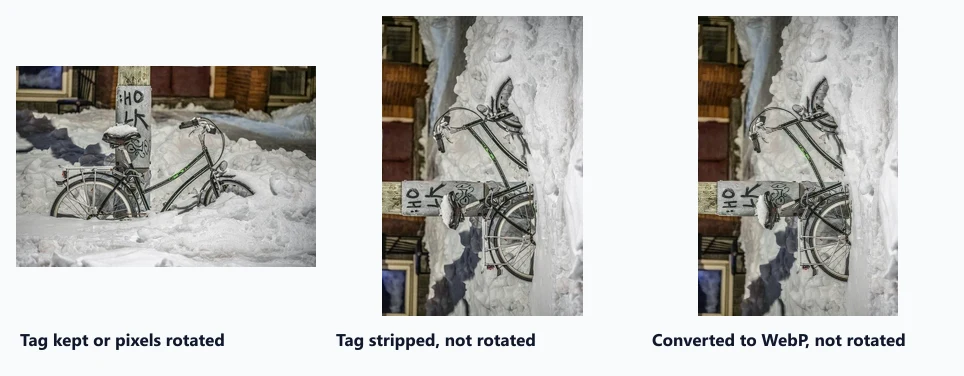
Chrome 155 displayed a tagged camera photo upright as an image, a background and on a canvas. Stripping metadata or converting to WebP without rotating first left it on its side.
Phone cameras often store a photo with its pixels sideways and a small EXIF tag, Orientation, that tells software how to rotate it for display. Image optimisers that strip metadata can remove that tag without rotating the pixels, and the photo suddenly appears on its side. How does Chrome handle the tag in each way of showing an image, and which processing steps break it? We built a camera-style photo and tested nine variants.
The test
We took a landscape CC0 photo of a bicycle, resized it to 600 × 401 pixels and created a “camera-style” JPEG: pixels rotated a quarter turn so they are stored as 401 × 600, plus Orientation = 6 (rotate 90° clockwise to display). From that file we made: a copy with metadata stripped by sharp 0.35.5’s default output (which does not rotate); a copy rotated with sharp’s .rotate(), which applies the tag to the pixels and then drops it; and WebP conversions with and without .rotate(). We displayed them in Chrome 155.0.8059.82 as plain <img> elements, and showed the camera-style file in three more ways: with CSS image-orientation: none, as a CSS background, and drawn onto a canvas. Orientation was read from the displayed box or from where the image’s pixels landed in a screenshot. See our methodology.
Results
| File or display method | Stored pixels | EXIF orientation tag | Shown upright? |
|---|---|---|---|
| Reference: upright JPEG | 600×401 | none | Yes |
| Camera-style JPEG (pixels sideways + Orientation 6) | 401×600 | 6 | Yes |
| Same file with CSS image-orientation: none | 401×600 | 6 | No, sideways |
| Same file as a CSS background | 401×600 | 6 | Yes |
| Same file drawn on a canvas | 401×600 | 6 | Yes |
| Metadata stripped without rotating | 401×600 | none | No, sideways |
| Rotated with sharp .rotate(), tag removed | 600×401 | none | Yes |
| Converted to WebP without rotating | 401×600 | none | No, sideways |
| Converted to WebP after .rotate() | 600×401 | none | Yes |
Chrome honoured the orientation tag everywhere by default. The camera-style JPEG appeared upright as an <img>, as a CSS background and when drawn on a canvas. Only image-orientation: none displayed the raw sideways pixels, as that property is meant to.
Stripping the tag without rotating broke the photo. The stripped copy stored the same sideways pixels with no instruction to rotate them, so Chrome showed it on its side. Its file was 687 bytes smaller than the camera-style original, the cost of keeping the photo usable.
Format conversion broke it the same way. Converting the camera-style JPEG to WebP without rotating first produced a sideways image, because the conversion did not carry the tag over. Converting after .rotate() gave an upright WebP.
Rotating first fixed both problems. The .rotate() copies were upright everywhere and contained no orientation tag, so later stripping or conversion could no longer turn them sideways.
How to avoid sideways photos
- Apply the orientation before removing metadata or converting format. In sharp, call
.rotate()with no arguments; in ImageMagick,-auto-orient; in libvips,autorot. - Test your pipeline with a real phone photo taken in portrait mode. It is the most common case that carries a tag.
- Strip metadata after orienting, which also removes location data, as our EXIF metadata test recommends for privacy.
- Do not rely on
image-orientationto fix sideways files; it only chooses whether to apply an existing tag.
Practical conclusion
Chrome 155 displayed a tagged camera photo upright as an image, a CSS background and on a canvas. Stripping metadata or converting to WebP without first applying the tag left the photo sideways. Always auto-rotate before you strip or convert.
Limitations
One orientation value (6) of the eight defined by EXIF, one browser and sharp’s behaviour; other tools may copy or drop the tag differently during conversion. We used a resized photo with a tag we added ourselves, not a file straight from a phone.
Data and files
Download exif-orientation.csv (9 rows, 0.7 KB) · Method: testing methodology. Photo: image credits.