picture for Dark Mode and Reduced Motion: What Chrome Downloads
With prefers-color-scheme and prefers-reduced-motion sources, Chrome downloaded only the matching image, and fetched the other chart only when the colour scheme changed.
The <picture> element can switch images on any media query, not only on screen width. Two useful cases are a dark version of a chart or diagram for visitors who use a dark colour scheme, and a still image instead of an animation for visitors who have asked their system to reduce motion. Does Chrome download only the version it shows, and what happens when the visitor’s setting changes while the page is open? We tested both with Chrome’s media emulation.
The test
For the colour scheme test, we generated two versions of a simple 800 × 450 PNG chart: dark bars and text on white, and lighter bars and text on a near-black background. The page used this markup:
<picture>
  <source media="(prefers-color-scheme: dark)" srcset="chart-dark.png">
  <img src="chart-light.png" width="800" height="450" alt="Chart">
</picture>
We loaded it in Chrome 155.0.8059.82 once with a light and once with a dark colour scheme emulated. After the load we switched the scheme and waited 1.2 seconds, then recorded which file was shown and how many requests were made.
For the motion test, we generated a 12-frame animated GIF of a moving dot (7,430 bytes) and a still PNG of its first frame (1,638 bytes). We put them in a <picture> with a (prefers-reduced-motion: reduce) source for the still image, then loaded the page with and without reduced motion emulated. See our methodology.
Results
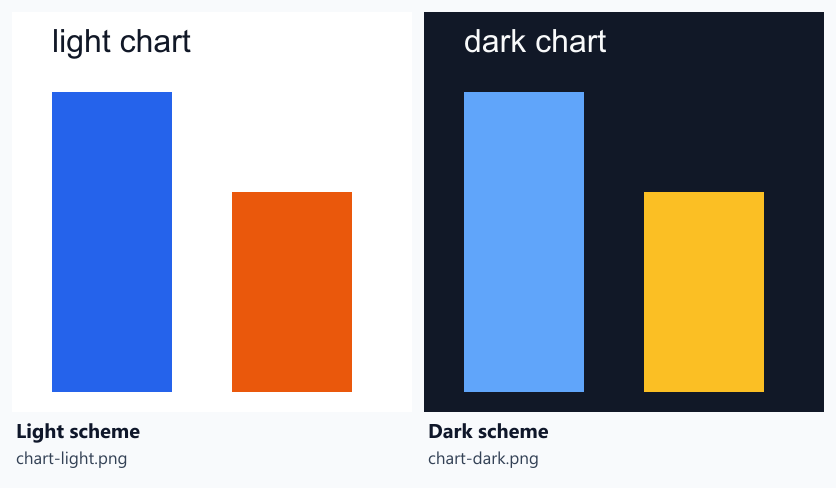
| Colour scheme at load | Image requests at load | Shown | Switched to | Shown after switch | Extra requests |
|---|---|---|---|---|---|
| light | 1 | chart-light.png | dark | chart-dark.png | 1 |
| dark | 1 | chart-dark.png | light | chart-light.png | 1 |
Only the matching version was downloaded at load. With a light scheme, Chrome requested and showed chart-light.png and nothing else. With a dark scheme, it requested only chart-dark.png.
Switching the scheme while the page was open swapped the image. Chrome made one new request for the other version and displayed it, in both directions. The visitor gets the right chart without reloading, at the cost of one extra download the first time they switch.
| prefers-reduced-motion | Image requests | File shown | Bytes transferred |
|---|---|---|---|
| no-preference | 1 | anim.gif | 7,605 B |
| reduce | 1 | still.png | 1,813 B |
Reduced motion worked the same way. Without the preference, Chrome downloaded and played the GIF (7,605 bytes transferred). With reduced motion, it downloaded only the still PNG (1,813 bytes) and never requested the animation.
What this means
- Theme-aware images cost nothing extra for most visitors. Each visitor downloads one version. Only those who change their scheme while reading pay for a second file.
- Respecting reduced motion can also save bytes. In our small test the still image was a quarter of the size of the animation. Real animations have more frames and larger dimensions, so the absolute saving grows with them.
- Keep the alternative text the same for both versions. The
altattribute belongs to the<img>and applies whichever source is shown, so describe the content, not the colours. - Combine with other sources carefully. The browser uses the first
<source>that matches. If you also switch formats or sizes, each combination needs its own<source>in the right order, as covered in our source selection test.
The CSS equivalent
For decorative images set in CSS, the same media features work inside a stylesheet:
.hero { background-image: url(hero-light.webp); }
@media (prefers-color-scheme: dark) {
  .hero { background-image: url(hero-dark.webp); }
}
@media (prefers-reduced-motion: reduce) {
  .banner { background-image: url(banner-still.webp); }
}
We did not measure this variant here. Background images are discovered later than <img> tags, as our discovery timing test shows, so keep important images in the HTML.
Practical conclusion
With <picture> and a prefers-color-scheme or prefers-reduced-motion source, Chrome 155 downloaded only the image matching the visitor’s setting. When the colour scheme changed after load, it fetched and showed the other version without a reload. That makes these media queries a cheap way to serve dark-mode charts and still alternatives to animations.
Limitations
Settings emulated through Chrome’s DevTools protocol rather than changed in the operating system, small synthetic test images, Chrome only. We did not test switching reduced motion while the page was open.
Data and files
Download dark-mode-picture.csv (2 rows, 0.2 KB) · Download reduced-motion-picture.csv (2 rows, 0.1 KB) · Method: testing methodology.