Low-Content Images and LCP: Testing Chrome’s 0.05 Bits-per-Pixel Rule
Chrome 155 ignored a hero image at 0.039 bits per pixel and counted one at 0.051, confirming the low-content threshold that keeps placeholders and flat backgrounds out of LCP.
Since Chrome 112 (2023), according to Chrome’s published LCP changelog, Chrome has excluded “low-content” images from Largest Contentful Paint: images that carry very little data for their size, such as solid-colour backgrounds or heavily blurred placeholders. The documented threshold is 0.05 bits per displayed pixel. Does Chrome 155 apply that threshold, and where exactly is the line? We compressed the same hero image to nine sizes and watched which ones Chrome accepted as the LCP element.
The test
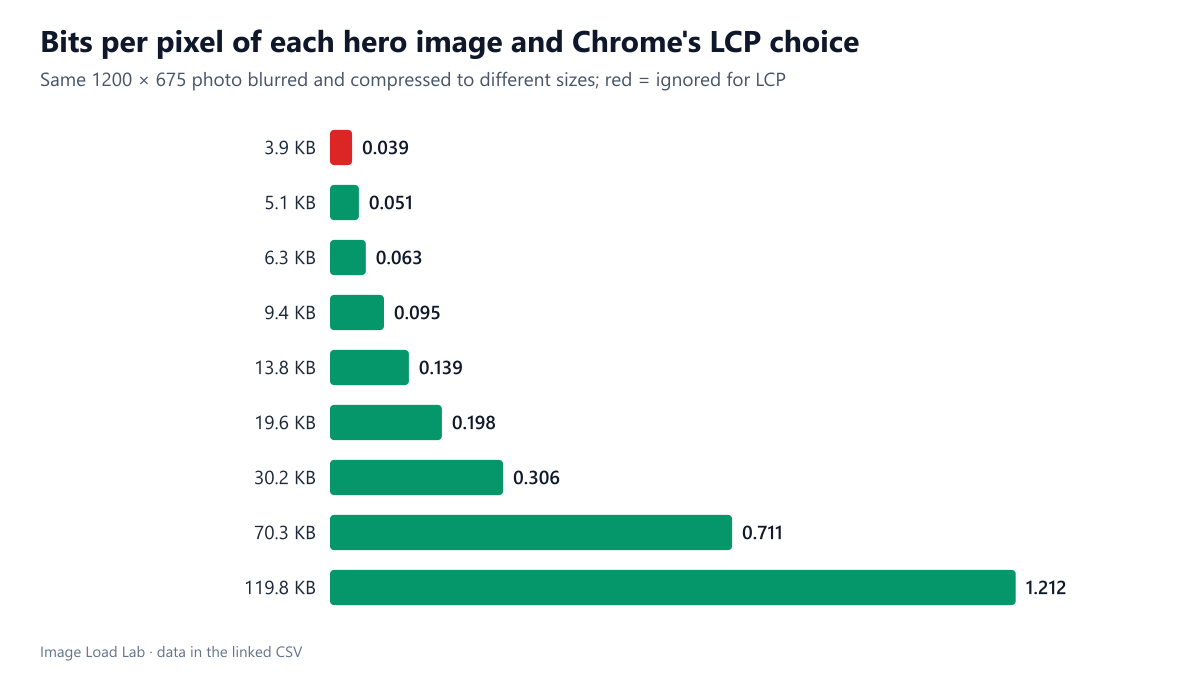
We took one CC0 photo of a beach and sky, cropped it to 1200 × 675 pixels and saved nine versions, blurring it more strongly and compressing it harder for the smaller files. They ranged from 3.9 KB to 119.8 KB. Each version was displayed at exactly its own size (810,000 pixels) below a large heading, so that the heading was the natural alternative LCP candidate. Bits per pixel were calculated as file bytes × 8 ÷ 810,000. Every page was loaded three times in Chrome 155.0.8059.82 on a desktop viewport over a fast local connection, with a PerformanceObserver recording LCP entries. See our methodology.
Results
| Hero file | Bytes | Bits per pixel | LCP element | Median LCP |
|---|---|---|---|---|
| lowent-b60-q20.jpg | 3,961 | 0.0391 | the heading | 56 ms |
| lowent-b40-q25.jpg | 5,173 | 0.0511 | the hero image | 68 ms |
| lowent-b30-q30.jpg | 6,406 | 0.0633 | the hero image | 56 ms |
| lowent-b20-q35.jpg | 9,655 | 0.0954 | the hero image | 56 ms |
| lowent-b12-q40.jpg | 14,119 | 0.1394 | the hero image | 56 ms |
| lowent-b8-q50.jpg | 20,029 | 0.1978 | the hero image | 64 ms |
| lowent-b4-q60.jpg | 30,968 | 0.3059 | the hero image | 76 ms |
| lowent-b1-q70.jpg | 71,940 | 0.7105 | the hero image | 84 ms |
| lowent-b0.3-q80.jpg | 122,683 | 1.2117 | the hero image | 96 ms |
The line sat between 0.039 and 0.051 bits per pixel. The 3.9 KB version, at 0.039 bits per pixel, was never reported as LCP: the heading above it took that role in all three runs. The 5.1 KB version, at 0.051, was accepted as the LCP element every time, and so was every larger version. That brackets the documented 0.05 threshold.
The image did not have to look detailed to count. The 5.1 KB version was a heavy blur with almost no visible detail, yet it passed. The rule is about bytes per pixel, not about what the image looks like.
Where you meet this rule
- Blurred placeholders are far below the threshold: a 24-pixel placeholder stretched over a hero carries a few hundred bytes for hundreds of thousands of pixels. That is why, in our placeholder test, Chrome never reported a placeholder as LCP and waited for the real photo.
- Simple SVG drawings and solid backgrounds shown as images are also excluded. In our LCP element test, a 170-byte SVG covering the hero area was ignored.
- Extremely compressed hero images close to the line can switch between counting and not counting when you change quality or dimensions, which changes the reported LCP from the image to whatever text is largest.
What to do with it
- Do not compress a hero below the threshold to “remove” it from LCP. The visitor still waits for it; only the number changes.
- Expect text to be your LCP when the hero is decorative and very light. Then the text’s font loading and render-blocking CSS matter more than the image.
- Check which element is LCP in DevTools’ Performance panel or Lighthouse before optimising; it may not be the one you assume.
Practical conclusion
Chrome 155 ignored a hero image at 0.039 bits per pixel and counted one at 0.051, confirming the 0.05 low-content threshold. Placeholders, flat backgrounds and tiny SVGs fall below it and never become the LCP element; real photos at normal quality are far above it.
Limitations
One photo, one display size and no images between 0.039 and 0.051 bits per pixel, so the exact threshold is bracketed rather than pinpointed. Chrome computes the ratio from the encoded body size it received and the displayed area; for images displayed larger or smaller than their natural size, the ratio changes accordingly.
Data and files
Download lcp-low-entropy.csv (9 rows, 0.5 KB) · Method: testing methodology. Photo: image credits.