Which Elements Count as LCP? img, Background, Poster, SVG and Canvas Tested
Chrome 155 counted a hero as LCP when it was an img, a CSS background, a video poster or an SVG image element. On a canvas, in an iframe or as a gradient it was ignored, and LCP stayed at the text.
Largest Contentful Paint (LCP) measures when the biggest piece of content in the first screen is painted. Chrome only considers some kinds of elements: images, text and a few related cases. A hero banner can be built in many ways, though: an <img>, a CSS background, a video poster, an SVG, a canvas. Which of these does Chrome actually count as the LCP element? We built the same hero eight ways and read what Chrome reported.
The test
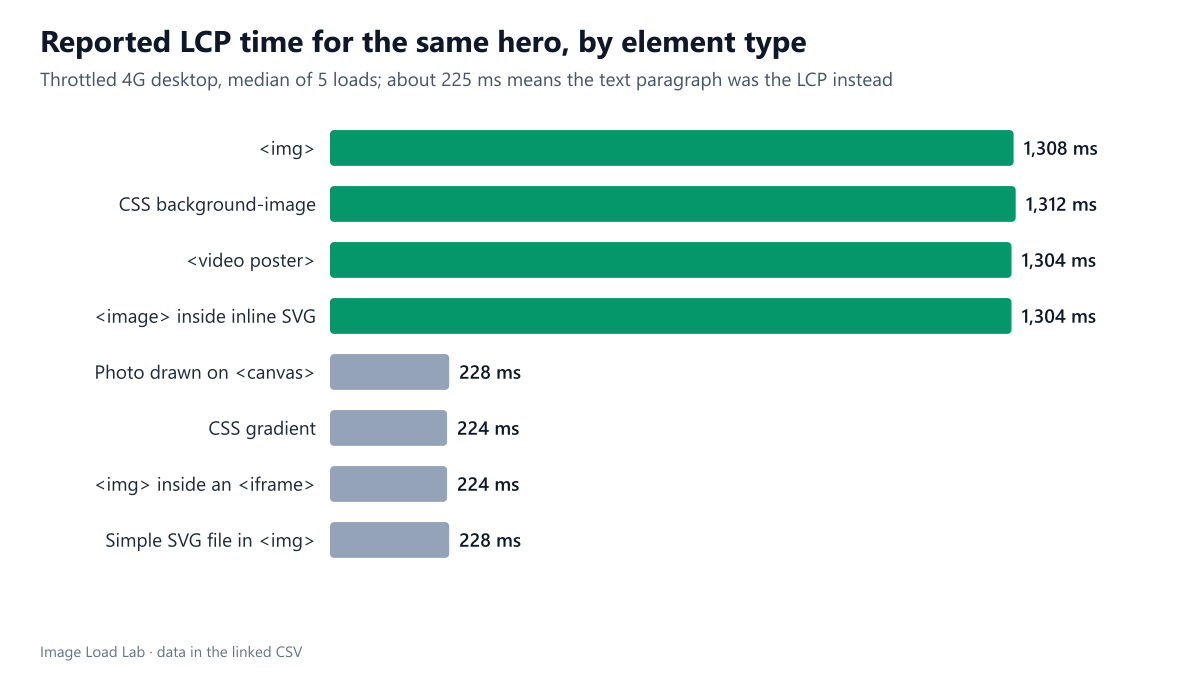
Each page has a short paragraph of text followed by a 1200 × 625-pixel hero. The hero shows the same 1600-pixel CC0 sunset photo (182 KB) as an <img>, as a CSS background-image, as the poster of an empty <video>, as an <image> inside inline SVG, drawn onto a <canvas> by a script, and as an <img> inside an <iframe>. Two more versions use no photo at all: a CSS gradient and a 170-byte SVG drawing loaded with <img>. Pages were loaded five times each in Chrome 155.0.8059.82 on a desktop viewport (1440 pixels), throttled to 1.6 Mbit/s with 150 ms latency and a 4× slower CPU, with a PerformanceObserver recording every LCP entry. See our methodology.
Results
| Hero element | Element Chrome reported as LCP | Median LCP | Same in all 5 runs |
|---|---|---|---|
| <img> | the hero | 1,308 ms | yes |
| CSS background-image | the hero | 1,312 ms | yes |
| <video poster> | the hero | 1,304 ms | yes |
| <image> inside inline SVG | the hero | 1,304 ms | yes |
| Photo drawn on <canvas> | the text paragraph | 228 ms | yes |
| CSS gradient | the text paragraph | 224 ms | yes |
| <img> inside an <iframe> | the text paragraph | 224 ms | yes |
| Simple SVG file in <img> | the text paragraph | 228 ms | yes |
Four forms counted as the hero. The <img>, the CSS background, the video poster and the SVG <image> all became the LCP element, at a median of 1,304 to 1,312 ms, when the photo finished loading. Before that, Chrome reported the text paragraph as a first candidate, then replaced it with the hero.
Four forms were invisible to LCP. With the photo drawn on a <canvas>, with a CSS gradient, with the photo inside an <iframe> and with the simple SVG drawing, Chrome kept the small text paragraph as the LCP element, at about 225 ms, in all five runs. The page looked complete only when the hero appeared, but the metric did not reflect it.
- Canvas and gradients are not image content for LCP; Chrome does not consider them.
- An iframe is a separate document. Its images can be LCP candidates for the framed page, but they are not reported to the parent page.
- The 170-byte SVG carries almost no data for its size, 0.002 bits per displayed pixel. In our low-entropy image test, Chrome ignored images below about 0.05 bits per pixel, which explains why this simple drawing did not count.
What this means
- The same visual result can produce very different LCP numbers. A canvas or gradient hero looks the same to a visitor as an image hero, but leaves LCP at the time of the text. That can make a page look faster in reports than it feels.
- A CSS background or video poster counts just like an image, so optimising it matters for LCP. Background images are found later than
<img>elements, as our CSS background test measured. - Do not change your hero to “improve” the metric. Turning a photo into a canvas or an iframe hides it from LCP but does not make it load any faster for the visitor.
Practical conclusion
In Chrome 155, a hero photo counted for LCP when it was an <img>, a CSS background, a video poster or an SVG <image>, at about 1.3 seconds on our throttled profile. Drawn on a canvas, placed in an iframe, or replaced by a gradient or a tiny SVG, it was ignored, and LCP stayed at the text paragraph’s 225 ms. Optimise whichever form you use; treat LCP for the other forms with caution.
Limitations
Chrome only. Other browsers that report LCP may differ in details. One hero size and one photo; the order of candidates depends on what else is on the page.
Data and files
Download lcp-candidates.csv (8 rows, 0.4 KB) · Method: testing methodology. Photo: image credits.