Do Blurred Placeholders Improve LCP? Four Techniques Tested
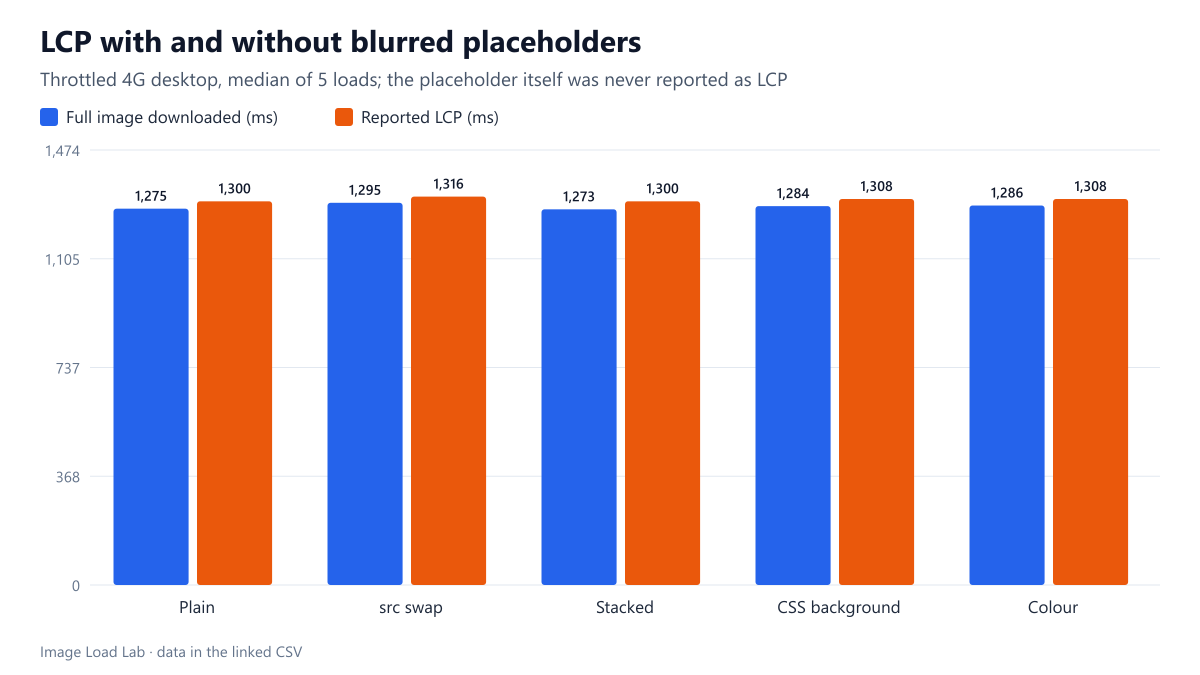
Chrome 155 never counted a blurred placeholder as the LCP element. In every setup LCP was the full photo at 1,300 to 1,316 ms; a script-swapped src started the real image slightly later.
Showing a tiny blurred version of a photo while the real one loads is a common technique, and some articles claim it improves Largest Contentful Paint because “something appears sooner”. Does a blurred placeholder change the LCP time Chrome reports, and does the way it is implemented matter? We tested four placeholder techniques against a plain image.
The test
The page has a line of small text and a 1200 × 625-pixel hero (a 182 KB CC0 sunset photo). The placeholder was a 24-pixel JPEG of the same photo, 321 bytes, embedded as a data URI and stretched with a CSS blur. The five setups were: a plain <img> with no placeholder; an <img> that shows the placeholder first and whose src a script swaps to the full photo once it has loaded; the full image stacked on top of a blurred placeholder image; the placeholder as a CSS background behind the full image; and a single dominant-colour background. Each was loaded five times in Chrome 155.0.8059.82 on a throttled desktop profile (1.6 Mbit/s, 150 ms latency, 4× CPU), recording every LCP entry and the network timing of the full image. See our methodology.
Results
| Setup | LCP candidates seen | Final LCP element | Median LCP | Full image requested at |
|---|---|---|---|---|
| Plain <img>, no placeholder | 2 | full photo | 1,300 ms | 174 ms |
| Tiny blurred image, src swapped by JS | 2 | full photo | 1,316 ms | 193 ms |
| Full image stacked over a blurred one | 2 | full photo | 1,300 ms | 176 ms |
| Blurred placeholder as CSS background | 2 | full photo | 1,308 ms | 185 ms |
| Dominant colour background | 2 | full photo | 1,308 ms | 185 ms |
The placeholder was never an LCP candidate. In every setup Chrome reported two LCP entries: first the small text paragraph, then the full photo. The blurred placeholder, although it covered the whole hero area long before the photo arrived, was never reported. At 321 bytes over 750,000 pixels it carries about 0.003 bits per pixel, far below the 0.05 threshold that Chrome uses to ignore low-content images, as our low-entropy test confirmed.
LCP was the full photo’s paint in every case. The median LCP ranged from 1,300 to 1,316 ms, between 21 and 27 ms after the full image finished downloading. Placeholders neither helped nor hurt the metric.
The script-swap version was slightly later. Its full image was requested at 193 ms instead of about 175–185 ms in the others, because the request came from a script rather than from the HTML, and its LCP was the latest at 1,316 ms. The difference is small here, but on a page with more scripts, a hero that waits for JavaScript can start much later; a plain <img> in the HTML is found by the browser’s preload scanner immediately.
So why use a placeholder?
- For perceived speed. A blurred preview or a colour block tells visitors that something is coming and avoids a white hole. That has value even though LCP does not change.
- Keep it cheap. Our placeholder size test found that a 24-pixel WebP takes about 160 bytes and a dominant colour about 20 characters of CSS.
- Keep the real image in the HTML. Stacking or using a CSS background placeholder lets the browser fetch the full photo as early as possible; swapping
srcfrom a script does not. - Width and height still matter. The placeholder does not prevent layout shift unless the image has its dimensions set.
Practical conclusion
Blurred placeholders did not change the reported LCP in Chrome 155: the placeholder was ignored and LCP was the full photo at 1,300–1,316 ms in all setups. Use placeholders for perceived speed, implement them so the real image stays in the HTML, and improve LCP by making the real image smaller and discoverable early.
Limitations
One placeholder size and one photo. A much larger placeholder (for example a 200-pixel image) could pass the 0.05 bits-per-pixel threshold and then count as an LCP candidate. Chrome only.
Data and files
Download lcp-placeholder.csv (5 rows, 0.5 KB) · Method: testing methodology. Photo: image credits.