Fade-In Effects and LCP: Which Entrance Animations Delay It
A hero faded in by JavaScript after loading reported LCP 1,027 ms after the image arrived. CSS keyframe fades, a transform slide-in and an early reveal did not delay LCP in Chrome 155.
Fading or sliding images into view is a popular design touch. Chrome does not count content painted at zero opacity towards Largest Contentful Paint, so an entrance effect could, in principle, push the LCP time later than the moment the image actually arrived. Which entrance effects delay LCP, and by how much? We tested six versions of the same hero image on a throttled connection.
The test
Each page has a line of small text and a 1200 × 625-pixel hero image (a 182 KB CC0 sunset photo). The six versions were: no effect; a CSS @keyframes fade from opacity: 0 to 1 over one second; the same fade starting from opacity: 0.1; an inline opacity: 0 that a script changes to 1 with a one-second transition when the image’s load event fires; an image at opacity: 0 revealed by a timer after one second; and a one-second slide-in using transform. Each was loaded five times in Chrome 155.0.8059.82 on a desktop viewport, throttled to 1.6 Mbit/s with 150 ms latency and a 4× slower CPU. We recorded when the image finished downloading and the LCP time Chrome reported. See our methodology.
Results
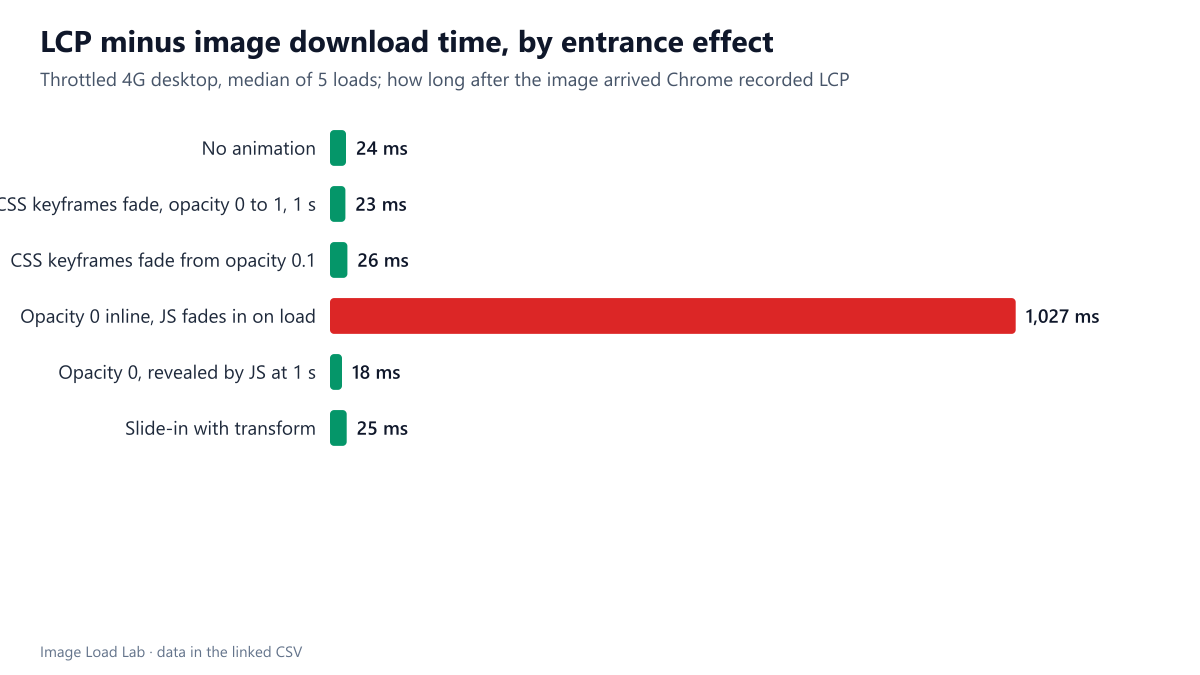
| Entrance effect | Image downloaded | Median LCP | LCP − download |
|---|---|---|---|
| No animation | 1,289 ms | 1,312 ms | 24 ms |
| CSS keyframes fade, opacity 0 to 1, 1 s | 1,288 ms | 1,308 ms | 23 ms |
| CSS keyframes fade from opacity 0.1 | 1,285 ms | 1,312 ms | 26 ms |
| Opacity 0 inline, JS fades in on load | 1,277 ms | 2,300 ms | 1,027 ms |
| Opacity 0, revealed by JS at 1 s | 1,286 ms | 1,308 ms | 18 ms |
| Slide-in with transform | 1,282 ms | 1,308 ms | 25 ms |
Only one pattern delayed LCP: the script-driven fade on load. When the image started at an inline opacity: 0 and a script faded it in after the load event, Chrome recorded LCP 1,027 ms after the image had arrived, at a median of 2,300 ms instead of about 1,310 ms. The image was on screen and loading was over; the metric still waited for the fade to complete.
CSS keyframe fades did not delay LCP in our test. Fading from 0 or from 0.1 with a CSS animation gave LCP 23–26 ms after the download, the same as no effect at all. The slide-in with transform behaved the same way.
Timing matters for the hidden-then-revealed pattern. The image held at opacity: 0 and revealed after one second did not delay LCP here, because the reveal happened before the image finished downloading at about 1,290 ms. On a faster connection, the image would arrive first and wait for the timer, and LCP would move to the reveal time.
Why the patterns differ
Chrome skips paints at zero opacity when it looks for LCP candidates, and records the element when it is painted visibly. With the script-driven fade, the image is fully loaded but stays transparent until the script reacts, and our measurements show LCP landing at the end of the one-second transition. With the CSS keyframe animations, Chrome reported LCP right after the first paint of the loaded image, even though that first frame of the animation was transparent or nearly so. We report what we observed; the details of how Chrome treats animations are an implementation choice that may change between versions.
What to do
- Do not hide the LCP image with inline
opacity: 0and reveal it from a script. It cost about a second of reported LCP, the full length of the fade. - If you want an entrance effect on a hero, use a CSS animation that runs on its own, and keep it short. Better still, keep effects for content below the first screen.
- Remember that the visitor’s experience is what matters. A one-second fade on the main image delays the moment they see it clearly, whether or not the metric records it.
Practical conclusion
In Chrome 155, a hero that a script faded in after loading reported LCP 1,027 ms after the image arrived; CSS keyframe fades, a transform slide-in and an early timer reveal did not delay it. Avoid script-driven reveals on the LCP image.
Limitations
Chrome only, one image and one-second effects. The order of events depends on network speed: on faster connections, patterns that wait for a timer or an event will delay LCP more. Libraries that animate with JavaScript every frame were not tested.
Data and files
Download lcp-fade-in.csv (6 rows, 0.3 KB) · Method: testing methodology. Photo: image credits.