Chrome’s Image Priorities: Medium, Low and the Boost to High
Chrome 155 gave the first five images Medium priority and the rest Low, then raised only the images in the first screen to High once the page was laid out.
Chrome does not download every image with the same urgency. Each request gets a priority, from Lowest to Highest, which decides the order in which requests go out when they compete. Images usually start low and can be raised once the browser knows where they sit on the page. Which priority does Chrome give the images on a long page, when does it raise them, and what does that change? We loaded a page of ten identical images and watched the priorities through the DevTools protocol.
The test
The page had a heading and ten copies of the same 800 × 600 CC0 JPEG (54 KB), each with a different query string, separated by short paragraphs. The first three were displayed 600 CSS pixels wide, the other seven 300 pixels wide. None had loading or fetchpriority attributes. We loaded the page three times on a phone viewport and three times on a desktop viewport in Chrome 155.0.8059.82, throttled to 150 ms latency and 1.6 Mbit/s with the CPU slowed four times. For each image, we recorded its position, its initial priority, any change of priority, and when its download finished. See our methodology.
Results
| Viewport | Image | Top (px) | In first screen | Initial priority | Raised to | Finished |
|---|---|---|---|---|---|---|
| mobile | 1 | 64 | yes | Medium | High | 1,995 ms |
| mobile | 2 | 413 | yes | Medium | High | 2,010 ms |
| mobile | 3 | 761 | yes | Medium | High | 2,010 ms |
| mobile | 4 | 1110 | no | Medium | – | 2,013 ms |
| mobile | 5 | 1391 | no | Medium | – | 2,025 ms |
| mobile | 6 | 1672 | no | Low | – | 2,040 ms |
| mobile | 7 | 1953 | no | Low | – | 3,210 ms |
| mobile | 8 | 2234 | no | Low | – | 3,242 ms |
| mobile | 9 | 2515 | no | Low | – | 3,257 ms |
| mobile | 10 | 2796 | no | Low | – | 3,257 ms |
| desktop | 1 | 64 | yes | Medium | High | 1,961 ms |
| desktop | 2 | 570 | yes | Medium | High | 1,977 ms |
| desktop | 3 | 1076 | no | Medium | – | 1,992 ms |
| desktop | 4 | 1582 | no | Medium | – | 1,992 ms |
| desktop | 5 | 1863 | no | Medium | – | 2,008 ms |
| desktop | 6 | 2144 | no | Low | – | 2,008 ms |
| desktop | 7 | 2425 | no | Low | – | 3,161 ms |
| desktop | 8 | 2706 | no | Low | – | 3,207 ms |
| desktop | 9 | 2987 | no | Low | – | 3,222 ms |
| desktop | 10 | 3268 | no | Low | – | 3,223 ms |
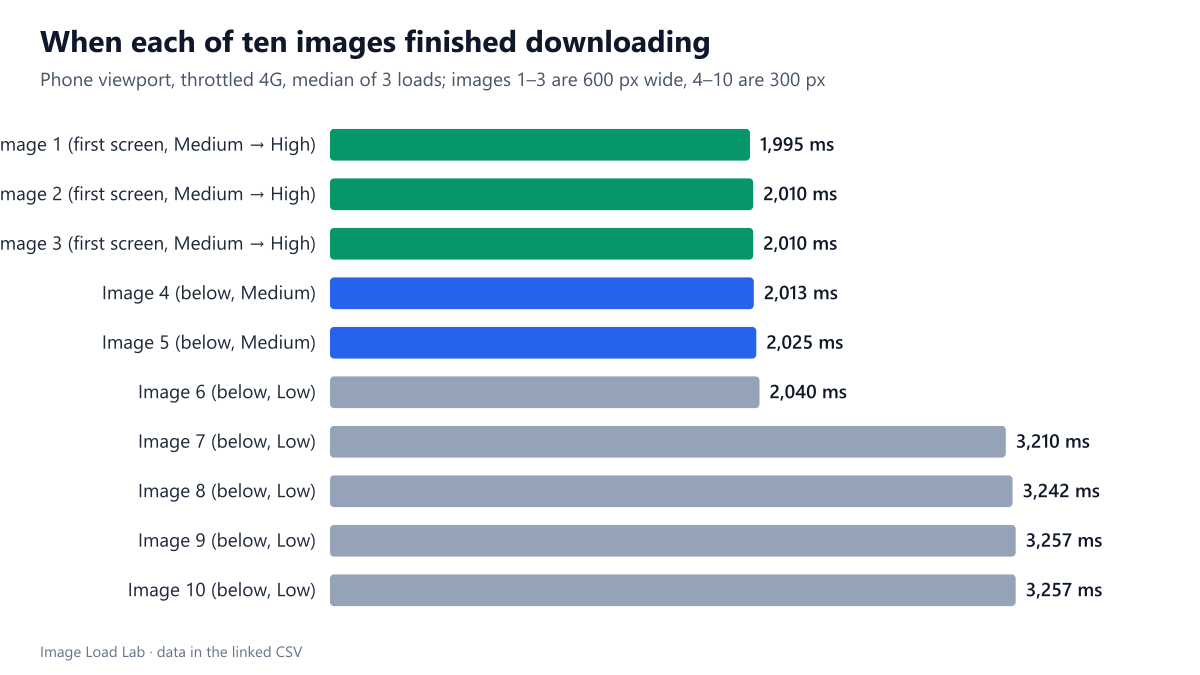
The first five images started at Medium, the rest at Low. This happened on both viewports and in every run, regardless of where the images ended up on screen. The rule follows document order, not visibility: image 4 and 5 were far below the first screen and still started at Medium.
Once the page was laid out, Chrome raised the visible images to High. On the phone, images 1 to 3 were in the first screen and were raised. On the desktop, the third image sat just below the fold and stayed at Medium, so only images 1 and 2 were raised.
The finish times show a second limit. Images 1 to 6 finished together at about 2.0 seconds, and images 7 to 10 at about 3.2 seconds on both viewports. Our local server used HTTP/1.1, where Chrome opens at most six connections to one host, so the first six images downloaded side by side and the next four waited for a free connection. In this setup, priority changed the order of the queue, but the connection limit decided which images shared the bandwidth.
What this means
- Chrome’s default already favours early, visible images, but only after layout. Until the CSS is applied, an image is just a position in the HTML.
- Mark the main image with
fetchpriority="high". That makes it High from the start, before layout, and was the only setting that satisfied Lighthouse’s LCP checks in our Lighthouse test. - Lazy-load images below the first screen. Without
loading="lazy", all ten images here were downloaded on page load, and below-the-fold images 4 to 6 took bandwidth from the visible ones. Our lazy-loading test measures that effect. - Under HTTP/2 or HTTP/3, all requests share one connection, so priorities matter more than in our HTTP/1.1 run. Our HTTP/2 test showed images downloading side by side and the first one finishing much later.
Seeing priorities on your own page
In Chrome DevTools, open the Network panel, right-click a column header and enable “Priority”. With “Big request rows” turned on in the panel’s settings, the column shows both the initial and the final priority, for example “Medium → High”. Reload with throttling so that the requests are spread out. If your LCP image shows Low or Medium at first, add fetchpriority="high" to it. If many below-the-fold images show Medium, they are among the first five in the HTML. Lazy-loading them, or moving them later in the document, frees bandwidth for the image that matters.
Practical conclusion
Chrome 155 gave the first five images Medium priority and the rest Low, then raised only the images in the first screen to High after layout. On our HTTP/1.1 test server, the six-connection limit decided which images finished first as much as priority did. Give the main image fetchpriority="high" and lazy-load the rest so that early, invisible images do not compete with it.
Limitations
One page layout, identical images, a local HTTP/1.1 server and Chrome only; three loads per viewport. The priorities Chrome assigns can change between versions. Other browsers use their own schemes.
Data and files
Download image-priority.csv (20 rows, 0.8 KB) · Method: testing methodology. Photo: image credits.