Image Decode Time in Chrome: JPEG vs WebP vs AVIF vs PNG
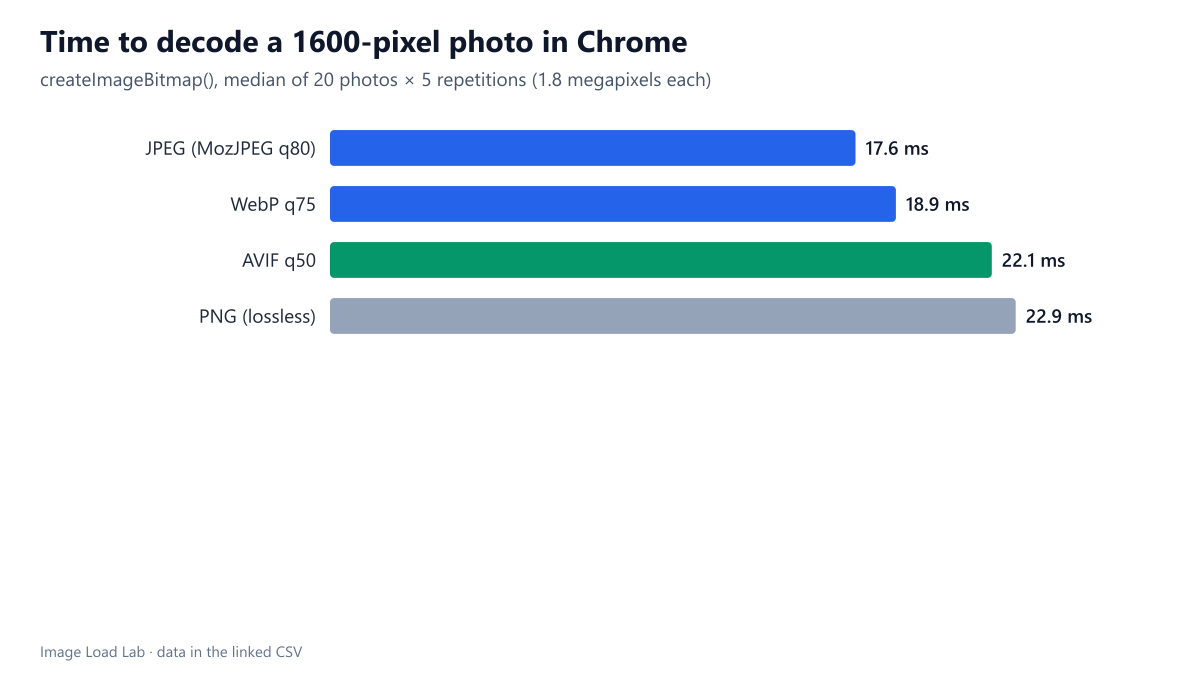
Decoding a 1.8-megapixel photo took a median 17.6 ms as JPEG, 18.9 ms as WebP, 22.1 ms as AVIF and 22.9 ms as PNG, tiny next to the download time AVIF's smaller files save.
AVIF files are smaller than JPEG at the same quality, but AVIF is also known to be more complex to decode. If decoding took much longer, part of the download saving could be lost on the device. How long does Chrome take to decode the same photo as JPEG, WebP, AVIF and PNG? We timed 400 decodes of our 20 test photos.
The test
Each of our 20 CC0 photos at 1600 pixels (1.8 megapixels) was saved with sharp 0.35.5 as MozJPEG quality 80, WebP quality 75, AVIF quality 50 and lossless PNG. A test page fetched all 80 files into memory first, so the network played no part, and then decoded each one with createImageBitmap(), timing it with performance.now(). Every file was decoded five times. The browser was Chrome 155.0.8059.82 on our desktop (Intel Core i5-13400F). We repeated the whole run with Chrome’s DevTools CPU throttling set to 4× to see whether it slowed decoding. See our methodology.
Results
| Format | Median file KB | Median decode | 90th percentile | With DevTools CPU 4× slowdown |
|---|---|---|---|---|
| JPEG (MozJPEG q80) | 190 | 17.6 ms | 33.8 ms | 18.6 ms |
| WebP q75 | 151 | 18.9 ms | 48.4 ms | 18.9 ms |
| AVIF q50 | 94 | 22.1 ms | 37.1 ms | 21.8 ms |
| PNG (lossless) | 3,095 | 22.9 ms | 29.0 ms | 24.0 ms |
All four formats decoded in about 20 ms. The median 1.8-megapixel photo took 17.6 ms as JPEG, 18.9 ms as WebP, 22.1 ms as AVIF and 22.9 ms as PNG. AVIF was 26 % slower than JPEG at the median, a difference of 4.5 ms per photo.
Decoding time is small next to download time. The median AVIF here was 94 KB and the JPEG 190 KB. On the 1.6 Mbit/s connection we use for throttled tests, those extra 96 KB take roughly half a second to download, about a hundred times the 4.5 ms decoding difference.
WebP had the widest spread. Its 90th-percentile decode took 48.4 ms, more than the other formats, although its median was close to JPEG’s.
DevTools CPU throttling did not slow decoding. With 4× throttling the medians were practically unchanged (18.7, 18.9, 21.8 and 24.0 ms). That suggests the decoding work ran outside the page’s throttled main thread. It also means that DevTools’ “slow phone” CPU setting did not simulate slower image decoding in our test.
What this means
- AVIF’s decoding cost is not a reason to avoid it. On our machine it added 4.5 ms per 1.8-megapixel photo, while its smaller file saved far more time on any real connection; our format comparison measured AVIF 29 % smaller than MozJPEG at equal quality.
- On slow phones, decoding is slower for every format. Phone CPUs are several times slower than our desktop; the ratio between formats is what this test can show, not phone timings.
- Very large images are a different matter. A 12-megapixel camera photo has almost seven times the pixels of our 1.8-megapixel test images, and decoding work grows with the number of pixels; shown as a thumbnail, most of that work and most of its bytes are wasted. Sizing images for their slot, as our dimensions test shows, saves both.
- The
decodingattribute changes when decoding happens relative to rendering, not how long it takes; our decoding attribute test found no LCP difference between its values.
Practical conclusion
In Chrome 155 on a desktop CPU, a 1.8-megapixel photo decoded in a median 17.6 ms as JPEG, 18.9 ms as WebP, 22.1 ms as AVIF and 22.9 ms as PNG. The extra milliseconds of AVIF are tiny compared with the download time its smaller files save.
Limitations
One desktop machine; mobile decode times were not measured, and DevTools throttling cannot simulate them. createImageBitmap() measures decoding from memory, including some overhead that a browser’s own image pipeline may not have.
Data and files
Download decode-time.csv (800 rows, 46.7 KB) · Method: testing methodology. Photos: image credits.