decoding=”async” Tested: Does It Change LCP or Blocking Time?
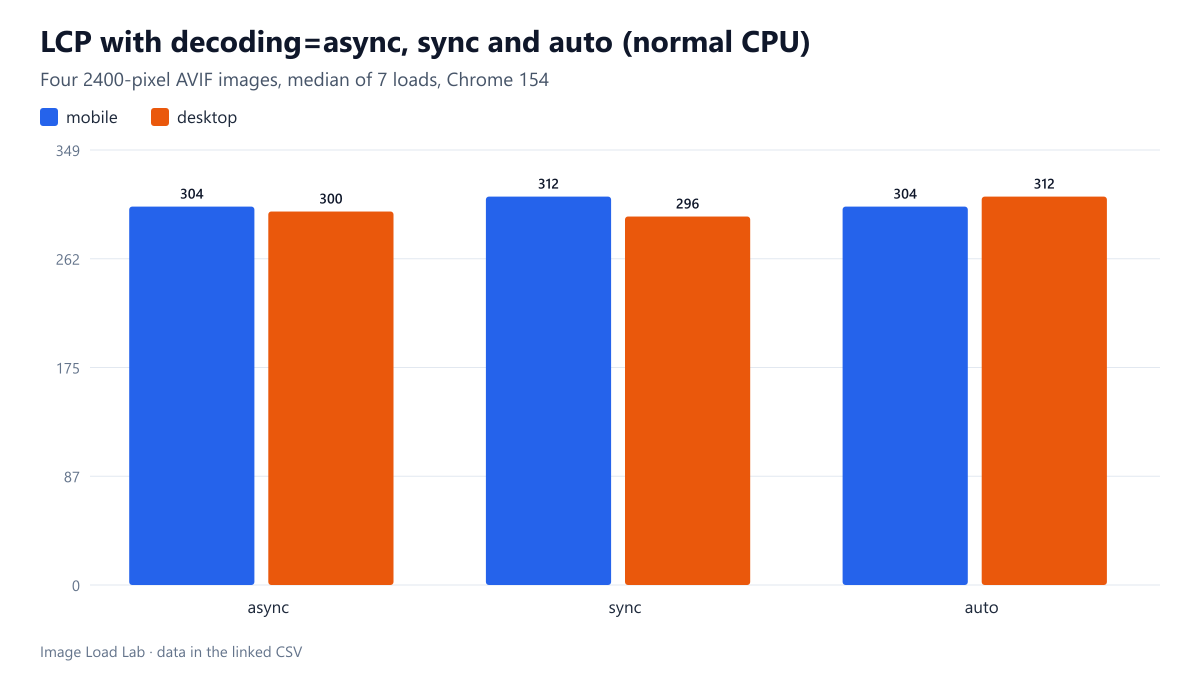
With four 2400-pixel AVIF images, decoding=async, sync and auto gave LCP within 16 ms of each other and no long tasks, with a normal and a 4× slower CPU.
The decoding attribute on an image is a hint: async tells the browser it may decode the image off the critical path, sync asks it to decode before presenting the next frame, and auto (the default) leaves the decision to the browser. Many performance checklists recommend adding decoding="async" everywhere. Does it measurably change when the main image appears, or how long the page’s main thread is blocked? We built a page with four large AVIF photos and tested all three values on two viewports, with a normal and a four-times-slower CPU.
The test page
The page holds four CC0 photos encoded as 2400 × 1350 AVIF (quality 55), between 100 and 180 KB each, so that decoding is real work. AVIF was chosen because it is the most expensive of the common formats to decode. The first image is the Largest Contentful Paint element. Three versions of the page differ only in the attribute on every image: decoding="async", "sync" or "auto".
Each version was loaded seven times per condition in a fresh Chrome 154 profile: mobile (390 × 844 at 3×) and desktop (1440 × 900 at 1×), with a fast network so that decoding rather than downloading dominated, and once more with the CPU slowed four times through the DevTools Protocol. We recorded LCP and every long task (main-thread work over 50 ms). Details are in the methodology.
Results
| decoding | Viewport | CPU | Median LCP (ms) | Fastest–slowest (ms) | Blocking time (ms) |
|---|---|---|---|---|---|
| async | mobile | normal | 304 | 296–316 | 0 |
| sync | mobile | normal | 312 | 300–324 | 0 |
| auto | mobile | normal | 304 | 300–336 | 0 |
| async | desktop | normal | 300 | 296–316 | 0 |
| sync | desktop | normal | 296 | 264–304 | 0 |
| auto | desktop | normal | 312 | 288–344 | 0 |
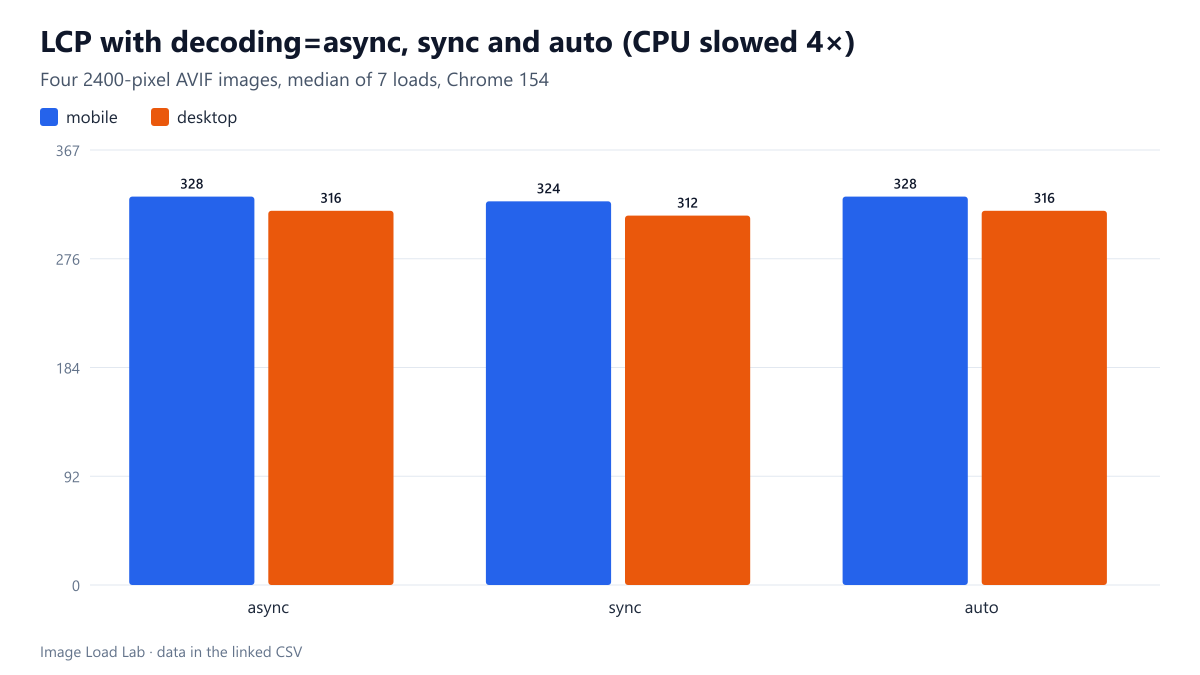
| async | mobile | 4× slower | 328 | 320–348 | 0 |
| sync | mobile | 4× slower | 324 | 304–340 | 0 |
| auto | mobile | 4× slower | 328 | 308–336 | 0 |
| async | desktop | 4× slower | 316 | 284–336 | 0 |
| sync | desktop | 4× slower | 312 | 292–324 | 0 |
| auto | desktop | 4× slower | 316 | 304–328 | 0 |
With a normal CPU, the median LCP was 296 to 312 ms on desktop and 304 to 312 ms on mobile, whatever the attribute. With the CPU slowed four times it was 312 to 316 ms on desktop and 324 to 328 ms on mobile. In every condition, the spread between the three values (at most 16 ms) was smaller than the spread between repeated runs of the same value (up to 56 ms). In other words, we could not measure any effect.
Not one run of any version recorded a long task. The image decoding never blocked the main thread for more than 50 ms, even with four 2400-pixel AVIF files and a throttled CPU.
Why there was no difference
Chrome already decodes images on separate raster threads, outside the main thread, for ordinary <img> elements. The decoding hint mainly affects whether the browser waits for a decode before showing a frame that contains the image. On a page where images are part of the initial load, the browser was not waiting anyway. The hint can still matter in other situations that this test did not cover, such as swapping an image’s src with JavaScript during an animation, where decoding="sync" can avoid a frame without the image and async can avoid a stutter.
Practical conclusion
- For ordinary content images,
decoding="async"made no measurable difference to LCP or main-thread blocking in Chrome 154 in our test. Adding it is harmless; expecting a speed-up from it is not supported by this data. - Spend the effort on things that did move LCP in our other tests: not lazy-loading the hero (lazy-loading test), keeping the hero out of external CSS (CSS background test) and sending the right file size (srcset test).
- WordPress adds
decoding="async"to content images automatically. That is fine; you do not need a plugin for it.
How this connects to our other tests
A negative result is still useful when it points somewhere else. Across the lab’s loading tests, the changes that moved Largest Contentful Paint were all about what the browser can discover and how many bytes it must download: lazy-loading the hero cost 160 to 244 ms (lazy-loading test), a hero inside an external stylesheet cost about 186 ms (CSS background test), and a missing sizes value quadrupled the download on desktop (srcset test). Decoding hints, like the priority hints in our priority test, did not show a measurable effect in our lab. Spend effort in that order.
If you maintain a theme or plugin, the practical takeaway is to leave the attribute alone rather than to strip it or to add sync: neither direction changed anything we could measure, and WordPress already sets async on content images by default.
Repeat this test on your own images
To check whether image decoding is a problem on your own page, record a page load in Chrome’s Performance panel with a 4× CPU slowdown and look at the Main track for long tasks while images arrive. Decoding normally appears on separate raster threads; if you see long Image Decode tasks on the main thread, they are usually caused by JavaScript that waits for images (for example img.decode() in a slider) or by very large images drawn onto a canvas, not by the decoding attribute. A useful second check is the Rendering panel’s paint flashing: if large images appear in several steps, the issue is download speed, which only a smaller file fixes. The three test pages and the seven-run measurement used here are in build_pages.mjs and run_loading.mjs in our scripts archive, along with the long-task counter that recorded zero long tasks in every run.
Limitations
One browser engine, a desktop CPU slowed by emulation rather than a real low-end phone, and four images. Safari and Firefox implement the hint differently. JavaScript-driven image swaps, very large galleries and canvas drawing were not tested.
Data and files
Download loading-decoding.csv (12 rows, 1.7 KB) · Method: testing methodology. Photos: image credits.