CMYK JPEGs on the Web: File Size and Colour in Chrome
CMYK JPEGs were three to four times larger than sRGB versions without a profile, and up to 21 times larger with sharp's 939 KB print profile embedded. Their colours shifted visibly in Chrome.
Images prepared for print are often saved as CMYK JPEGs: four channels of cyan, magenta, yellow and black ink instead of the red, green and blue of screens. They regularly end up on websites when a print file is reused. Browsers can display them, but what do they cost in bytes, and how do their colours compare with an sRGB version of the same photo? We converted four photos and displayed them in Chrome.
The test
Four of our CC0 photos (a market sign, a flower, a dish of food and a sunset) were resized to 800 pixels and saved with sharp 0.35.5 at JPEG quality 90 three ways: as an ordinary sRGB JPEG; converted to CMYK with sharp’s built-in CMYK profile embedded, as a print workflow would deliver it; and converted to CMYK without any embedded profile. Each file was shown in Chrome 155.0.8059.82 at its natural size, and we compared screenshots of the CMYK versions with the sRGB version pixel by pixel. See our methodology.
Results
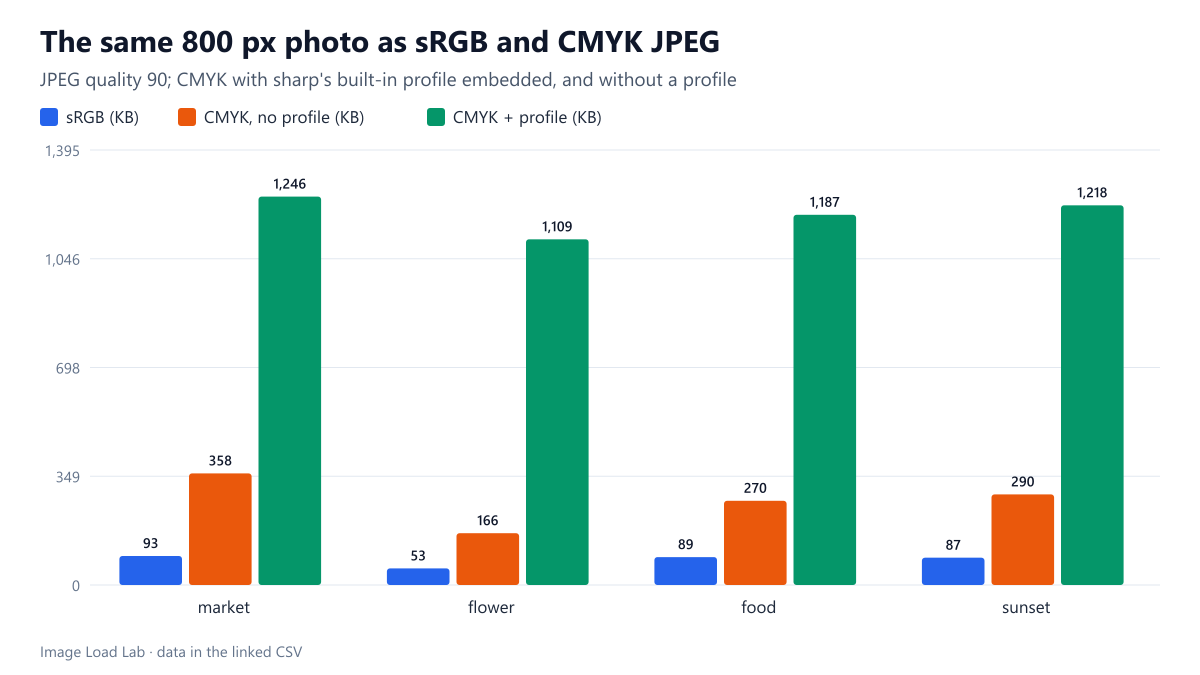
CMYK files were several times larger. The sRGB JPEGs weighed 53 to 93 KB. Without a profile, the CMYK versions weighed 166 to 358 KB, about three to four times as much. A CMYK JPEG stores four channels instead of three, and it cannot use the brightness-plus-colour encoding that lets an RGB JPEG compress colour so efficiently. With the embedded profile, every file grew by another 939 KB, the size of sharp’s built-in CMYK profile, to between 1.1 and 1.2 MB.
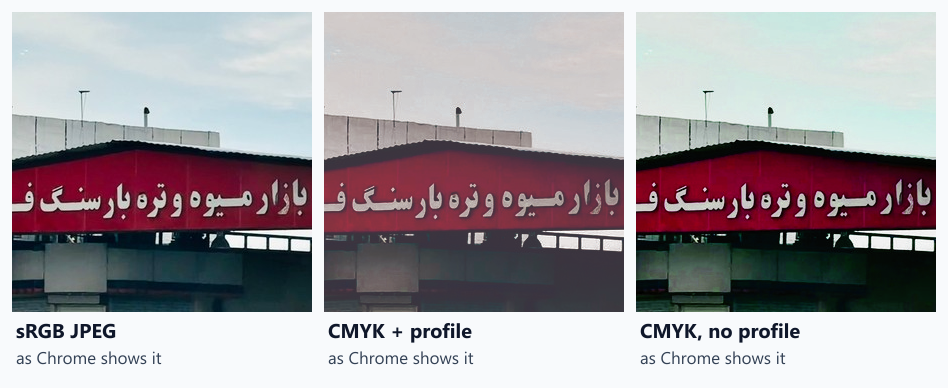
Colours changed visibly. In Chrome’s screenshots, the CMYK files with a profile differed from the sRGB versions by a mean of 28 to 42 RGB units per pixel, and the files without a profile by 10 to 23. The crops show the kind of change: with the profile, the pale blue sky turns pinkish grey and the image loses contrast; without it, the sky takes on a cyan tint. Converting to a print colour space and back cannot keep every screen colour, and without a profile Chrome has to guess how the ink values map to screen colours.
| Photo | File | Channels | Embedded profile | Bytes | Chrome: mean colour distance from sRGB version |
|---|---|---|---|---|---|
| market | market-srgb.jpg | 3 | none | 95,259 | reference |
| market | market-cmyk.jpg | 4 | 961,644 B | 1,275,475 | 36.2 |
| market | market-cmyk-noprofile.jpg | 4 | none | 366,567 | 21.62 |
| flower | flower-srgb.jpg | 3 | none | 54,663 | reference |
| flower | flower-cmyk.jpg | 4 | 961,644 B | 1,135,130 | 42.15 |
| flower | flower-cmyk-noprofile.jpg | 4 | none | 170,073 | 10.1 |
| food | food-srgb.jpg | 3 | none | 91,562 | reference |
| food | food-cmyk.jpg | 4 | 961,644 B | 1,215,776 | 27.98 |
| food | food-cmyk-noprofile.jpg | 4 | none | 276,620 | 11.86 |
| sunset | sunset-srgb.jpg | 3 | none | 89,576 | reference |
| sunset | sunset-cmyk.jpg | 4 | 961,644 B | 1,246,934 | 30.13 |
| sunset | sunset-cmyk-noprofile.jpg | 4 | none | 297,398 | 22.57 |
What to do with print images
- Convert CMYK images to sRGB before publishing. In our test that cut file sizes by 3 to 20 times and restored the intended screen colours. In sharp,
toColourspace('srgb'); in ImageMagick,-colorspace sRGBwith the source profile applied. - Ask for screen versions of print assets. A designer exporting “for web” from the original file will produce better colours than any conversion of the print JPEG.
- Check uploads for CMYK. A 1 MB JPEG that is only 800 pixels wide is a strong hint; image tools and DevTools show the colour space.
- Convert before uploading to a CMS. We did not test how WordPress handles CMYK uploads; converting first is the reliable route, as described in our upload workflow.
Practical conclusion
CMYK JPEGs were 3 to 4 times larger than sRGB without a profile and about 13 to 21 times larger with sharp’s embedded print profile, and their colours shifted visibly in Chrome. Convert print images to sRGB before they go on a web page.
Limitations
Our CMYK files were converted from sRGB photos with sharp’s built-in profile; real print files use other profiles (often smaller ones) and were never in sRGB, so their colours and sizes will differ. Chrome only; comparisons are of screenshots on a standard sRGB rendering path.
Data and files
Download cmyk.csv (12 rows, 0.7 KB) · Method: testing methodology. Photos: image credits.