Lighthouse Aspect Ratio Audit: It Flags Distortion You Cannot See
Lighthouse 13.5 flagged images stretched by as little as 0.9 %, while visible distortion started around 10 %. The fixes: size by one dimension, crop with object-fit.
An image shown with a different shape from its file is stretched or squashed. It happens easily: a CSS rule fixes the height of a card image, a theme sets both width and height, or width and height attributes do not match the file. Lighthouse’s Best Practices audit “Displays images with correct aspect ratio” is meant to catch it. How much distortion does it take before Lighthouse flags an image, and how visible is that distortion? We displayed the same photo at seven heights.
The test
One test page shows the same 600 × 450 CC0 photo (4:3) seven times, each 300 CSS pixels wide, with heights of 225 pixels (exact), 227, 230, 232, 236, 248 and 270 pixels: distortions of 0.9 %, 2.2 %, 3.1 %, 4.9 %, 10.2 % and 20 %. Each image had matching width and height attributes and CSS dimensions, so the distortion was deliberate and consistent. We ran Lighthouse 13.5.0 twice on its mobile profile in Chrome 155.0.8059.82 and read the image-aspect-ratio audit. See our methodology.
Results
| Displayed size | Height distortion | Flagged by Lighthouse |
|---|---|---|
| 300 x 225 | 0.0 % | no |
| 300 x 227 | 0.9 % | yes |
| 300 x 230 | 2.2 % | yes |
| 300 x 232 | 3.1 % | yes |
| 300 x 236 | 4.9 % | yes |
| 300 x 248 | 10.2 % | yes |
| 300 x 270 | 20.0 % | yes |
Lighthouse flagged every distorted image, down to 0.9 %. Both runs listed all six distorted versions, including the 300 × 227 display of a 4:3 file, where the height is off by two pixels. Only the exactly proportioned image passed.
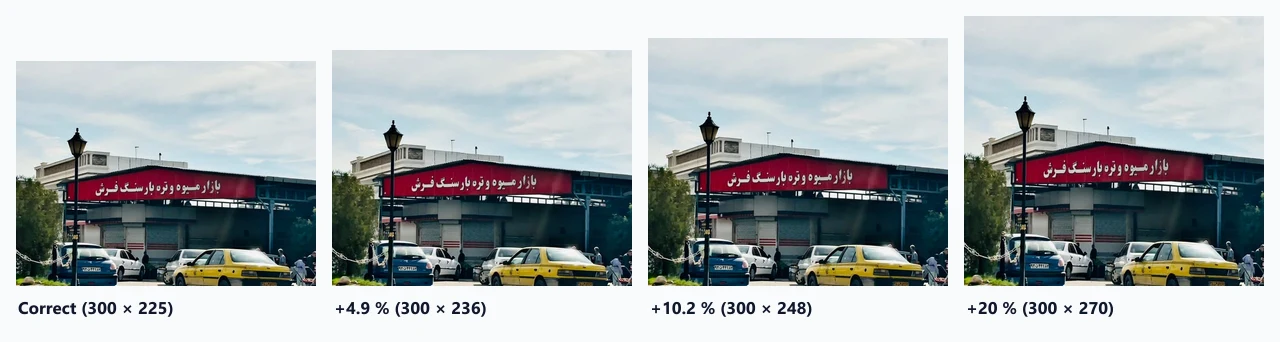
The smallest distortions are not visible. In the figure, the 4.9 % version is hard to tell apart from the correct one; the stretch becomes noticeable around 10 % and obvious at 20 %, especially with people’s faces or round objects. Lighthouse makes no such distinction: one distorted image is enough to fail the audit.
Common causes
- Width and height attributes that do not match the file, for example a theme writing
width="300" height="200"for every thumbnail while the files are 4:3. - CSS that sets both dimensions, such as a card image with
height: 200pxandwidth: 100%, which changes shape with the card’s width. - Rounding in generated thumbnails, where a resize to an odd height produces a ratio slightly different from the attributes.
How to fix it
- Keep CSS to one dimension: set the width and let
height: autofollow the attributes. That also prevents layout shift, as our CLS test shows. - To force a shape, crop instead of stretching:
object-fit: coverfills a fixed box without distortion, at the cost of trimming the edges. Lighthouse does not flagobject-fitimages for aspect ratio. - Generate crops at the right ratio if a layout needs square or wide thumbnails, so that no pixels are wasted or distorted.
A fix in CSS
A typical card grid that forces every image into the same shape can be rewritten so that it crops instead of stretching:
/* before: stretches when the file is not exactly 3:2 */
.card img { width: 100%; height: 200px; }

/* after: same box, no distortion */
.card img { width: 100%; aspect-ratio: 3 / 2; height: auto; object-fit: cover; }
The second rule keeps the layout stable, because aspect-ratio reserves the space before the image loads, and lets the browser trim the excess instead of distorting it. If important parts of the photo are cut off, adjust object-position or generate a dedicated crop.
Practical conclusion
Lighthouse 13.5 flagged images distorted by as little as 0.9 %, far below what anyone would notice; visible stretching started around 10 %. Fix the cause anyway, because the same mistakes produce visible distortion on other screen widths: size images by one dimension and crop with object-fit when a fixed shape is needed.
Limitations
One photo, one page and Lighthouse’s mobile profile. We did not test images inside <picture> with art direction, where the displayed ratio legitimately differs between sources. The statement about object-fit follows Lighthouse’s documentation of the audit; we did not include an object-fit case in this run.
Data and files
Download lh-image-aspect-ratio.csv (7 rows, 0.2 KB) · Method: testing methodology. Photo: image credits.