SVG vs PNG for Interface Icons: Bytes and Sharpness Measured
Twelve line icons as one Brotli-compressed SVG sprite weighed 456 bytes, less than a single 48-pixel PNG of the clock icon, and stayed sharp at every screen density.
The question: for the small interface icons every site has (search, menu, close, download, mail), is SVG or PNG the lighter and sharper choice, and does WebP change the answer? We drew a set of 12 common line icons as SVG, exported each one as PNG at three pixel sizes, and measured bytes and on-screen sharpness.
How the icon set was built
The 12 icons (search, home, menu, close, download, upload, settings, image, chart, mail, clock, check) were written by hand as 24 × 24 SVG line icons with a 2-pixel stroke and round joins, the style used by most modern icon sets. They are synthetic test assets, not a copy of any icon library. For each icon we measured:
- the SVG file as written, and the same file compressed with gzip (level 9) and Brotli, the two encodings a web server applies to text;
- PNG exports at 24, 48 and 96 pixels (1×, 2× and 4× of a 24-pixel slot), rendered by librsvg through sharp 0.35.5 and then optimised with oxipng 10.2.1 (
-o 4 --strip all); - lossless WebP versions of the same PNGs.
We also combined all 12 SVGs into one sprite file using <symbol> elements, which is how many sites ship icon sets.
Results: bytes
| Icon | SVG raw | SVG Brotli | PNG 24 px | PNG 48 px | PNG 96 px | WebP lossless 48 px |
|---|---|---|---|---|---|---|
| search | 236 | 157 | 434 | 848 | 1512 | 614 |
| home | 233 | 147 | 311 | 486 | 641 | 370 |
| menu | 217 | 143 | 101 | 135 | 189 | 96 |
| close | 214 | 146 | 197 | 283 | 398 | 234 |
| download | 247 | 152 | 206 | 288 | 428 | 228 |
| upload | 246 | 151 | 191 | 284 | 430 | 226 |
| settings | 312 | 196 | 308 | 556 | 1110 | 424 |
| image | 293 | 181 | 313 | 570 | 1002 | 408 |
| chart | 227 | 154 | 127 | 167 | 238 | 108 |
| 255 | 161 | 300 | 491 | 841 | 352 | |
| clock | 236 | 158 | 498 | 1073 | 1883 | 754 |
| check | 208 | 141 | 178 | 251 | 327 | 210 |
| ALL (sprite / sum) | 2543 | 456 | 3164 | 5432 | 8999 | 4024 |
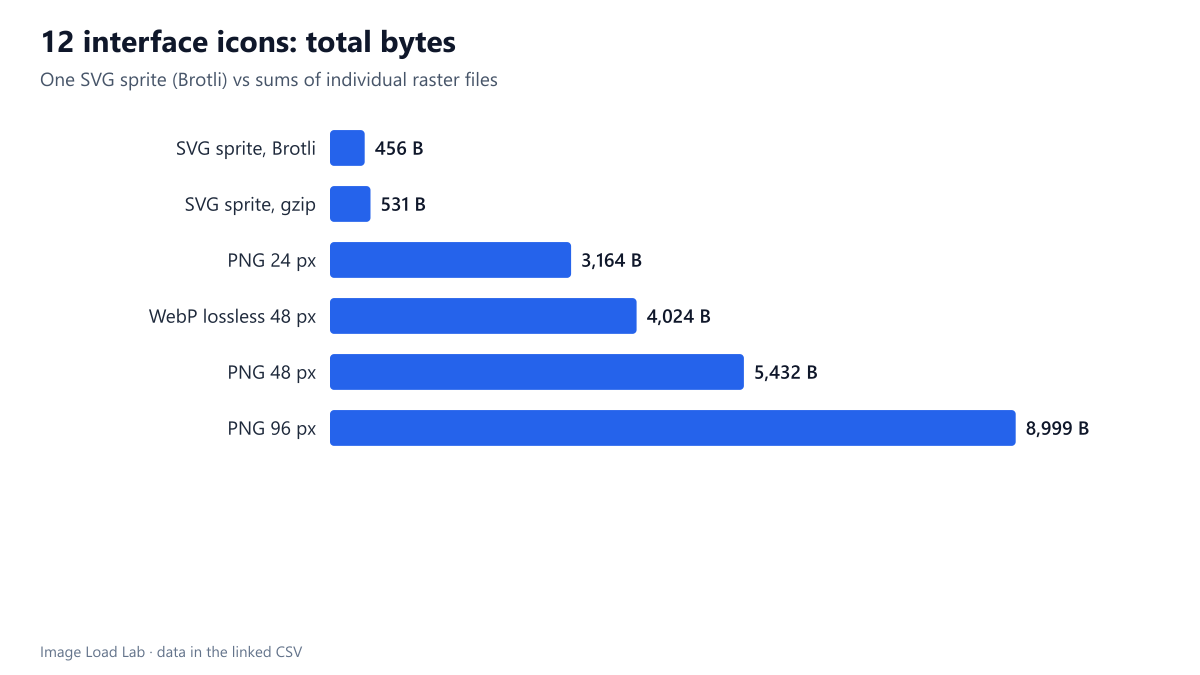
Raw SVG files were between 208 and 312 bytes. After Brotli, which is what a server with compression enabled actually sends, they shrank to 141–196 bytes. A 24-pixel PNG ranged from 101 bytes (the three-line menu icon) to 498 bytes (the clock), and the PNG grows quickly with pixel size: the whole set weighed 3,164 bytes at 24 px, 5,432 bytes at 48 px and 8,999 bytes at 96 px. Lossless WebP trimmed those totals by 19–26 %.
The sprite result is the most useful number: all 12 icons in a single SVG file took 456 bytes with Brotli, less than a single 48-pixel PNG of the clock icon. Because the sprite’s paths share attributes and structure, compression works across icons, and one request replaces twelve.
Results: sharpness on a high-density screen
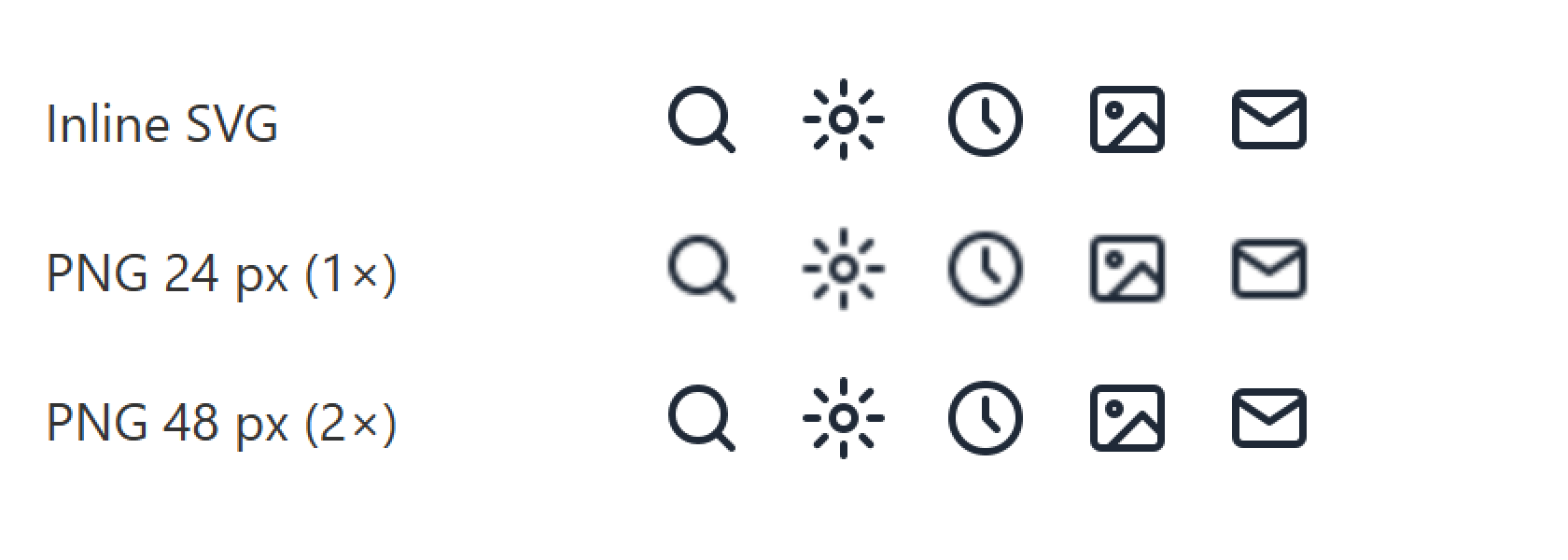
Bytes are only half the decision. The screenshot above was captured by Chrome at a device pixel ratio of 2 and is shown enlarged. A 24-pixel PNG displayed in a 24-pixel slot must be stretched to 48 device pixels and turns soft. A 48-pixel PNG is sharp at that density but still becomes soft at DPR 3, and it doubles the bytes. The SVG is drawn at whatever density the screen has.
Why individual small files are the wrong comparison
A 150-byte icon sent as its own request still costs HTTP headers in both directions, often several hundred bytes, plus a place in the request queue. That overhead is larger than the icon itself, whatever the format. The real choice is between an inline SVG or a single sprite on one side, and a sprite sheet or individual raster files on the other. The data above favours SVG on both counts: smaller and sharper.
When PNG or WebP still makes sense
- Detailed, multi-colour illustrations with gradients and textures, where an SVG export can contain thousands of path points. Measure the exported SVG before assuming it is small.
- Icons generated from photographs or with raster effects (grain, blur, noise).
- Places where SVG is not accepted, such as some email clients and favicon fallbacks.
Practical conclusion
- Use SVG for line and flat interface icons, preferably as a single sprite or inline. Our 12-icon sprite was 456 bytes compressed.
- Always serve SVG with compression enabled: Brotli cut our files by 30–40 %.
- If you must use raster icons, export them at 2× the CSS size, optimise them with oxipng and consider lossless WebP.
- Give meaningful icons an accessible name (
aria-labelor visible text) and hide purely decorative ones witharia-hidden="true". File format does not change that.
Repeat this test on your own images
To check your own icon set, measure what the server actually sends rather than the file on disk. In DevTools, open the Network panel, reload, filter by svg or png and compare the Transferred column with the Size column: the first includes compression and headers. To see the compressed size of an SVG without a server, run gzip -9 -c icon.svg | wc -c or the Brotli equivalent. For sharpness, set your browser’s zoom to 200 % (or use a high-density screen) and look at the icons in their real size; a raster icon smaller than the screen’s pixel density will look soft, as in the screenshot above. Our script run_alpha_icons_dpr.mjs builds the 12 icons, the sprite and the PNG and WebP exports used here.
Limitations
Twelve simple line icons, one stroke style and one rasteriser. Icon sets with fills, many colours or complex shapes will produce larger SVGs. We measured file bytes, not rendering cost: drawing hundreds of complex inline SVGs has a CPU cost that this test did not measure.
Data and files
Download icons.csv (13 rows, 0.7 KB) · Method and versions: testing methodology.