WebP Near-Lossless: Smaller Than Lossless, Cleaner Than Lossy?
Near-lossless WebP at level 60 made screenshots 13.2 % smaller than lossless WebP with a SSIMULACRA2 score of 94. For photographs it stayed almost four times larger than lossy quality 90.
WebP has a mode between lossless and lossy that few people use: near-lossless. It slightly adjusts pixel values before lossless compression, so that the file compresses better while every pixel stays close to the original. How much does near-lossless save compared with true lossless WebP, how close does it stay to the original, and when is it better than ordinary lossy WebP? We tested five settings on screenshots, synthetic graphics and photographs.
The test
We used four real screenshots of an earlier version of this site, four synthetic graphics generated by code (a gradient, a flat illustration, line art and a chart) and eight of our CC0 photos at 1600 pixels. Each image was encoded with cwebp 1.6.0 as lossless (-lossless -m 4), as near-lossless at levels 80, 60, 40 and 20 (-lossless -near_lossless N, where lower means more preprocessing; 100 is off), and as lossy WebP at quality 90 and 75 for comparison. Every file was scored with SSIMULACRA2 against the lossless source, where 100 means identical. Sizes are compared with the true lossless WebP of the same image. See our methodology.
Results
| Image group | cwebp setting | Median KB | vs lossless WebP | Median SSIMULACRA2 | Lowest score |
|---|---|---|---|---|---|
| Screenshots (4) | Lossless | 230.8 | – | 100.0 | 100.0 |
| Near-lossless 80 | 211.8 | −8.3 % | 95.2 | 94.9 | |
| Near-lossless 60 | 198.8 | −13.2 % | 94.0 | 93.6 | |
| Near-lossless 40 | 192.3 | −16.0 % | 91.9 | 91.3 | |
| Near-lossless 20 | 186.4 | −17.9 % | 86.5 | 85.3 | |
| Lossy q90 | 54.1 | −77.6 % | 72.7 | 69.3 | |
| Lossy q75 | 34.5 | −85.8 % | 67.2 | 65.6 | |
| Synthetic graphics (4) | Lossless | 113.4 | – | 100.0 | 100.0 |
| Near-lossless 80 | 114.2 | −1.4 % | 92.4 | 91.9 | |
| Near-lossless 60 | 104.8 | −4.3 % | 92.0 | 90.9 | |
| Near-lossless 40 | 77.4 | −10.2 % | 91.4 | 90.3 | |
| Near-lossless 20 | 56.9 | −19.5 % | 89.7 | 87.4 | |
| Lossy q90 | 24.5 | +14.9 % | 84.4 | 80.2 | |
| Lossy q75 | 16.5 | −22.8 % | 81.5 | 75.6 | |
| Photos (8) | Lossless | 1,952.0 | – | 100.0 | 100.0 |
| Near-lossless 80 | 1,464.1 | −22.5 % | 93.7 | 92.3 | |
| Near-lossless 60 | 1,247.0 | −30.3 % | 92.5 | 91.4 | |
| Near-lossless 40 | 1,187.2 | −36.2 % | 90.3 | 88.8 | |
| Near-lossless 20 | 1,185.6 | −40.5 % | 86.8 | 84.1 | |
| Lossy q90 | 330.2 | −83.6 % | 81.0 | 76.3 | |
| Lossy q75 | 157.7 | −92.3 % | 67.2 | 63.6 |
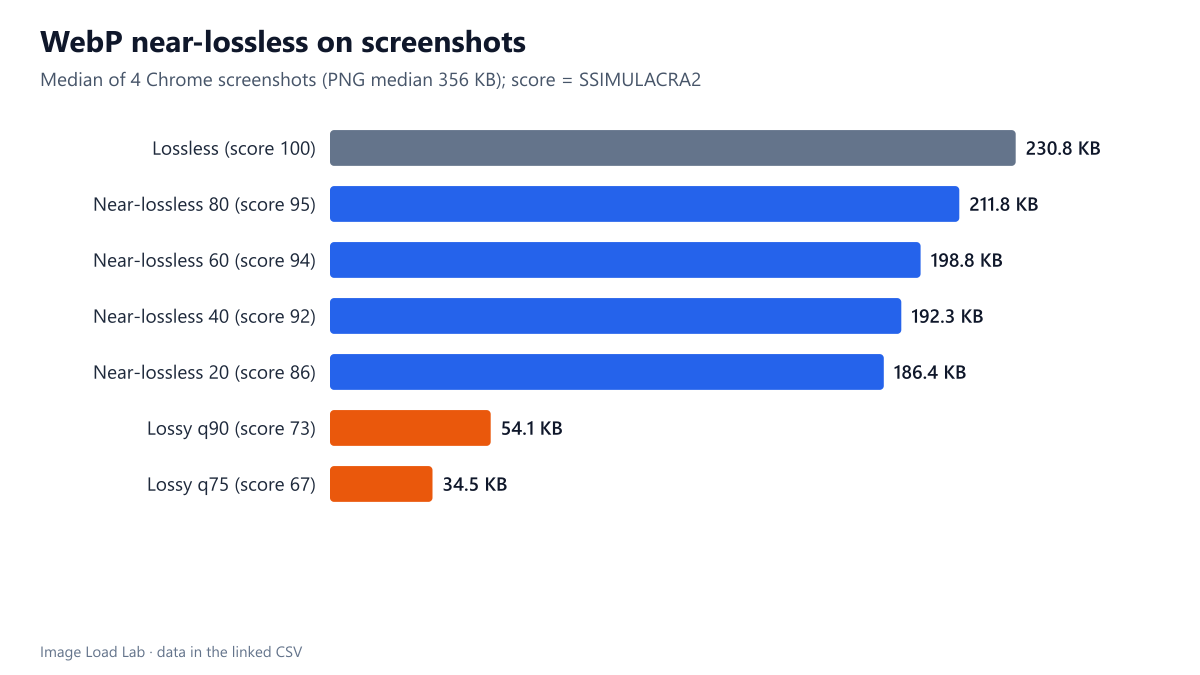
On screenshots, near-lossless saved 8–18 % and stayed almost indistinguishable. The four screenshots needed a median 356 KB as PNG and 230.8 KB as lossless WebP. Near-lossless 60 brought that down to 198.8 KB (13.2 % less than lossless WebP) with a median score of 94.0; level 20 reached 186.4 KB (17.9 % less) with a score of 86.5. Even the lowest score at level 40 was 91.3.
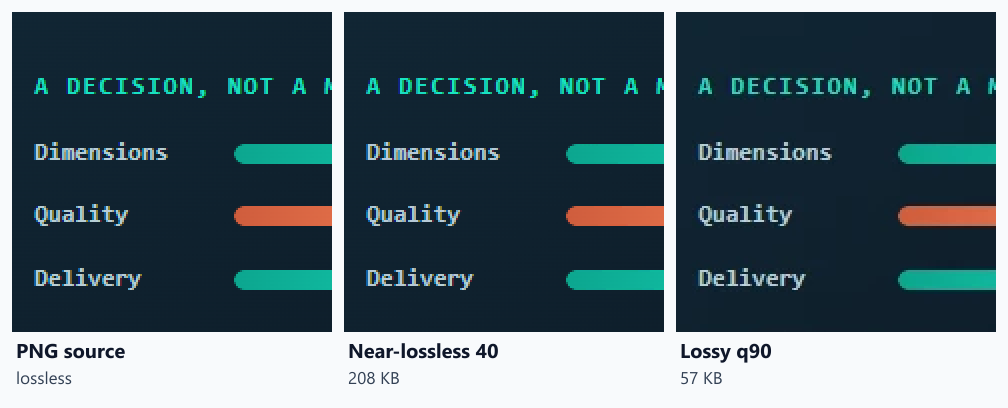
Lossy WebP was in a different size class. Quality 90 produced 54.1 KB for the same screenshots, 77.6 % less than lossless, but with a median score of 72.7: still good, but no longer near-identical. The crops below show where that difference lies: small coloured text becomes softer and duller in the lossy file, while near-lossless 40 looks the same as the source.
On photographs, near-lossless is a poor compromise. Our photos needed a median 1,952 KB as lossless WebP; near-lossless 60 cut that by 30.3 % to 1,247 KB, which is still almost four times the 330 KB of lossy quality 90, a file that scored 81.0. Nobody serves 1.2 MB photos to save a few points of a quality score.
Synthetic graphics gained the most in relative terms. Near-lossless 20 saved a median 19.5 % over lossless WebP while scoring 89.7, and for flat graphics the lossless files were already small.
When near-lossless makes sense
- Screenshots for documentation, UI mock-ups and diagrams with text, where lossy artefacts on letters are not acceptable but exact pixels are not required either. Near-lossless 40 to 60 saved 13–16 % over lossless WebP with scores above 91.
- Not for photos. Use lossy WebP or AVIF; near-lossless leaves photographs several times larger.
- Compare with lossy first. If a lossy quality-90 screenshot looks acceptable at the size it will be shown, it is about four times smaller than near-lossless. Our lossless screenshot test covers the lossless options in more detail.
Practical conclusion
WebP near-lossless is a useful middle step for screenshots and graphics: level 60 saved a median 13.2 % over lossless WebP on our screenshots while keeping a SSIMULACRA2 score of 94. For photographs it is the wrong tool; lossy WebP at quality 90 was about a quarter of the size.
Limitations
Small groups (four screenshots, four synthetic images, eight photos), one encoder version and one effort level (-m 4). The screenshots show an older design of this site at 1× density. Chrome and other browsers decode near-lossless files like any lossless WebP; we did not measure decoding speed.
Data and files
Download webp-near-lossless.csv (112 rows, 12.2 KB) · Method: testing methodology. Photos: image credits.