WordPress Big Image Threshold and the 2048-Pixel srcset Limit
For a 5184-pixel upload, WordPress served at most a 2048-pixel file in srcset, used a 2560-pixel scaled copy as full size and kept the 2.8 MB original on the server, unused by pages.
Since version 5.3, WordPress reduces very large uploads automatically: an image wider or taller than 2560 pixels is scaled down, and the scaled copy becomes the “full size” used on the site. Separately, WordPress leaves files wider than 2048 pixels out of srcset. What exactly happens to a camera-sized photo, which files end up in the page markup, and what stays on the server unused? We followed one 5184-pixel upload through this WordPress 7.1.2 site.
The test
We uploaded a 5184 × 3456-pixel CC0 camera JPEG (2,915,869 bytes) through the REST API with default settings and read the attachment’s metadata. Every generated file was fetched to record its size. WordPress also returns the image markup it would place in a post; we read its srcset and sizes attributes. For comparison we uploaded the same photo as a 1600-pixel WebP and as a 1600-pixel AVIF. See our methodology.
Results
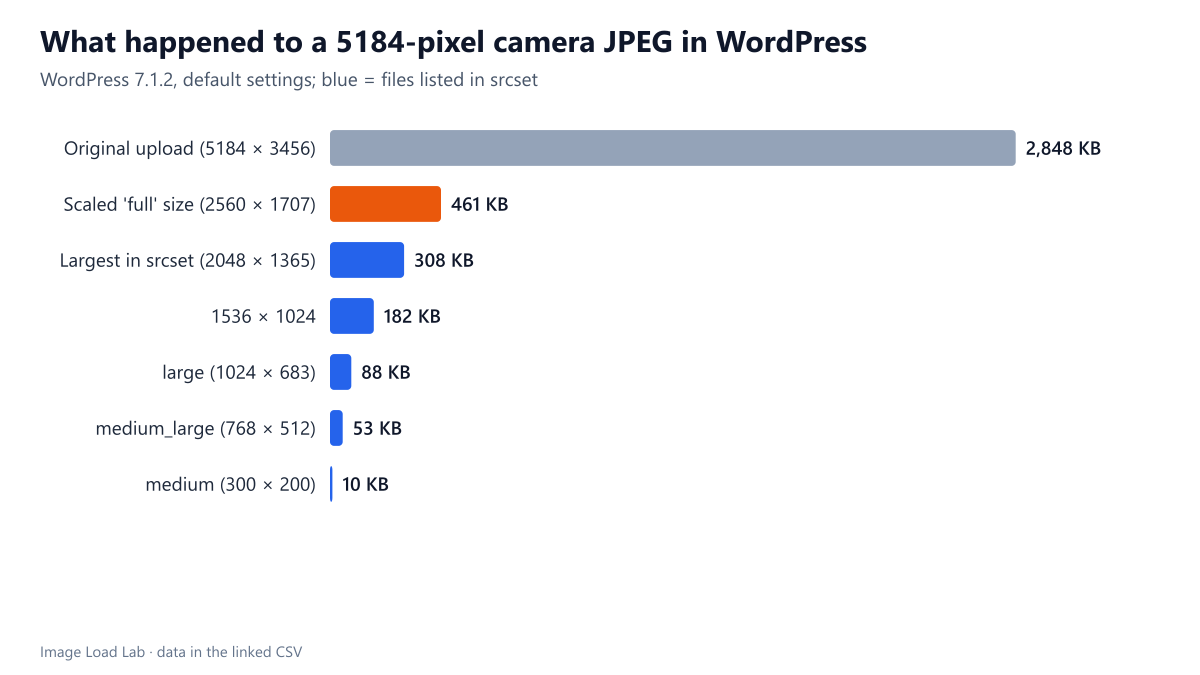
The original was kept but not used. WordPress created a -scaled copy at 2560 × 1707 pixels (461 KB) and registered it as the full-size image. The 2.8 MB original stayed on the server, referenced in the metadata as original_image, but no generated markup pointed to it.
The scaled copy did not appear in srcset either. The markup listed five candidates: 300, 768, 1024, 1536 and 2048 pixels wide. The 2560-pixel “full” file was left out because it is wider than 2048 pixels, and the 150 × 150 thumbnail was left out because its square crop has a different aspect ratio. Interestingly, the candidates were not listed in order of width (300, 1024, 768, 1536, 2048), which does not matter to browsers.
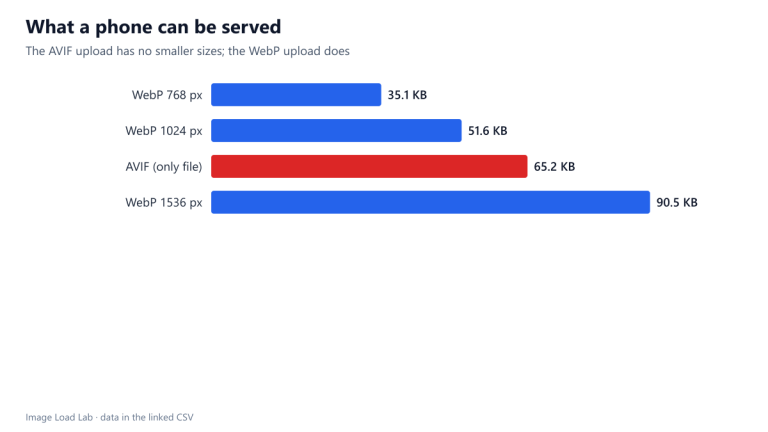
The 1600-pixel WebP upload was not scaled. Below the 2560-pixel threshold, it was kept as uploaded (86 KB) and included in its own srcset at 1600w, with intermediate sizes at 300, 768, 1024 and 1536. The AVIF upload produced no intermediate sizes and no srcset at all on this host.
The default markup asked for a small image. The markup WordPress returned for the attachment used the “medium” size with sizes="auto, (max-width: 300px) 100vw, 300px", so that a browser displaying it would usually pick the 300- or 768-pixel file. Themes and the block editor request other sizes, as our WordPress size audit shows.
What this means
- Uploading camera originals costs disk space, not bandwidth. On this photo, 2.8 MB stayed on the server unused by pages. Across hundreds of uploads that adds up for backups and hosting quotas.
- The largest file visitors can receive is 2048 pixels wide. That covers a 1024-pixel slot on a 2× screen; for full-width images on large high-density screens, WordPress will serve a slightly soft image unless a theme or plugin raises the limit with the
max_srcset_image_widthfilter. - Resizing before upload is still worthwhile. Exporting at about 2560 pixels keeps every derivative WordPress needs and avoids storing the camera original.
- The threshold can be changed with the
big_image_size_thresholdfilter, or disabled; disabling it makes the camera original the full size, which then appears insrcsetonly if it is no wider than 2048 pixels.
How to check and change it on your site
To see what WordPress kept for any upload, open /wp-json/wp/v2/media/ID in a browser while logged in (replace ID with the attachment number from the media library URL). The media_details object lists every generated size with its width, height and file name, and original_image appears when the big-image threshold applied.
Both limits can be changed with two filters, for example in a small site-specific plugin:
// keep uploads up to 3000 pixels instead of 2560
add_filter( 'big_image_size_threshold', fn() => 3000 );
// allow files up to 2560 pixels wide in srcset
add_filter( 'max_srcset_image_width', fn() => 2560 );
Raise them only if your layout really shows images that wide on high-density screens; every step up adds bytes for the visitors who receive the larger file.
Practical conclusion
For a 5184-pixel upload, WordPress 7.1.2 served at most a 2048-pixel file in srcset, used a 2560-pixel scaled copy as “full size” and kept the 2.8 MB original unused on the server. Resize photos to around 2560 pixels before uploading unless you need the originals stored.
Limitations
One upload with default settings and no image plugins; themes, plugins and the block editor change which sizes and sizes values reach the page. The markup we read is the one WordPress returns through its REST API for the attachment.
Data and files
Download wp-upload.csv (17 rows, 3.1 KB) · Method: testing methodology. Photo: image credits.