Uploading AVIF to WordPress: What Our Shared Host Actually Did
WordPress 7.1.2 accepted our AVIF upload but created no image sizes, and the server sent it as application/octet-stream. Chrome still showed it, by sniffing.
WordPress has accepted AVIF uploads since version 6.5, and AVIF was the most efficient format in our format comparison. So we uploaded an AVIF file to this site, which runs WordPress 7.1.2 on ordinary shared hosting, and checked three things: did WordPress create its usual image sizes, what content type does the server send, and does the browser display it?
The upload
We used the same CC0 photograph in three formats so the results can be compared directly: a 1600 × 1067 AVIF (quality 50, 66,773 bytes), a WebP of the same size (quality 75, 88,122 bytes) and the 5184-pixel camera JPEG. All three were uploaded through the WordPress REST API, which runs the same code as the Media Library uploader. Then we requested every file WordPress stored and recorded the HTTP response headers.
What happened
| Upload | File WordPress stored | Pixels | Content-Type served | Bytes |
|---|---|---|---|---|
| Camera JPEG | uploaded file as served | 2560 × 1707 | image/jpeg | 472,127 |
| Camera JPEG | large | 1024 × 683 | image/jpeg | 90,498 |
| Camera JPEG | thumbnail | 150 × 150 | image/jpeg | 4,266 |
| Camera JPEG | medium_large | 768 × 512 | image/jpeg | 53,852 |
| WebP 1600 | uploaded file as served | 1600 × 1067 | image/webp | 88,122 |
| WebP 1600 | large | 1024 × 683 | image/webp | 52,866 |
| WebP 1600 | thumbnail | 150 × 150 | image/webp | 3,156 |
| WebP 1600 | medium_large | 768 × 512 | image/webp | 35,896 |
| AVIF 1600 | uploaded file as served | 1600 × 1067 | application/octet-stream | 66,773 |
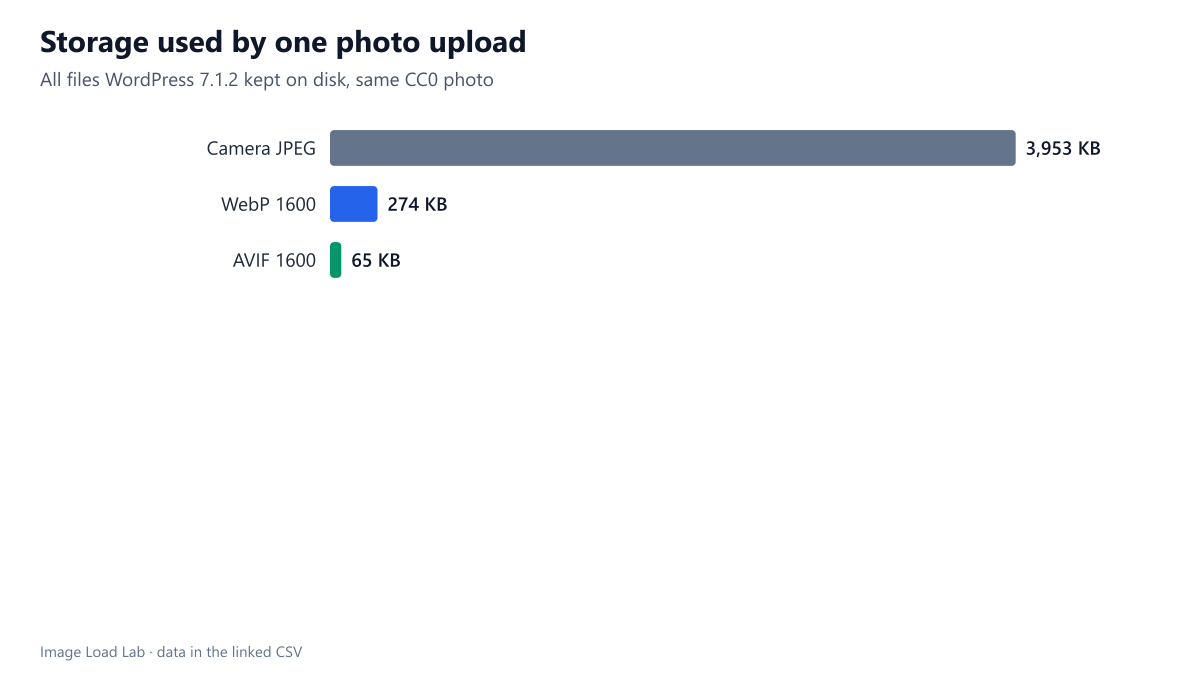
No image sizes were generated for the AVIF. The WebP upload produced five additional sizes (150, 300, 768, 1024 and 1536 pixels wide) and the JPEG produced six plus a 2560-pixel “scaled” copy. The AVIF produced none. WordPress only creates sizes when the server’s image library (GD or Imagick) can decode and encode the format, and on this host it cannot handle AVIF. The upload is still accepted and stored, but as a single file.
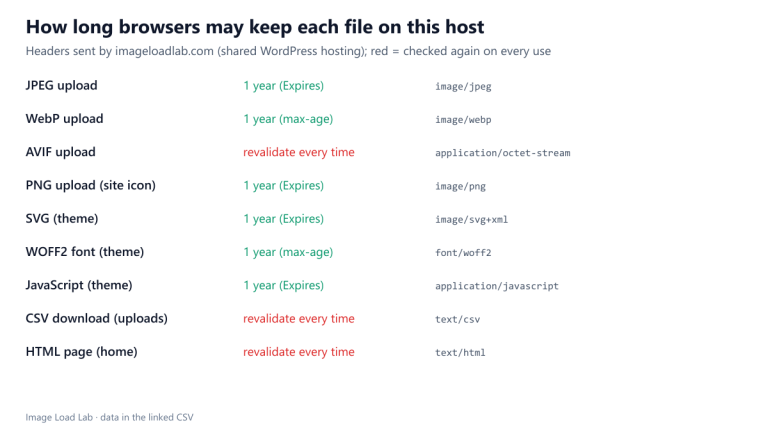
The server sent the wrong content type. The AVIF was served as application/octet-stream, the generic type for unknown files, instead of image/avif. The web server does not have a mapping for the .avif extension. The WebP and JPEG files were served correctly as image/webp and image/jpeg.
Chrome displayed it anyway. We loaded the file into an image element in Chrome 154: it decoded at 1600 pixels wide. Chrome identifies the format from the file’s first bytes when the server does not forbid it, and our server does not send the X-Content-Type-Options: nosniff header. That is luck, not correctness. A CDN or security plugin that adds nosniff, or another browser that relies more strictly on the declared type, could refuse to display the image.
The practical consequence: no responsive sizes
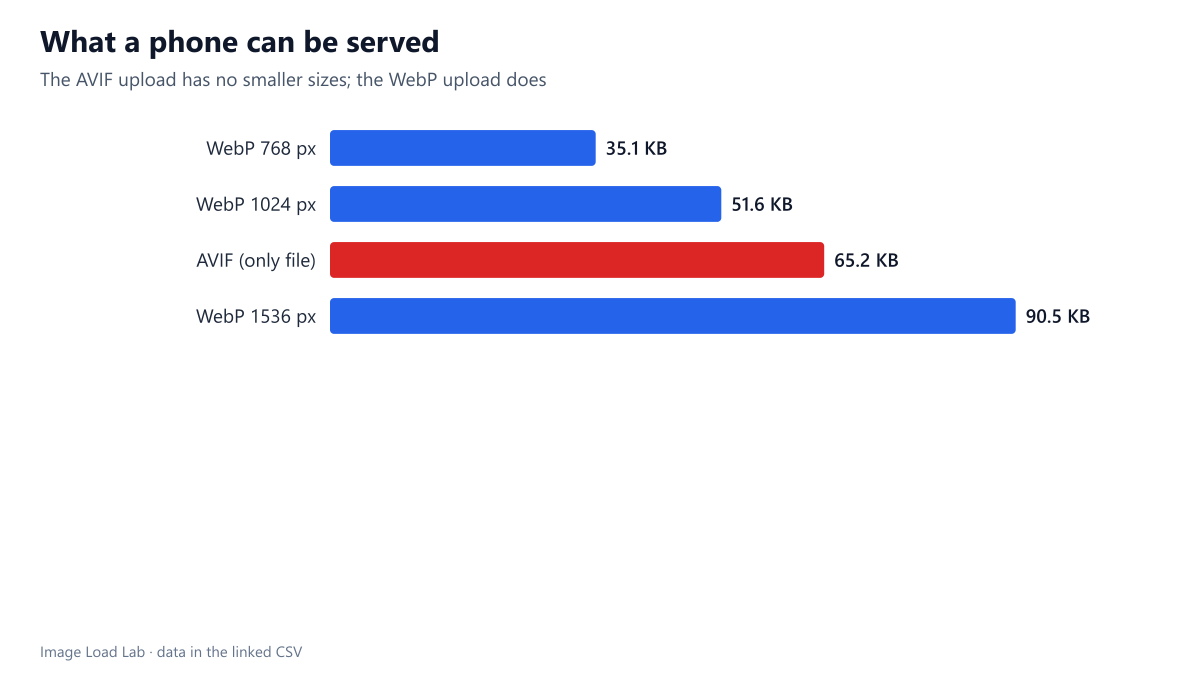
Without generated sizes, WordPress has nothing to put in a srcset. Every visitor receives the one 1600-pixel file, 66,773 bytes, whatever their screen. With the WebP upload, a phone showing the image in our 358-pixel article column at 2× density can be served the 768-pixel WebP of 35,896 bytes (or the 1024-pixel WebP of 52,866 bytes if the sizes attribute says 100vw). Either way, on small screens the “more efficient” AVIF ends up heavier than the WebP set. The AVIF file was 24 % smaller than the WebP file of the same dimensions, but losing responsive sizes cost more than that.
What would make AVIF work properly on this host
- Content type. The server needs
image/avifmapped to.avif. On Apache or LiteSpeed that is one line in the site’s.htaccess(AddType image/avif .avif). Most hosting control panels also have a “MIME types” screen. - Image library support. WordPress needs a GD or Imagick build with AVIF support to create sizes. Tools → Site Health → Info → Media Handling shows which formats the server’s library supports. If AVIF is missing, only the host can add it.
- Verify before switching. Upload one test AVIF, check that its sizes appear in the Media Library, and fetch one file with your browser’s developer tools to confirm the
Content-Type.
Until both are in place, this site publishes its images as WebP, which the host handles fully.
Practical conclusion
- “WordPress supports AVIF” means it will accept the upload. It does not mean your server can resize it or will serve it correctly.
- If your host cannot generate AVIF sizes, uploading AVIF removes responsive images and can increase bytes on phones.
- WebP was fully supported on the same host, with sizes generated and the correct content type, so it is the safer default here.
How this connects to our other tests
This result changes how to read our other AVIF findings. In the format comparison, AVIF needed about 29 % fewer bytes than JPEG at equal quality, and in the plugin checklist converting WordPress’s JPEG sizes to AVIF would have saved 42–44 %. Those savings only reach visitors if the server can create the sizes and send the right content type. On a host like ours, the practical order is: fix the server, then switch formats.
Repeat this test on your own images
To check your own host in two minutes: upload a small AVIF file to the Media Library, then open its attachment details. If WordPress shows only the original file and no generated sizes, your server’s image library cannot process AVIF. Next, open the file’s URL with DevTools open and look at the response headers in the Network panel: Content-Type should read image/avif. You can also run curl -I on the URL from a terminal. Finally, check Site Health under Tools, where the Media Handling section lists the formats the server’s image library supports. If any of the three checks fails, keep publishing WebP until your host fixes it. Our script run_wp_upload.py contains the upload and header checks used for this guide.
Limitations
One host, one WordPress version and one browser. Firefox and Safari were not tested. Hosts differ widely in their server configuration and image libraries, which is exactly why the three checks above are worth two minutes on your own site.
Data and files
Download wp-upload.csv (17 rows, 3.1 KB) · Method: testing methodology. Photo: image credits.