Before You Install an Image Plugin: Measure What It Could Save
At equal quality, converting WordPress's own JPEG sizes saved 5–25 % with WebP and 42–44 % with AVIF in our test. A checklist to run before installing a plugin.
Image optimisation plugins promise large savings, usually by converting WordPress’s JPEG sizes to WebP or AVIF. Before installing one, how much could conversion actually save on your own images, at the same visual quality? We measured it on this site: we took every JPEG size WordPress 7.1.2 generated from a real upload, scored its quality, and found the smallest WebP and AVIF file that matches each one. Then we turned the findings into a checklist.
How we measured the potential saving
The starting point is the CC0 camera photo we uploaded in our upload workflow test. WordPress created a 2560-pixel “scaled” copy and five smaller sizes, all JPEG. For each of them:
- We downloaded the exact file the server delivers.
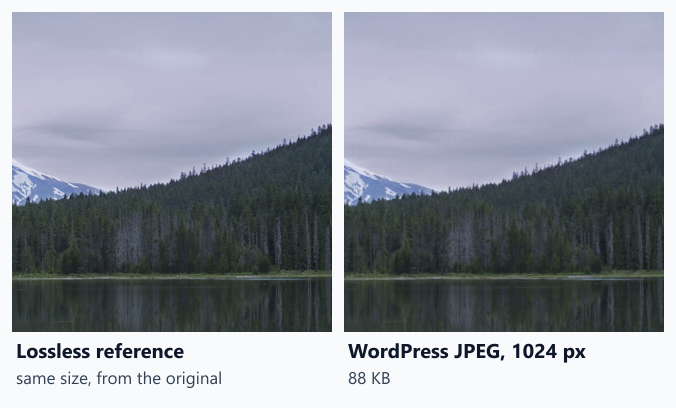
- We made a lossless reference of the same pixel size from the camera original (Lanczos3 resize).
- We scored WordPress’s JPEG against that reference with SSIMULACRA2. All sizes scored between 76.9 and 77.9, consistent with WordPress’s default JPEG quality.
- We encoded the reference as WebP and AVIF at a ladder of quality settings and interpolated the file size that reaches the same score as WordPress’s JPEG.
So each comparison is like for like: same pixels, same measured quality, different format. The 150-pixel thumbnail is left out because WordPress crops it in a way our reference could not reproduce exactly. Method details are in the methodology.
What conversion would save
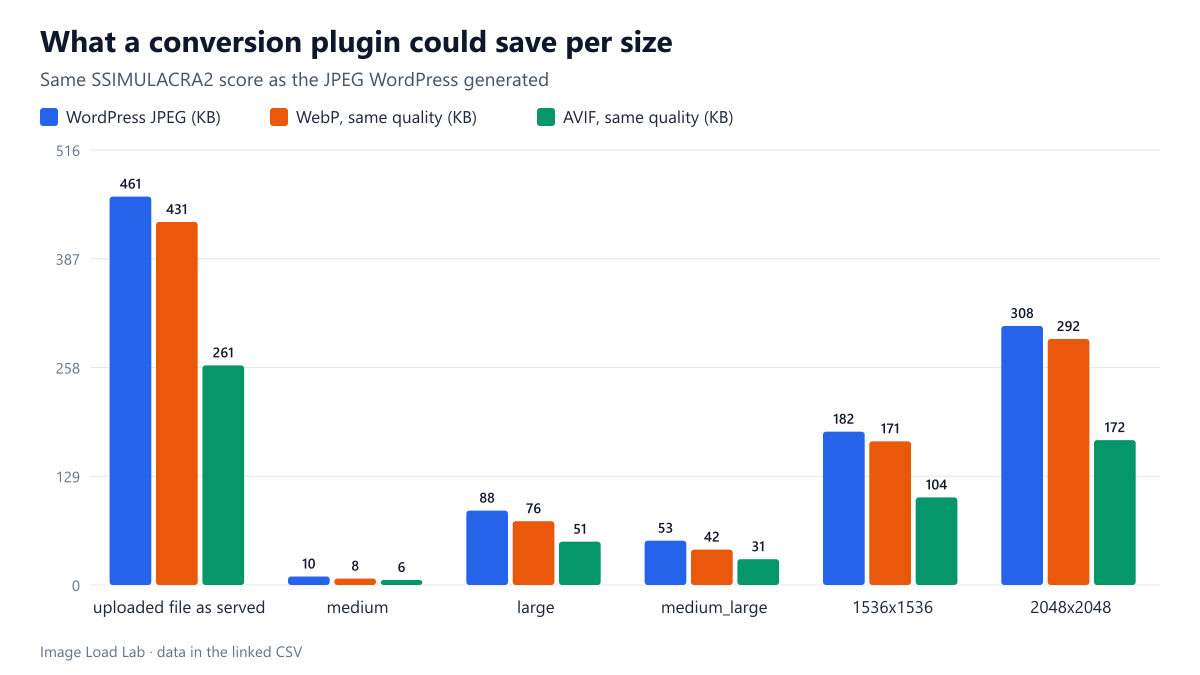
| WordPress size | Pixels | WordPress JPEG (bytes) | Its SSIMULACRA2 | WebP, same score (bytes) | AVIF, same score (bytes) | WebP saving | AVIF saving |
|---|---|---|---|---|---|---|---|
| uploaded file as served | 2560 × 1707 | 472,127 | 77.31 | 441,261 | 266,897 | 6.5 % | 43.5 % |
| medium | 300 × 200 | 10,380 | 77.413 | 7,822 | 6,073 | 24.6 % | 41.5 % |
| large | 1024 × 683 | 90,498 | 77.94 | 77,518 | 52,593 | 14.3 % | 41.9 % |
| medium_large | 768 × 512 | 53,852 | 77.177 | 43,053 | 31,342 | 20.1 % | 41.8 % |
| 1536×1536 | 1536 × 1024 | 186,407 | 77.357 | 174,720 | 106,546 | 6.3 % | 42.8 % |
| 2048×2048 | 2048 × 1365 | 314,894 | 76.924 | 298,997 | 176,147 | 5.0 % | 44.1 % |
WebP: the saving depended strongly on size. It was 20.1 % and 24.6 % for the small 768 and 300-pixel sizes, 14.3 % at 1024 pixels, and only 5.0 to 6.5 % for the 1536, 2048 and 2560-pixel files. Large photos are where WordPress’s JPEG is already efficient.
AVIF: the saving was steady at 41.5 to 44.1 % across every size. That matches our format comparison, where AVIF was the only format that consistently beat a good JPEG at equal quality.
For a visitor on a desktop in a layout like ours, who downloads the 768 or 1024-pixel size, a WebP-converting plugin would save around 14–20 % of that image’s bytes. That is useful, but it is a different number from a saving measured against an unoptimised camera original. When you compare plugins, check which baseline their percentages use.
Checklist before you install
- Measure your baseline. Open a typical post, list the images it downloads and their sizes (our request audit shows how). If they are already the right width, format conversion is the only remaining gain.
- Ask “smaller at what quality?”. Compare a converted file with the original at 100 % zoom, or with a metric. A plugin that saves 40 % by lowering quality is not saving the same thing as one that changes format.
- Check that your host can serve the format. On this site, AVIF files were sent with the wrong content type and WordPress could not create AVIF sizes; see our AVIF upload test. A plugin cannot fix a server it cannot configure.
- Check how it delivers the files. Some plugins rewrite the HTML into
<picture>elements; others rely on server rewrite rules or a CDN. Make surewidth,height,srcsetandsizessurvive, and that the page still works with the plugin disabled. - Count the storage. Most converters keep the JPEGs and add WebP or AVIF copies of every size. One camera photo already used 4,048,293 bytes of storage on our host before any conversion.
- Read where the work happens. Cloud-based optimisers upload your images to a third-party service. Check its privacy terms if your images are not public.
- Plan the rollback. Test on a staging copy first, and confirm what happens to the converted files and the markup when the plugin is deactivated.
Practical conclusion
- On WordPress’s own JPEG sizes, converting to WebP at equal quality saved 5–25 % in our test, most on small sizes. AVIF saved 42–44 %.
- Because the largest gain needs AVIF, check AVIF support on your host before choosing a plugin.
- If your images are oversized for their slot, fix that first. Our srcset test saved far more bytes than any format change.
Repeat this test on your own images
You can estimate the potential on your own site in a few minutes. Download one generated size of a typical photo (for example the 1024-pixel file), make a WebP version with cwebp -q 80 photo-1024.jpg -o photo-1024.webp and compare the two files side by side at 100 %. If they look the same to you, the size difference is roughly what a WebP plugin would save on that size; if the WebP looks worse, raise the quality until it does not, and compare again. For a more objective comparison, score both against a lossless resize of the original with ssimulacra2, which is what our script run_wp_plugin_potential.py does for every size.
Limitations
One photo and one host. Images with flat colours or text gain more from WebP than this landscape photo did. We measured the potential of the formats with sharp’s encoders, not any particular plugin, whose own settings will give different results.
Data and files
Download wp-plugin-potential.csv (7 rows, 0.5 KB) · Download wp-upload.csv (17 rows, 3.1 KB) · Method: testing methodology. Photo: image credits.