Our Theme Lazy-Loaded the First Archive Image: What WordPress Does Instead
Forcing loading=lazy on archive cards overrode WordPress. Letting WordPress 7.1.2 decide gave the first card fetchpriority=high, and it was requested 360 to 500 ms sooner.
Since version 5.5, WordPress adds loading="lazy" to images automatically. Later versions refined that: in the main list of posts, WordPress leaves the first images eager and gives the first one fetchpriority="high", so the images a visitor sees first are not delayed. A theme can override all of this by passing its own loading value, and ours did. What did the override cost on this site’s archive pages, and what does WordPress 7.1.2 do when the theme lets it decide? We found the problem in our own theme, fixed it, and measured both versions on the live site.
What we found
We listed the attributes of every <img> on six pages of this site. On the guide index and the category archives, every card image carried loading="lazy", including the first, which sits in the first screen on a phone. The cause was one line in our theme: the function that prints a card passed 'loading' => 'lazy' to get_the_post_thumbnail(). When a theme passes a value, WordPress uses it and skips its own logic.
In theme version 2.0.5 we stopped passing loading for the archive cards and let WordPress choose. The cards further down the home page and the related guides under each article keep loading="lazy", since they are never in the first screen.
| Card | Theme forced lazy (2.0.4) | WordPress decides (2.0.5) |
|---|---|---|
| 1 | loading=lazy, fetchpriority=(none), sizes=auto… | loading=(none), fetchpriority=high |
| 2 | loading=lazy, fetchpriority=(none), sizes=auto… | loading=(none), fetchpriority=(none) |
| 3 | loading=lazy, fetchpriority=(none), sizes=auto… | loading=(none), fetchpriority=(none) |
| 4 | loading=lazy, fetchpriority=(none), sizes=auto… | loading=lazy, fetchpriority=(none), sizes=auto… |
| 5 | loading=lazy, fetchpriority=(none), sizes=auto… | loading=lazy, fetchpriority=(none), sizes=auto… |
WordPress then marked the first card fetchpriority="high", left the second and third without a loading attribute (eager), and lazy-loaded the fourth card onwards with sizes="auto, …". The category archives received the same pattern.
How we measured the difference
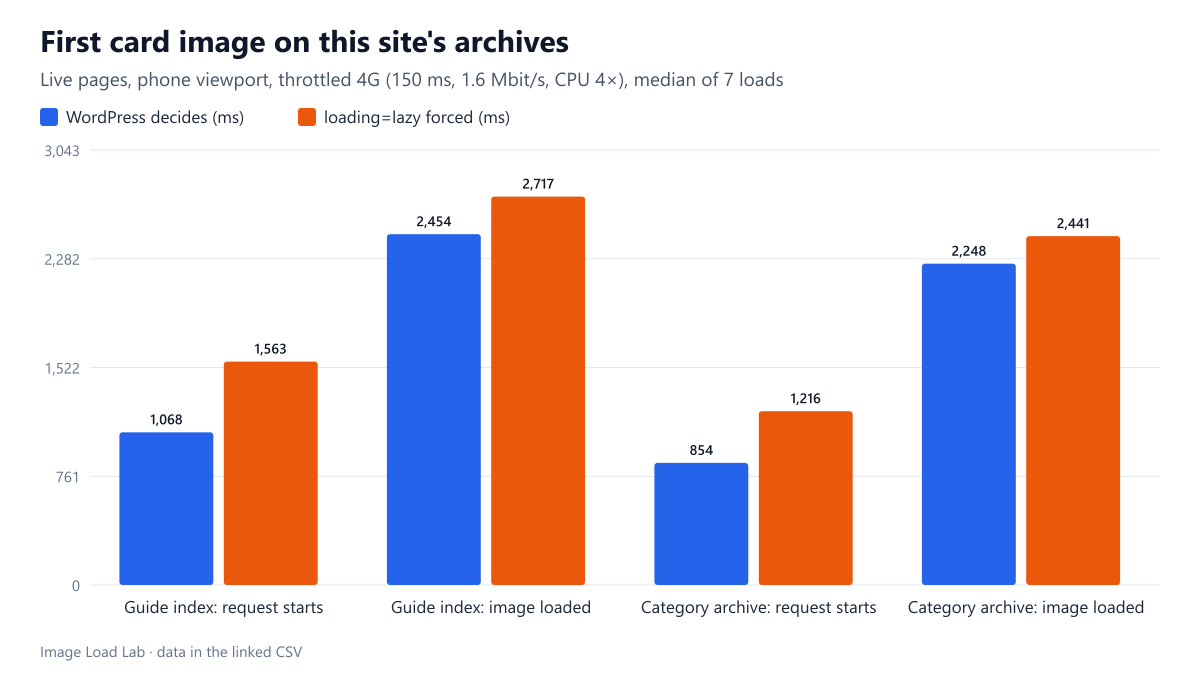
Once the fix was live, we loaded the guide index and the “Formats & compression” archive seven times each in two versions. The first was the page as WordPress now serves it. The second was the same page with its HTML rewritten in the browser to put loading="lazy" back on every card and remove fetchpriority, which reproduces the old theme exactly. We used Chrome 155.0.8059.82 driven by Playwright, with a phone viewport, 150 ms latency, 1.6 Mbit/s and the CPU slowed four times. We recorded when the first card image was requested and finished, and the Largest Contentful Paint. See our methodology.
Results
| Page | Card images | First image: loading / fetchpriority | Request starts | Image loaded | LCP (element) |
|---|---|---|---|---|---|
| Guide index | WordPress decides | none / high | 1,068 ms | 2,454 ms | 1,412 ms (p) |
| Guide index | loading=lazy forced | lazy / none | 1,563 ms | 2,717 ms | 1,572 ms (p) |
| Category archive | WordPress decides | none / high | 854 ms | 2,248 ms | 1,172 ms (p) |
| Category archive | loading=lazy forced | lazy / none | 1,216 ms | 2,441 ms | 1,224 ms (p) |
The first card image was requested 360 to 500 ms earlier when WordPress decided: at 1,068 ms instead of 1,563 ms on the guide index, and at 854 ms instead of 1,216 ms on the category archive. A lazy image is only requested after layout, when the browser knows it is near the screen; an eager one can be found by the preload scanner while the HTML is still arriving.
It finished loading 193 to 263 ms sooner. The gap shrank because the image, once requested, still had to share the slow connection with the page’s other resources.
LCP did not depend on it. On both pages, the largest element in the first screen was the introductory paragraph, not the card image, so LCP stayed between 1.2 and 1.6 seconds in both versions. The medians were slightly lower without forced lazy loading, but within the variation between loads. The visible benefit is that the first card’s picture appears sooner, not a better LCP score.
What to check in your theme
- Search your theme for
'loading' => 'lazy'in calls toget_the_post_thumbnail(),the_post_thumbnail()andwp_get_attachment_image(). In the main loop of archive and home templates, leave the attribute out so WordPress can decide. - Keep explicit lazy loading where it is always right, such as related posts at the bottom of an article or a footer gallery.
- Look at the rendered HTML, not the template. View the page source as a logged-out visitor and check the first images for
fetchpriority="high"and the absence ofloading="lazy". - Do not lazy-load the LCP image. If your archive’s largest element is a card image, forced lazy loading would cost LCP directly, as in our lazy-loading test and the Lighthouse discovery test.
- Check the content images too. Our own publishing script writes
loading="lazy"on the figures inside each guide. That is right on this site, where every article opens with a title, a summary and an introduction before the first figure, but not for an article that starts with an image.
Practical conclusion
Our theme forced loading="lazy" on every archive card and so disabled WordPress’s own handling of the first images. Letting WordPress 7.1.2 decide gave the first card fetchpriority="high", kept the first three eager and lazy-loaded the rest. On a throttled phone, the first card image was requested 360–500 ms earlier and finished 190–260 ms earlier. LCP did not change here because a paragraph was the largest element.
Limitations
Two archive pages of one site, seven loads per version, one network profile, Chrome only. The “before” version was reproduced by rewriting the HTML in the browser rather than by reinstalling the old theme, which keeps everything else identical but is not a byte-for-byte copy of the old server response.
Data and files
Download wp-archive-lazy-live.csv (28 rows, 3.6 KB) · Download wp-img-attributes-theme-204.csv (105 rows, 17.8 KB) · Download wp-img-attributes-theme-205.csv (105 rows, 17.8 KB) · Method: testing methodology.