Cache Headers on a Shared WordPress Host: What Each File Type Gets
JPEG, PNG, WebP, SVG, font and script files on our host were cacheable for a year, but AVIF uploads came with the wrong content type and max-age=0. How to check and fix your own.
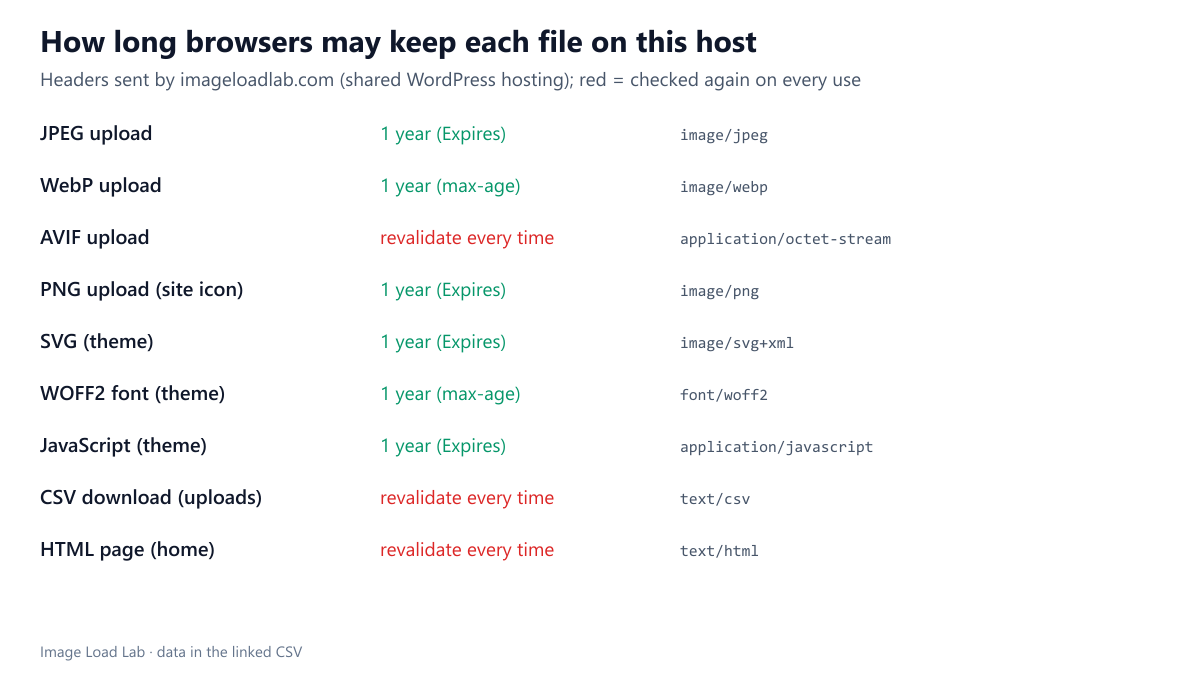
How long browsers keep an image is decided by the HTTP headers the server sends with it, not by WordPress. On shared hosting you rarely see those headers, and they can differ by file type. What does a typical shared WordPress host send for JPEG, WebP, AVIF, PNG, SVG, fonts, scripts and pages? We requested one file of each type from this site and recorded the caching headers.
The test
We requested nine resources from imageloadlab.com, which runs WordPress 7.1.2 on shared hosting with a page-cache plugin: a JPEG, a WebP and an AVIF from the media library, the PNG site icon, the theme’s SVG icon, a WOFF2 font, the theme’s JavaScript file, a CSV data download and the home page. Each request sent Accept-Encoding: br, gzip like a browser. We recorded Cache-Control, Expires, ETag, Last-Modified, Content-Encoding and Content-Type. See our methodology.
Results
| Resource | Content-Type | Cache-Control | Effective lifetime | Last-Modified | ETag | Compression |
|---|---|---|---|---|---|---|
| JPEG upload | image/jpeg |
public |
1 year (Expires) | yes | no | none |
| WebP upload | image/webp |
public, max-age=31536000 |
1 year (max-age) | yes | no | none |
| AVIF upload | application/octet-stream |
public, max-age=0 |
revalidate every time | yes | no | none |
| PNG upload (site icon) | image/png |
public |
1 year (Expires) | yes | no | none |
| SVG (theme) | image/svg+xml |
public |
1 year (Expires) | yes | no | br |
| WOFF2 font (theme) | font/woff2 |
public, max-age=31536000 |
1 year (max-age) | yes | no | none |
| JavaScript (theme) | application/javascript |
public |
1 year (Expires) | yes | no | br |
| CSV download (uploads) | text/csv |
public, max-age=0 |
revalidate every time | yes | no | none |
| HTML page (home) | text/html; charset=UTF-8 |
public, max-age=0 |
revalidate every time | no | no | br |
Most static files were cacheable for a year. JPEG and PNG uploads, the SVG and the JavaScript file came with Cache-Control: public and an Expires date exactly one year after the request. WebP and the font got an explicit max-age=31536000 (one year) as well. Browsers can therefore reuse them without asking the server, the fastest case in our repeat-visit test.
AVIF was the exception, twice over. The AVIF upload was sent as application/octet-stream instead of image/avif, and with max-age=0, which makes the browser revalidate it on every use. The server simply did not know the file type, so it fell back to the generic rules. Chrome still displayed the file when it was placed in an <img>, but a visitor would pay a round trip for it on every page view.
No ETags anywhere. None of the nine responses carried an ETag; static files had Last-Modified instead, which serves the same purpose for revalidation.
Text was compressed, images were not. The SVG, the JavaScript and the HTML page were sent with Brotli. JPEG, WebP, AVIF and PNG were sent as they are, which is right: they are already compressed.
Pages were not cached by browsers. The HTML came with max-age=0, so each visit asks the server again. That is normal for pages that change; the page cache on the server still answers quickly.
What to check and fix
- Open DevTools → Network on your site, select an image and read its response headers. Look for a
max-ageor anExpiresdate far in the future. - Teach the server about AVIF. On Apache or LiteSpeed,
AddType image/avif .avifin.htaccess, and anExpiresByType image/avif "access plus 1 year"rule if the host uses mod_expires; many hosting control panels have a “MIME types” screen for the first part. - Do not give long lifetimes to files you overwrite in place. WordPress uploads get new file names, so they are safe; a theme file edited under the same name may stay cached for a year unless its URL carries a version.
- Data downloads such as our CSV files were sent with
max-age=0; that is harmless for occasional downloads.
Practical conclusion
On this shared WordPress host, JPEG, PNG, WebP, SVG, font and script files were cacheable for a year, but AVIF uploads were sent with the wrong type and max-age=0. If you serve AVIF, check its headers: adding the MIME type and an expiry rule fixes both problems.
Limitations
One host, checked once; hosting companies and caching plugins change these rules. We did not test what a CDN in front of the site would add.
Data and files
Download host-cache-headers.csv (9 rows, 2.1 KB) · Method: testing methodology.