Cache-Control for Images: Repeat Visits With no-store, ETag and immutable
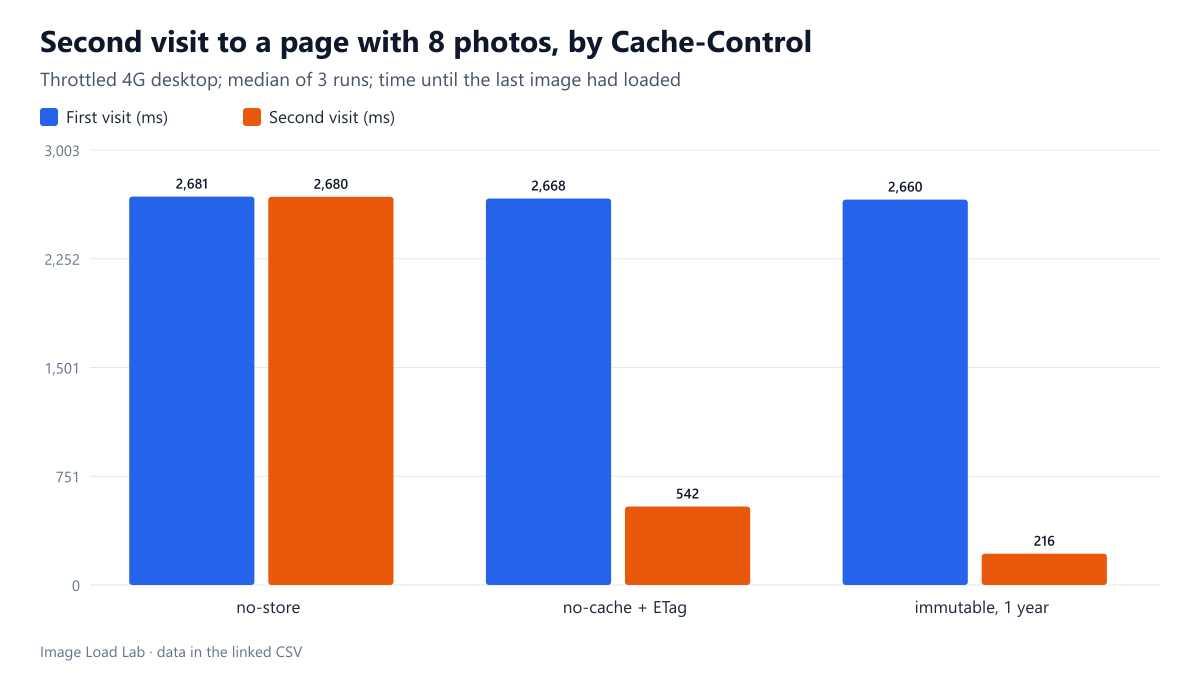
On a throttled connection, a repeat visit to a page of eight photos took 2.68 s with no-store, 0.54 s with no-cache and an ETag, and 0.22 s with a one-year immutable policy.
The first visit to a page has to download every image. The second visit, whether a reload, a return from another page or a new session the next day, depends on the Cache-Control header each image was sent with. How much faster is a repeat visit with no caching, with revalidation, and with long-term caching? We loaded the same page twice under three policies on a throttled connection.
The test
The page holds eight 800-pixel JPEG photos (54 KB each, 433 KB in total). Our test server sent them with one of three headers: Cache-Control: no-store (never keep a copy); Cache-Control: no-cache with an ETag (keep a copy but ask the server every time whether it is still current); or Cache-Control: public, max-age=31536000, immutable (keep it for a year without asking). For each policy we opened the page in a fresh Chrome 155.0.8059.82 profile, then navigated to it again in the same profile, recording the requests, the bytes transferred and the time until the last image had loaded. The connection was throttled to 1.6 Mbit/s with 150 ms latency and a 4× slower CPU; each scenario ran three times. See our methodology.
Results
| Cache-Control | First visit: image bytes | Second visit: requests to the server | Second visit: image bytes | Second visit: last image done |
|---|---|---|---|---|
| no-store | 432 KB | 8 of 8 | 432.5 KB | 2,680 ms |
| no-cache + ETag | 433 KB | 8 of 8 | 1.4 KB | 542 ms |
| max-age=31536000, immutable | 433 KB | 0 of 8 | 0.0 KB | 216 ms |
The first visit was the same under all three policies: about 433 KB of images, finished at a median of 2.66–2.68 seconds.
With no-store, the second visit was as slow as the first. All eight images were downloaded again, 433 KB, and the last one finished at 2,680 ms.
With no-cache and an ETag, the second visit was five times faster. Chrome sent all eight requests to the server, but each answer was a short “not modified” response: 1.4 KB in total instead of 433 KB. The images were done at 542 ms, the cost being one round trip per image on a connection with 150 ms latency.
With a one-year immutable policy, the server was not contacted at all. Zero bytes were transferred, all eight images came from the browser’s cache, and they were done at 216 ms, mostly the time to read and decode them.
Choosing a policy for images
- Images whose URL changes when the file changes (a hash or version in the file name, or WordPress’s year/month upload paths for files that are never replaced) can safely use a long
max-agewithimmutable. That was the fastest option by far. - Images that may be replaced under the same URL should use
no-cachewith anETagorLast-Modified. Revalidation saved 99.7 % of the bytes here, though it still cost round trips. - Avoid
no-storefor images unless they are private. It made every visit a first visit. - Check what your host sends. On this site, a theme SVG came back with only
Cache-Control: public, without a lifetime, as noted in our SVG compression test; browsers then estimate a lifetime themselves.
Practical conclusion
On a throttled connection, a repeat visit took 2.68 s with no-store, 0.54 s with no-cache and an ETag, and 0.22 s with a one-year immutable policy. Give images that never change at the same URL a long cache lifetime; use revalidation for the rest.
Limitations
Revisits happened seconds after the first visit; over days, browsers may evict cached files, especially on phones with little storage. One page, eight images and Chrome only.
Data and files
Download cache-repeat.csv (9 rows, 0.5 KB) · Method: testing methodology. Photo: image credits.