SVG and HTTP Compression: gzip vs Brotli on 28 Files
Our 28 SVG files shrank from 1,622 KB to 418 KB with gzip and 339 KB with Brotli, far more than SVGO alone saved. Our host compressed SVG automatically; here is how to check yours.
SVG images are text, so web servers can compress them with gzip or Brotli before sending them, just like HTML and CSS. Not every server does it for SVG, because compression is often configured by file type. How much smaller do SVG files get on the wire, is Brotli worth it over gzip, and does our own host compress them? We measured 28 files and checked the server behind this site.
The test
We used the same 28 SVG files as in our SVGO test: 13 public-domain files from Wikimedia Commons (icons, flags, diagrams and a map), eight charts generated by our scripts and seven small hand-written graphics. For each file we computed the size after gzip at level 9 and Brotli at quality 11 with Node.js, before and after SVGO. Then we requested an SVG from this site’s own theme three times, with Accept-Encoding: br, gzip, with gzip only and with no compression offered, and recorded the response headers. See our methodology.
Results
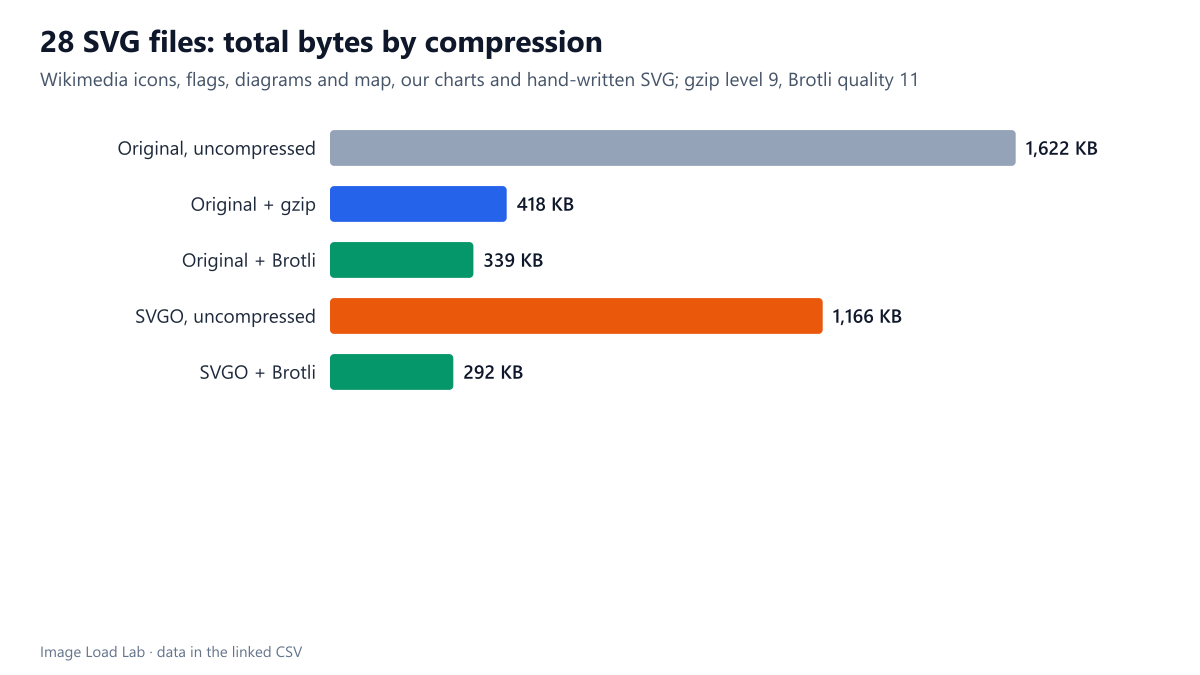
Compression cut the 28 files to about a fifth. Together they weighed 1,622 KB uncompressed, 418 KB with gzip and 339 KB with Brotli: a 74 % saving with gzip and 79 % with Brotli. That is far more than SVGO alone achieved (1,166 KB, a 28 % saving) and shows where the big win is.
Brotli beat gzip by about a fifth. Over all 28 files, Brotli output was 19 % smaller than gzip output (339 KB against 418 KB). For small icons the difference was a few dozen bytes; for the large diagrams it was several kilobytes per file.
The combination was smallest. SVGO followed by Brotli brought the total to 292 KB, 14 % less than Brotli alone. Minification removes data that compression cannot, such as editor metadata and excess decimal places, so the two add up.
| SVG file (14 largest) | Original KB | gzip KB | Brotli KB | Brotli saving | SVGO + Brotli KB |
|---|---|---|---|---|---|
| Bandera de la República Española (1931-1939) | 350.5 | 50.9 | 36.1 | 90 % | 20.1 |
| Complete neuron cell diagram en | 305.1 | 92.1 | 77.4 | 75 % | 72.4 |
| Atmosphere composition diagram-en | 295.1 | 81.9 | 69.2 | 77 % | 63.2 |
| United States Public Domain Map | 206.3 | 43.9 | 26.7 | 87 % | 22.6 |
| Flagellum base diagram-en | 121.4 | 37.1 | 32.4 | 73 % | 25.6 |
| Flag of Mexico | 114.4 | 44.8 | 40.1 | 65 % | 40.1 |
| Endomembrane system diagram en | 109.0 | 26.2 | 22.2 | 80 % | 14.5 |
| Flag of Guatemala | 54.5 | 23.7 | 20.5 | 62 % | 20.0 |
| b-desc-bytes | 6.8 | 1.0 | 0.8 | 88 % | 0.8 |
| Flag of Soeda, Fukuoka | 6.1 | 2.1 | 1.6 | 73 % | 1.6 |
| b-hidden-bytes | 5.9 | 0.9 | 0.8 | 87 % | 0.7 |
| a-equiv-q | 5.2 | 1.0 | 0.8 | 85 % | 0.8 |
| a-oxipng-curve | 4.9 | 1.1 | 0.9 | 81 % | 0.9 |
| Tango-style question icon | 4.4 | 1.7 | 1.5 | 66 % | 1.0 |
What our own host does
The SVG icon in this site’s theme is 502 bytes. Requested with Brotli allowed, the server sent 255 bytes with Content-Encoding: br; with only gzip allowed, 267 bytes with Content-Encoding: gzip; with no compression offered, the full 502 bytes. The responses carried Vary: Accept-Encoding, User-Agent, which tells caches to keep the versions apart. So on this shared host, SVG compression works without any configuration on our side. The responses also carried only Cache-Control: public, without a max-age; browsers then decide for themselves how long to reuse the file.
How to check and fix your server
- Check one SVG in your browser’s DevTools: in the Network panel, the Content-Encoding response header should say
brorgzip. If it is missing, the file travels uncompressed. - On Apache and LiteSpeed, make sure
image/svg+xmlis in the list of compressed types (for example inAddOutputFilterByType DEFLATE); on Nginx, add it togzip_typesandbrotli_types. - Compress first, minify second. Compression saved 79 % here and SVGO a further 14 %; both are worth having, but compression matters most.
- SVG inlined in HTML is compressed together with the page, so it benefits automatically. As a CSS data URI, encode it as UTF-8 text rather than Base64; our Base64 test explains why.
Practical conclusion
HTTP compression shrank our 28 SVG files by 74 % with gzip and 79 % with Brotli, much more than SVGO alone. Confirm that your server sends Content-Encoding for SVG, prefer Brotli where available, and add SVGO on top for exported files.
Limitations
Compression levels in our measurement are the maximum (gzip 9, Brotli 11); servers that compress on the fly often use lower levels, which produce somewhat larger output. The host check covers one file on one server at one moment.
Data and files
Download svgo.csv (28 rows, 2.8 KB) · Method: testing methodology. SVG sources: image credits.