10-bit vs 8-bit AVIF for Ordinary Images: Size, Quality and Speed
10-bit AVIF made a smooth gradient 10 to 21 % smaller and 4 to 5 points better, and photos about 3 % smaller at equal quality, for roughly a third more encoding time.
AVIF can store images with 8, 10 or 12 bits per channel. Most web images start as 8-bit JPEGs or PNGs, so 10-bit storage sounds pointless for them. Yet encoder developers often recommend 10-bit AVIF even for 8-bit sources, because the extra precision inside the encoder can reduce banding. Does 10-bit AVIF make 8-bit photos smaller or better, what does it cost in encoding time, and does Chrome display it? We encoded 20 photos and a smooth gradient both ways at four quality settings.
The test
The sources were our 20 CC0 photos at 1600 pixels (8-bit PNG) and one synthetic gradient test image generated by code (1600 × 1000, 8-bit). Each was encoded with sharp 0.35.5 (libaom 3.15.1, effort 4) at quality 40, 50, 60 and 70, with bitdepth: 8 and with bitdepth: 10. Files were scored with SSIMULACRA2 against the 8-bit source, and for each photo we also interpolated the bytes needed to reach scores of 60 and 70. Encoding time is the median per image on our 16-thread desktop. Finally, we decoded the 10-bit files in Chrome 155.0.8059.82 to confirm they display. See our methodology.
Results
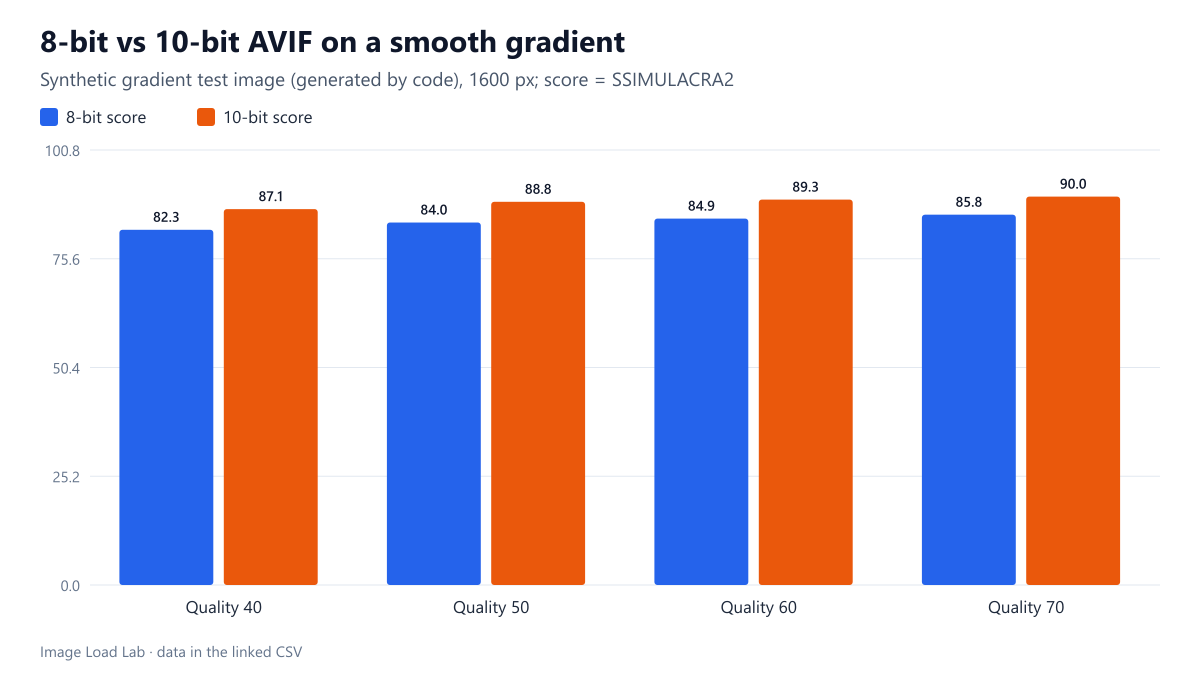
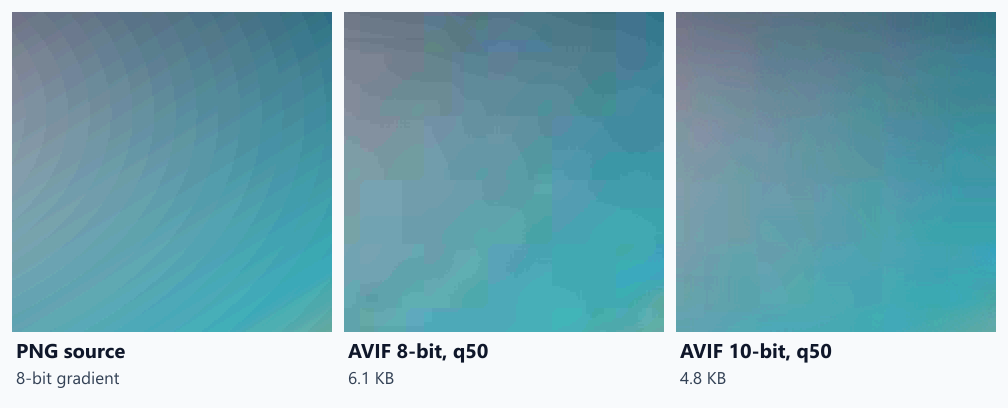
On the gradient, 10-bit was clearly better and smaller. At quality 50, the 8-bit AVIF weighed 6.1 KB and scored 84.0; the 10-bit file weighed 4.8 KB (20.6 % less) and scored 88.8. The pattern held at every quality setting: 10–21 % smaller and 4 to 5 points higher. The crops below, with contrast increased to make the effect visible, show why: the 8-bit encode breaks the smooth shading into flat blocks, while the 10-bit encode keeps closer to the source.
On photographs, the gain was small but consistent. At the same quality setting, 10-bit files were 1.5–2.1 % smaller up to quality 60 with practically the same score, and at quality 70 the size was equal but the score rose from 80.8 to 82.2. At equal quality, 10-bit needed a median 3.0 % fewer bytes to reach a score of 70 (18 photos; range from 9.9 % less to no difference) and 1.4 % fewer to reach 60.
| Images | Quality | KB (8-bit / 10-bit) | Size change | SSIMULACRA2 (8 / 10) | Encode time (8 / 10) |
|---|---|---|---|---|---|
| Photos (median of 20) | 40 | 54.2 / 53.1 | −2.1 % | 53.4 / 53.0 | 489 / 712 ms |
| 50 | 94.4 / 91.9 | −2.1 % | 66.6 / 66.9 | 574 / 763 ms | |
| 60 | 142.6 / 140.3 | −1.5 % | 74.9 / 75.9 | 703 / 872 ms | |
| 70 | 198.9 / 198.8 | +0.1 % | 80.8 / 82.2 | 849 / 993 ms | |
| Gradient | 40 | 4.4 / 3.9 | −10.3 % | 82.3 / 87.1 | 197 / 342 ms |
| 50 | 6.1 / 4.8 | −20.6 % | 84.0 / 88.8 | 200 / 331 ms | |
| 60 | 7.4 / 6.1 | −17.6 % | 84.9 / 89.3 | 208 / 317 ms | |
| 70 | 9.8 / 8.0 | −18.5 % | 85.8 / 90.0 | 208 / 364 ms |
10-bit costs encoding time. At quality 50 the median photo took 574 ms as 8-bit and 763 ms as 10-bit, about a third longer; across the four quality settings the increase ranged from 17 % to 46 %. On the gradient image, encoding time rose by 52–75 %.
Chrome displayed the 10-bit files. Chrome 155 decoded both the 10-bit gradient (1600 × 1000) and a 10-bit photo (1600 × 1200) without error.
What this means in practice
- For images with smooth gradients (skies, studio backdrops, illustrations, UI with soft shadows), 10-bit AVIF is worth it: smaller files and visibly less blocking in our test.
- For ordinary photos, 10-bit saves about 3 % at equal quality. Use it if your pipeline supports it and the extra encoding time is acceptable.
- Check your tools. In sharp the option is
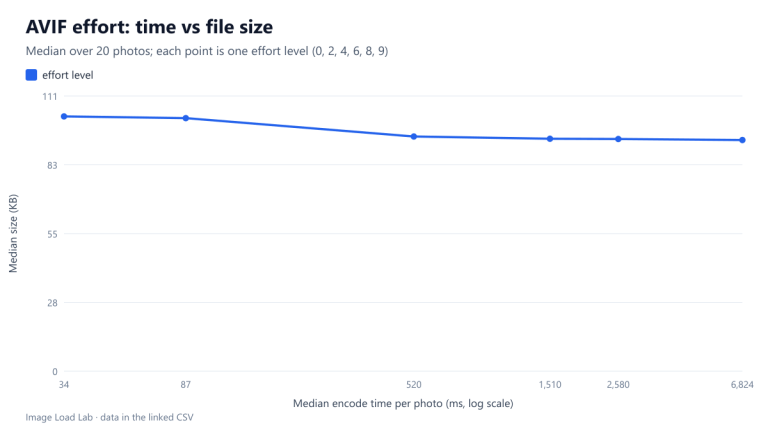
avif({ bitdepth: 10 }); with avifenc it is-d 10. Some CMS plugins and image CDNs do not expose it. - For the bigger picture, our format comparison measured AVIF against JPEG and WebP, and our AVIF effort test shows another way to trade encoding time for bytes.
Practical conclusion
Encoding 8-bit images as 10-bit AVIF made a smooth gradient 10–21 % smaller and 4–5 points better, and photos about 3 % smaller at equal quality, for roughly a third more encoding time. Chrome 155 displayed the files normally. Prefer 10-bit for gradient-heavy images and use it generally when encoding time allows.
Limitations
One encoder (libaom through sharp) at effort 4, one synthetic gradient and 20 photos. We confirmed decoding in Chrome only; other browsers’ AVIF decoders were not tested here. SSIMULACRA2 measures difference from the 8-bit source, so it cannot reward 10-bit for detail the source never had.
Data and files
Download avif-bitdepth.csv (168 rows, 16.7 KB) · Method: testing methodology. Photos: image credits.