content-visibility: auto on a 1,000-Card Image Gallery
content-visibility: auto brought first paint and LCP forward by about 23 % and cut layout during load by 42 %, but more than doubled the layout work done while scrolling to the end.
The CSS property content-visibility: auto lets the browser skip the layout and painting of elements that are far off-screen until the visitor scrolls near them. On long pages such as image galleries, product listings and archives, that sounds like free speed. How much does it speed up a gallery of 1,000 cards, and what does it cost later? We loaded the same gallery with and without it on a phone profile with a slowed CPU.
The test
The page is a responsive grid of 1,000 cards. Each card holds a lazy-loaded 400-pixel image with width and height attributes, a heading and a line of text. In the second version, every card has content-visibility: auto and contain-intrinsic-size: auto 260px, so that skipped cards keep a placeholder height. Both versions were loaded five times in Chrome 155.0.8059.82 with a phone viewport (390 pixels, 3× density) and the CPU slowed four times. We recorded First Contentful Paint, LCP and Chrome’s own counters for layout, style and task time during load, then scrolled to the bottom in steps of 2,000 pixels and recorded the layout and style work done while scrolling. See our methodology.
Results
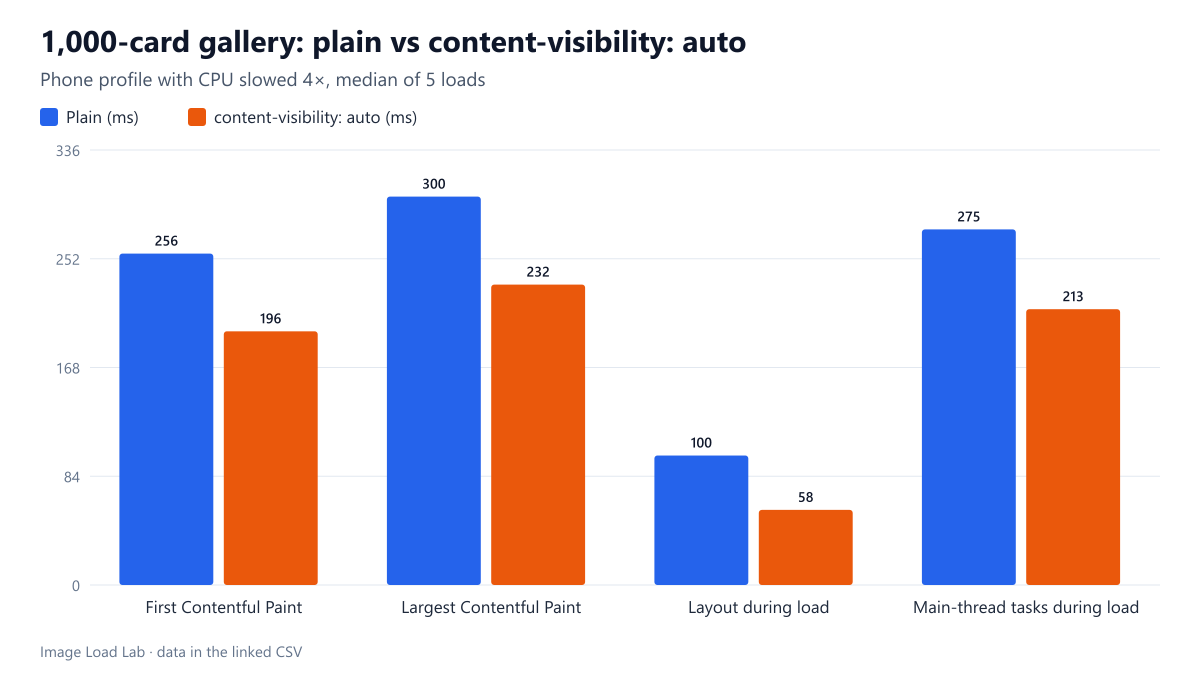
| Metric | Plain | content-visibility: auto | Change |
|---|---|---|---|
| First Contentful Paint | 256 ms | 196 ms | −23 % |
| Largest Contentful Paint | 300 ms | 232 ms | −23 % |
| Layout during load | 100 ms | 58 ms | −42 % |
| Main-thread tasks during load | 275 ms | 213 ms | −22 % |
| Layout while scrolling to the end | 488 ms | 1,115 ms | +129 % |
| Style recalculation while scrolling | 0 ms | 80 ms | new work |
The first screen appeared about a quarter sooner. With content-visibility: auto, First Contentful Paint came at a median of 196 ms instead of 256 ms, and LCP at 232 ms instead of 300 ms. Layout during load fell from 100 to 58 ms and total main-thread task time from 275 to 213 ms, because Chrome laid out only the cards near the first screen.
The skipped work came back while scrolling, and more of it. Scrolling through all 1,000 cards cost 1,115 ms of layout with content-visibility against 488 ms without it, plus about 80 ms of style recalculation that the plain page did not need. Each time skipped cards came into range, Chrome had to lay them out, and doing that in many small batches took more total time than doing it once at the start.
When it pays off
- Long pages where most visitors read the top: archives, search results, long articles. The faster first screen benefits everyone, and the extra work happens only for those who scroll far.
- Not for pages that are scrolled quickly from end to end. In our test the total layout work more than doubled; on a slow phone that can show up as stutter during fast scrolling.
- Always set
contain-intrinsic-size. Without a placeholder size, skipped cards collapse to zero height and the scrollbar jumps as they are rendered. Theautokeyword makes Chrome remember the real size once a card has been rendered. - It does not affect image downloads. Images inside skipped cards still follow normal loading rules; our closed containers test found that an eager image under
content-visibility: hiddenwas still downloaded. Combine it withloading="lazy".
Practical conclusion
On a 1,000-card gallery with a slowed CPU, content-visibility: auto brought First Contentful Paint and LCP forward by about 23 % and cut layout during load by 42 %, but more than doubled the layout work done while scrolling to the end. Use it on long pages that are read from the top, with contain-intrinsic-size set.
Limitations
Chrome only, one card design and a scripted scroll in large jumps rather than a human swipe. Chrome’s layout and style counters measure main-thread work, not how smooth scrolling feels. A page with fewer or simpler elements will gain less.
Data and files
Download content-visibility.csv (10 rows, 0.7 KB) · Method: testing methodology. Photo: image credits.